
A private network IP address scheme refers to the strategic allocation of non-routable IP addresses within a local area network to ensure secure, organized, and scalable internal communication. By utilizing defined blocks reserved by the Internet Assigned Numbers Authority (IANA), administrators can connect numerous devices while isolating them from the public internet, thereby enhancing security and conserving globally unique IPv4 addresses.
Understanding the Role of Private IP Space
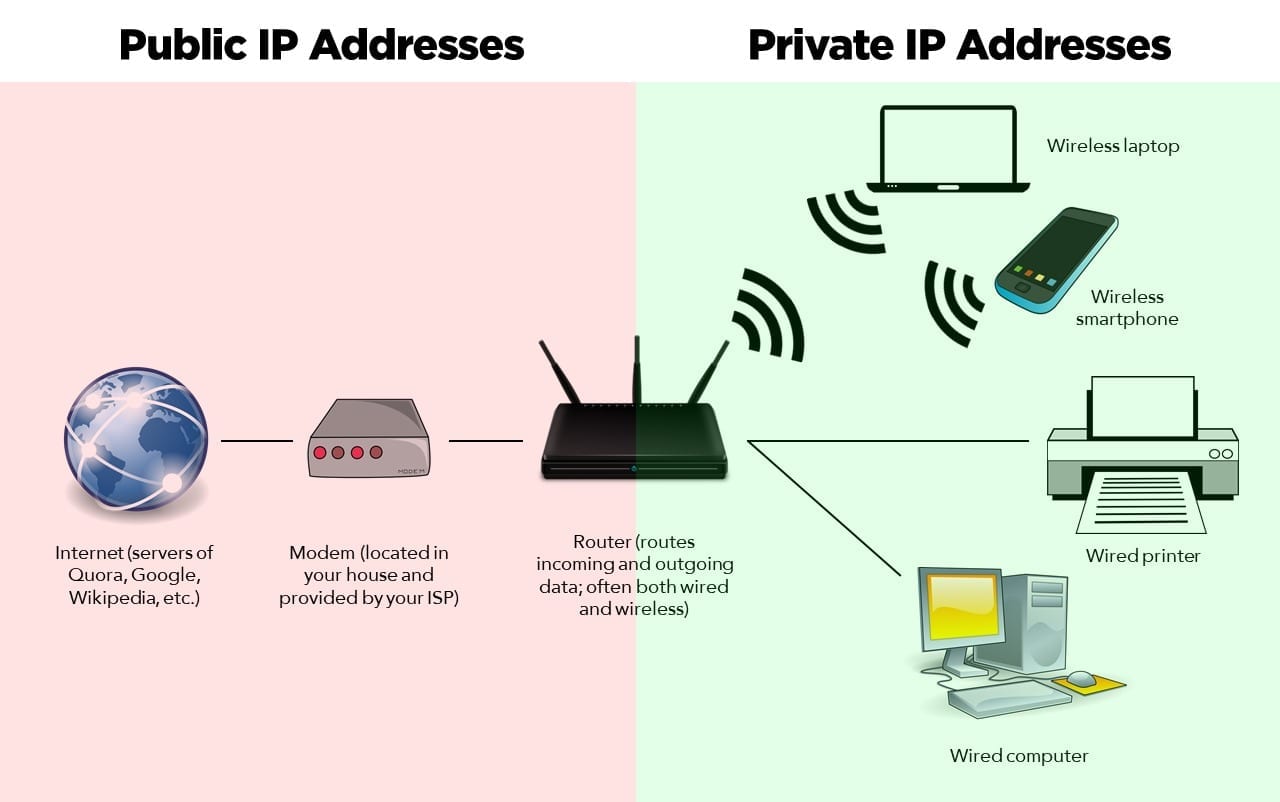
In the landscape of modern networking, public IP addresses are a finite resource. Each device directly connected to the internet requires a globally unique address to be reachable. However, most local devices—such as printers, office workstations, smart sensors, and internal servers—do not require direct exposure to the public web.
A private network IP address scheme solves the limitation of IPv4 address exhaustion while simultaneously providing a layer of security. By designating specific ranges for internal use only, organizations can reuse the same address spaces across different private networks without conflicts. These private addresses are designated as "non-routable" by internet service providers (ISPs). When a device on a private network needs to access the internet, it relies on Network Address Translation (NAT) to map its private address to a single, shared public IP address provided by the gateway router.
Defined Private Address Ranges (RFC 1918)
The foundation of any private network scheme rests on Request for Comments (RFC) 1918, which defines three distinct ranges of IP addresses reserved specifically for private internets. These ranges are segregated by their size and intended complexity, allowing administrators to select a block that matches their network's scale.
- Class A (10.0.0.0/8): This range allows for over 16 million addresses. It is typically reserved for large-scale enterprise networks, multinational corporations, or complex campus environments where segmentation into many smaller subnets is required.
- Class B (172.16.0.0/12): Spanning from 172.16.0.0 to 172.31.255.255, this range offers roughly one million addresses. It serves as a middle-ground solution for medium-to-large businesses.
- Class C (192.168.0.0/16): This is the most common range for small businesses and residential networks. It provides 65,536 addresses, which is more than sufficient for standard Wi-Fi setups, home offices, and small retail environments.
Factors for Selecting Your IP Scheme
Choosing the right scheme is not merely about picking the largest block; it requires careful planning to prevent future bottlenecks. Consider the following criteria when designing your addressing strategy:
- Network Scalability: Estimate the total number of devices, including IoT sensors, mobile devices, and server infrastructure. A network that grows rapidly should avoid the smaller Class C range if it anticipates reaching thousands of nodes.
- Avoidance of Overlap: If you intend to connect two different office locations via a Virtual Private Network (VPN), both locations must have unique IP schemes. If both use the common 192.168.1.0/24 subnet, they will be unable to communicate because the router will not know where to route the traffic.
- Future-Proofing: Factor in the administrative overhead of re-addressing a network. Changing an IP scheme once a network is live is a complex process that often requires downtime. Selecting a broader range initially can save significant configuration labor in the long term.
Table: Comparison of Private IP Address Ranges
| Network Class | IP Range | Mask | Address Count | Typical Use Case |
|---|---|---|---|---|
| Class A | 10.0.0.0 – 10.255.255.255 | 255.0.0.0 | 16,777,216 | Large Enterprise / ISP Labs |
| Class B | 172.16.0.0 – 172.31.255.255 | 255.240.0.0 | 1,048,576 | Medium to Large Businesses |
| Class C | 192.168.0.0 – 192.168.255.255 | 255.255.0.0 | 65,536 | Small Office / Home / SOHO |
Subnetting for Security and Performance
Simply assigning a block of IP addresses is rarely enough for a robust network. To optimize performance and security, administrators use Variable Length Subnet Masking (VLSM). Subnetting allows you to break a large network block into smaller, logical groups.
For instance, an organization using the 10.0.0.0/8 block might create a specific subnet for Guest Wi-Fi, another for Internal Human Resources, and a third for Server infrastructure. By segmenting these areas, you can implement Access Control Lists (ACLs) to ensure that a device on the Guest Wi-Fi network cannot communicate with the HR database servers. This "Defense in Depth" strategy is a hallmark of professional network administration.
Best Practices for Implementation
When deploying your scheme, adhere to standard operational procedures to maintain integrity and ease of troubleshooting:
- Document Everything: Maintain an IP Address Management (IPAM) log or a centralized database that maps every device’s MAC address to its assigned static IP address. Even in automated environments, having a master record is vital.
- Reserve Ranges for Servers: If your network uses Dynamic Host Configuration Protocol (DHCP) to assign addresses automatically, designate a static pool for critical infrastructure. For example, assign DHCP addresses to the range 192.168.1.100–192.168.1.200, while reserving 192.168.1.1–192.168.1.99 for servers, routers, and switches.
- Standardize Naming Conventions: Combine your IP scheme with a consistent DNS (Domain Name System) naming convention. If an IP address is 10.0.5.15, the corresponding host record should clearly indicate its function, such as "srv-web-01.internal.local."
- Use Loopback Interfaces: For networking hardware, utilize loopback interfaces for management and routing protocols. This ensures that the device remains reachable for administrative tasks even if one of the physical interfaces goes down.
Troubleshooting Common IP Conflicts
The most common issue in private network schemes is the IP address conflict, which occurs when two devices are assigned the same address. This leads to intermittent connectivity, "destination host unreachable" errors, and session drops.
To troubleshoot, start by verifying your DHCP lease table. If you have static assignments, ensure they fall outside of the DHCP scope. If a conflict persists, check for "rogue" devices—unauthorized equipment plugged into the network that may have static IP settings configured from a previous deployment. Modern network management tools can automate this by scanning for Duplicate Address Detection (DAD) events.
Transitioning to IPv6 (The Future Context)
While this article focuses on the IPv4 private space, it is important to acknowledge that the industry is steadily moving toward IPv6. IPv6 replaces private address schemes with "Unique Local Addresses" (ULA), defined in RFC 4193. Unlike IPv4 private spaces, the IPv6 ULA space is vast and designed to be globally unique even if it is not routed on the public internet, which eliminates the risk of address collisions when merging two companies' networks. As of 2026, most hybrid environments run a "dual-stack" configuration, maintaining both legacy IPv4 private schemes and modern IPv6 connectivity.
Frequently Asked Questions
Can I use any IP address I want for a private network? No. You must use the address ranges defined in RFC 1918. If you use addresses outside of these ranges (such as those assigned to public entities), your internal devices will be unable to access the legitimate public websites that own those IP addresses, as the router will attempt to route traffic to the public internet instead of the internal network.
What is the difference between static and dynamic IP addresses? Static IP addresses are manually configured on a device and remain constant, making them ideal for servers, printers, and network gateways. Dynamic IP addresses are assigned by a DHCP server and can change over time, which is highly efficient for managing large numbers of transient devices like laptops and mobile phones.
How many subnets can I create from a single Class C block? The number of subnets depends on the length of the mask you apply. Using a standard 192.168.0.0/16 block, you can create up to 256 subnets if you use a /24 mask. The more specific your subnet mask (the higher the number after the slash), the more subnets you can create, but each will have fewer available IP addresses.
Why does my internet stop working when I change my IP scheme? Changing the IP scheme changes the gateway address. If your router’s IP address changes from 192.168.1.1 to 10.0.0.1, all your devices—which were configured for the old gateway—will lose the ability to reach the internet until they receive a new address or are manually reconfigured to point to the new gateway.
Final Recommendation
Before settling on your network IP scheme, perform a comprehensive audit of your current hardware and future growth projections. If you are a small home or office, sticking to the 192.168.x.x range is efficient and widely supported by consumer-grade hardware. For business environments, adopt the 10.0.0.0/8 block with a well-planned subnetting architecture. Always document your scheme in an IPAM tool and ensure your DHCP scope is clearly separated from static server assignments to avoid operational conflicts.

Image Gallery
Select an image to open it in a new tab.
Mateo Castillo
Decentralized Finance and E-Payments Strategist
