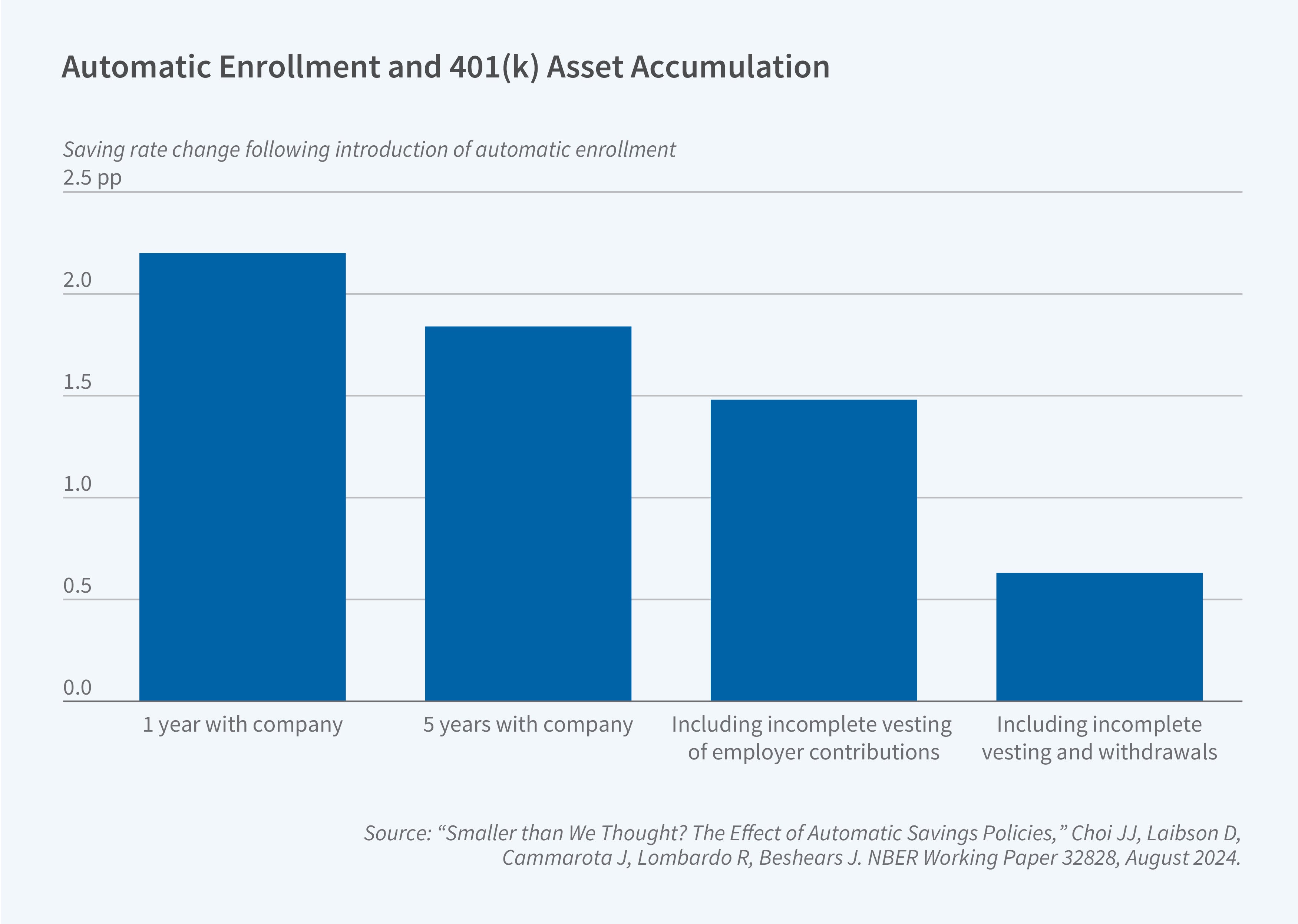
401(k) auto enrollment is a retirement plan feature that automatically registers eligible employees into their company’s 401(k) plan at a predetermined contribution rate unless they explicitly opt out. This "nudge" mechanism is designed to increase participation in employer-sponsored retirement programs by removing the hurdle of manual sign-up processes, helping workers build long-term savings effortlessly.
Understanding the Mechanics of Auto Enrollment
At its core, automatic enrollment is an administrative function performed by an employer to ensure that a higher percentage of their workforce saves for retirement. In traditional voluntary enrollment models, employees must proactively complete paperwork or log into a portal to initiate their savings journey. This often leads to "procrastination bias," where individuals intend to save but fail to take the necessary steps to start.
When a company implements an auto enrollment feature, the process shifts from opt-in to opt-out. Upon meeting the eligibility requirements—which may be based on tenure, hours worked, or position—the employee is automatically enrolled. A percentage of their paycheck is directed toward the plan’s default investment option. Crucially, the employee retains the right to cancel their participation, change their contribution percentage, or select different investment vehicles at any time.
Why Employers Use Auto Enrollment
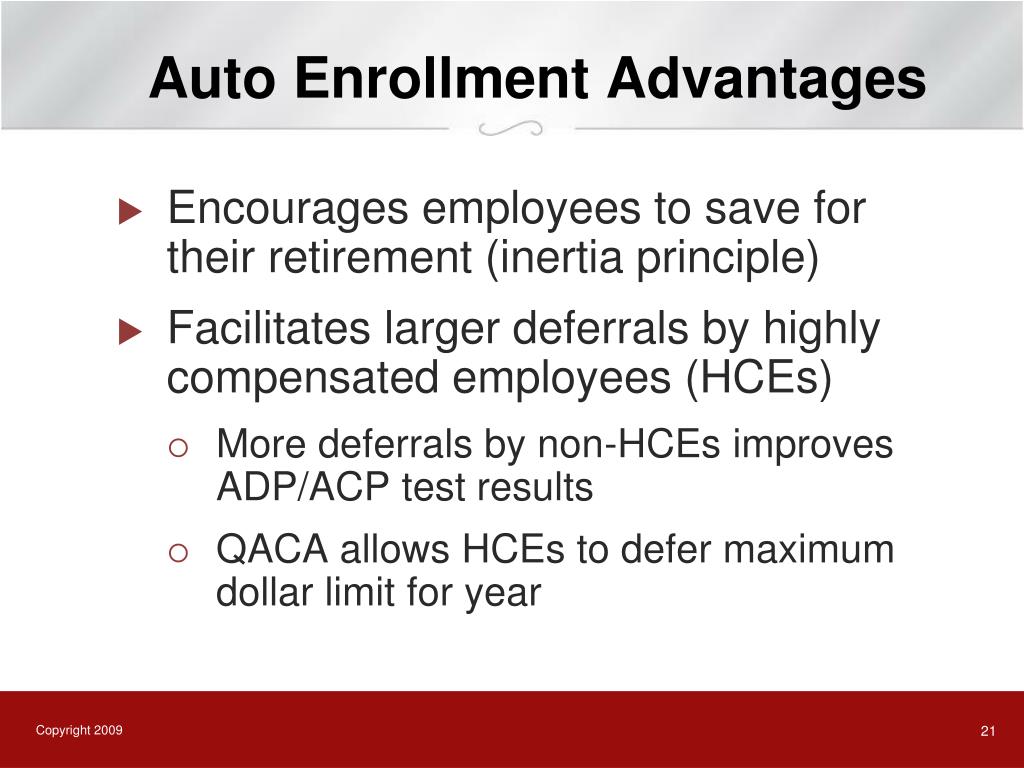
For many organizations, the goal of auto enrollment is to improve the "health" of the company plan. Federal regulations often favor plans with high participation rates. By maximizing the number of employees who contribute, companies may find it easier to satisfy Non-Discrimination Testing (NDT) requirements, which ensure that a 401(k) plan does not unfairly favor highly compensated employees.
Furthermore, auto enrollment is frequently paired with auto escalation. This feature automatically increases the employee’s contribution percentage by a small, fixed amount each year. Over the course of a career, these incremental increases significantly boost the final account balance without the employee feeling a massive, immediate hit to their take-home pay.
The Role of Default Investments (QDIAs)
Because auto-enrolled employees have not proactively chosen where their money should be invested, the law requires employers to be careful about where those funds are placed. The Department of Labor provides "safe harbor" protections to employers who select Qualified Default Investment Alternatives (QDIAs) that meet specific criteria.
Common QDIAs include:
- Target Date Funds (TDFs): These are the most common default options. A TDF automatically adjusts its asset allocation—moving from more aggressive growth stocks to conservative bonds—as the participant nears their expected retirement year.
- Balanced Funds: These maintain a static mix of stocks and bonds designed for a moderate risk profile.
- Managed Accounts: A professional service that manages the account on behalf of the participant based on their specific demographic data.
By utilizing these options, employers mitigate the risk of liability associated with investing employee money in an inappropriate or overly risky asset class without prior consent.
Eligibility and Administrative Requirements
While auto enrollment simplifies the path to saving, it is not an automatic process for the employer to initiate; it must be written into the formal Plan Document. Employers must also provide clear communication to employees. Under the Employee Retirement Income Security Act (ERISA), employers are required to issue an "Auto Enrollment Notice" at least 30 days before the initial enrollment date and annually thereafter.
This notice must include:
- The employee’s default contribution rate.
- The right to opt out and the procedure to do so.
- The ability to change investments and contribution rates.
- Details regarding the plan’s default investment option (the QDIA).
Comparison: Opt-In vs. Auto Enrollment
The shift from an opt-in system to auto enrollment fundamentally changes the retirement trajectory for the average worker. The following table illustrates the common differences in how these two models function in practice.
| Feature | Voluntary (Opt-In) | Auto Enrollment |
|---|---|---|
| Initial Action | Employee must register | Enrollment is automatic |
| Participation Rates | Typically lower due to inertia | Significantly higher |
| Default Settings | None | Pre-set contribution & investment |
| Employer Effort | Passive | Requires regular plan notices |
| Opt-Out Right | Not applicable | Always available |
The "Opt-Out" Process and Participant Rights
Some employees may be concerned that auto enrollment forces them to contribute money they cannot afford. It is essential to understand that auto enrollment is never a permanent obligation. If you find yourself automatically enrolled in a plan but prefer to have that cash in your paycheck, you have the right to opt out.
To do this, you must contact your company’s HR department or log into your 401(k) provider’s portal to request a withdrawal of the contributions or a cessation of future ones. Many plans also offer a "permissible withdrawal" period, typically within 90 days of the first automatic contribution, allowing employees to withdraw the funds (and earnings) without penalty, though ordinary income taxes on the contributions will still apply if the funds were tax-deferred.
Common Misconceptions
One major misconception is that auto enrollment implies the employer is "locking away" the money forever. In reality, while 401(k) funds are intended for retirement, they are still your assets. You maintain full control over the funds once they are contributed, subject only to standard tax-advantaged withdrawal rules (such as the 10% penalty for early withdrawals before age 59½, with certain exceptions).
Another common myth is that auto enrollment means the employer is choosing your "best" investment. The employer is only choosing an appropriate default. You are always encouraged to review your asset allocation, fee structures, and fund options. Using the default option is a starting point, not necessarily the ideal long-term strategy for your unique risk tolerance or financial goals.
Strategic Next Steps for Employees
If you have been notified that your company is implementing auto enrollment, or if you have recently been enrolled, consider these steps to optimize your financial future:
- Verify your contribution rate: Many auto-enrollment plans start at a low rate, such as 3% of your salary. While better than nothing, it may not be enough to hit your retirement goals. Check if your company offers a match and ensure you are contributing at least enough to receive that full benefit—it is essentially free money.
- Review the QDIA: Log into your account and read the prospectus for the default investment. Ask yourself if it aligns with your timeline. If you are young and want more growth, you might consider adjusting your allocation to be more stock-heavy.
- Check for auto-escalation: If your plan features annual auto-escalation, track how your take-home pay changes over time. Many people find they don’t even notice a 1% increase in their contribution each year.
- Seek professional guidance: If your finances are complex, consider speaking with a financial advisor who operates as a fiduciary. They can help you determine if the 401(k) is the best vessel for your savings compared to other vehicles like an IRA or a Roth account.
Disclaimer: This information is for educational purposes and does not constitute financial, legal, or tax advice. Retirement planning involves risk, including the loss of principal. Always consult with a qualified professional before making significant decisions regarding your retirement accounts or tax strategy.
Frequently Asked Questions
What happens if I don't want to participate in auto enrollment? You can opt out at any time. Simply notify your payroll or HR department, or follow the instructions provided in your plan documents to stop future contributions. Most plans allow you to opt out before your first contribution is even deducted.
Does auto enrollment mean the company manages my money? No. The company selects the provider (such as Fidelity, Vanguard, or Empower) and the default investment options, but the actual management of your funds is handled by the investment firm. You retain full control over your investment choices and can change them at any time.
Is my money safe if I am automatically enrolled? 401(k) assets are held in a trust for the benefit of employees and are separate from the employer’s own assets. Even if the company faces financial difficulty, your 401(k) savings remain your property and are protected by federal law under ERISA.
Can I change my contribution percentage? Yes. Auto enrollment sets your initial contribution, but it does not fix it. You can log into your account at any time to increase or decrease your percentage, or even pause contributions entirely if you encounter a financial hardship.
What are the tax implications of auto enrollment? In a traditional 401(k), automatic contributions are made on a pre-tax basis, meaning they reduce your current taxable income. If your employer offers a Roth 401(k) option, contributions are made after-tax, which may provide tax-free growth and withdrawals in retirement.
Does auto enrollment change the vesting schedule? No. Auto enrollment changes how you enter the plan, not how you earn the money. Vesting schedules—which dictate when you gain ownership of employer-matching funds—remain the same regardless of whether you were enrolled automatically or chose to join voluntarily.
Next Action: Check your most recent pay stub or log into your employer’s HR portal today to confirm your current contribution percentage. If you are currently at the default rate, compare it against your employer’s matching policy to ensure you are not leaving "free money" on the table.
Image Gallery
Select an image to open it in a new tab.

Vivian Cho
Executive IT and Emerging Technologies Reporter
