An emptyDir volume in Kubernetes is an ephemeral storage space created on a node when a Pod is assigned to it. It begins as an empty directory, persists for the entire lifespan of the Pod, and is automatically deleted when the Pod is removed from the node. It serves as a scratchpad for temporary data, inter-container communication, or caching during a Pod's operational life.
The Role of Ephemeral Storage in Kubernetes Architecture
In the ecosystem of container orchestration, state management is often the most complex hurdle for developers. While persistent volumes are designed to survive the termination of a Pod or the loss of a node, emptyDir represents the opposite: it is explicitly designed for short-lived, transient data. By default, emptyDir volumes are stored on the medium backing the node—typically the node’s local disk, such as an SSD or HDD, though it can be configured to use memory (RAM) for high-performance requirements.
The "empty" in emptyDir is literal. When a Pod is scheduled on a worker node, the kubelet creates a directory on the host filesystem that is mounted into the containers defined within the Pod specification. Because this directory is physically located on the host node, the contents survive container crashes within the same Pod, but they do not survive the deletion of the Pod itself. This distinction is critical for architects who must decide between persistent storage for data integrity and ephemeral storage for performance.
Prerequisites and Lifecycle Management
To effectively use emptyDir, you must understand the constraints of the Kubernetes scheduler and the kubelet. The lifecycle of an emptyDir volume is strictly bound to the life of the Pod. If you delete the Pod, even if the underlying node remains healthy, the data inside the emptyDir is purged. Similarly, if the Pod is moved to another node—or if the node itself is decommissioned—the volume is lost permanently.
Before implementing these volumes, ensure your application architecture accounts for this volatility. emptyDir is not suitable for databases, user-uploaded content, or any data that is required to survive a redeployment. Instead, it shines in scenarios where data is reproducible or derived from external sources, such as:
- Temporary Caching: Storing processed media files or computed data that can be re-generated.
- Inter-container Communication: Allowing a sidecar container to read logs or shared configuration files produced by the main application container.
- Checkpointing: Storing intermediate states for complex, multi-stage processing tasks.
Configuring emptyDir with Memory Backing
By default, the medium of an emptyDir is determined by the node's disk. However, for applications requiring sub-millisecond latency, you can explicitly request that the volume be backed by RAM. By setting the medium field to Memory, the kubelet utilizes the node's volatile memory instead of the disk.
This configuration is particularly common for high-frequency trading applications, real-time analytics, or web servers that perform heavy session management where disk I/O would otherwise become a performance bottleneck. Caution is required here: when you use medium: Memory, the consumption of that volume counts against the Pod’s memory limit. If your application attempts to store more data in the emptyDir than the allocated memory limit, the Pod may be subject to Out of Memory (OOM) kills.
Performance and Security Considerations
When choosing between disk-backed and memory-backed emptyDir volumes, consider the physical resources of your underlying infrastructure. Disk-backed volumes consume space from the node's root partition or the dedicated container runtime directory. If a container writes excessively to an emptyDir without a defined size limit, it can potentially fill up the host node’s filesystem, leading to catastrophic node instability—often referred to as a "disk pressure" event in Kubernetes clusters.
To mitigate this, you should always define a sizeLimit in your volume configuration. This setting acts as a hard cap on the storage consumption. Once the usage exceeds this threshold, the kubelet will enforce eviction policies, which usually result in the Pod being terminated or moved.
Security also plays a vital role. Since emptyDir resides on the host filesystem, any process with root access to the node might technically have visibility into the files stored there. For sensitive, transient data, ensure that your node access policies are strict and consider encrypting data before writing it to the volume if the environment demands high compliance standards.
Comparing Storage Options in Kubernetes
Choosing the right storage medium depends entirely on the data's longevity and performance needs. The following table provides a comparison between common storage configurations.
| Storage Type | Persistence | Performance | Use Case |
|---|---|---|---|
| emptyDir (Disk) | Ephemeral | Moderate | Scratch space, cache, temp logs |
| emptyDir (Memory) | Ephemeral | Very High | Caching, session states, IPC |
| PersistentVolume | Long-term | Variable | Databases, user files, logs |
| HostPath | Node-local | High | System tools requiring node access |
Implementation Best Practices
When deploying emptyDir, avoid hardcoding directory paths. Instead, rely on mount points within your Pod specification. This abstraction ensures that if you decide to migrate from a local emptyDir to a networked storage volume in the future, your application code remains unchanged.
Furthermore, always monitor the storage metrics provided by the Kubernetes Metrics Server. In 2026, observability tools have become increasingly sophisticated; utilize them to alert on emptyDir usage spikes. If you find your application consistently approaching the sizeLimit of an emptyDir volume, it is a strong signal that you should consider moving the data to a more durable or scalable storage backend, such as a PersistentVolume Claim (PVC) backed by an SSD or a managed network storage service.
Troubleshooting Common Issues
The most frequent issue encountered with emptyDir is unexpected data loss during rolling updates. Because Kubernetes performs rolling updates by creating new Pods and terminating old ones, any data stored in an emptyDir is wiped during this transition. If your application relies on data stored in emptyDir to "warm up" or initialize, it will fail upon restart.
To troubleshoot this:
- Check Pod Events: Use
kubectl describe podto see if the kubelet evicted the Pod due toDiskPressure. - Verify Mount Paths: Ensure that the
mountPathin yourvolumeMountssection matches the path expected by your containerized application. - Inspect Resource Usage: Use
kubectl top podto monitor if the memory or disk usage is hitting the limits you defined. - Confirm Permissions: Ensure the user running the container has the necessary file system permissions to write to the path where the volume is mounted.
Frequently Asked Questions
Does an emptyDir persist after a node reboot?
No. An emptyDir is strictly ephemeral. While it survives container restarts within a single Pod, it is wiped when the Pod is deleted or evicted from the node. It does not survive node reboots or rescheduling.
Can I share an emptyDir between containers in the same Pod?
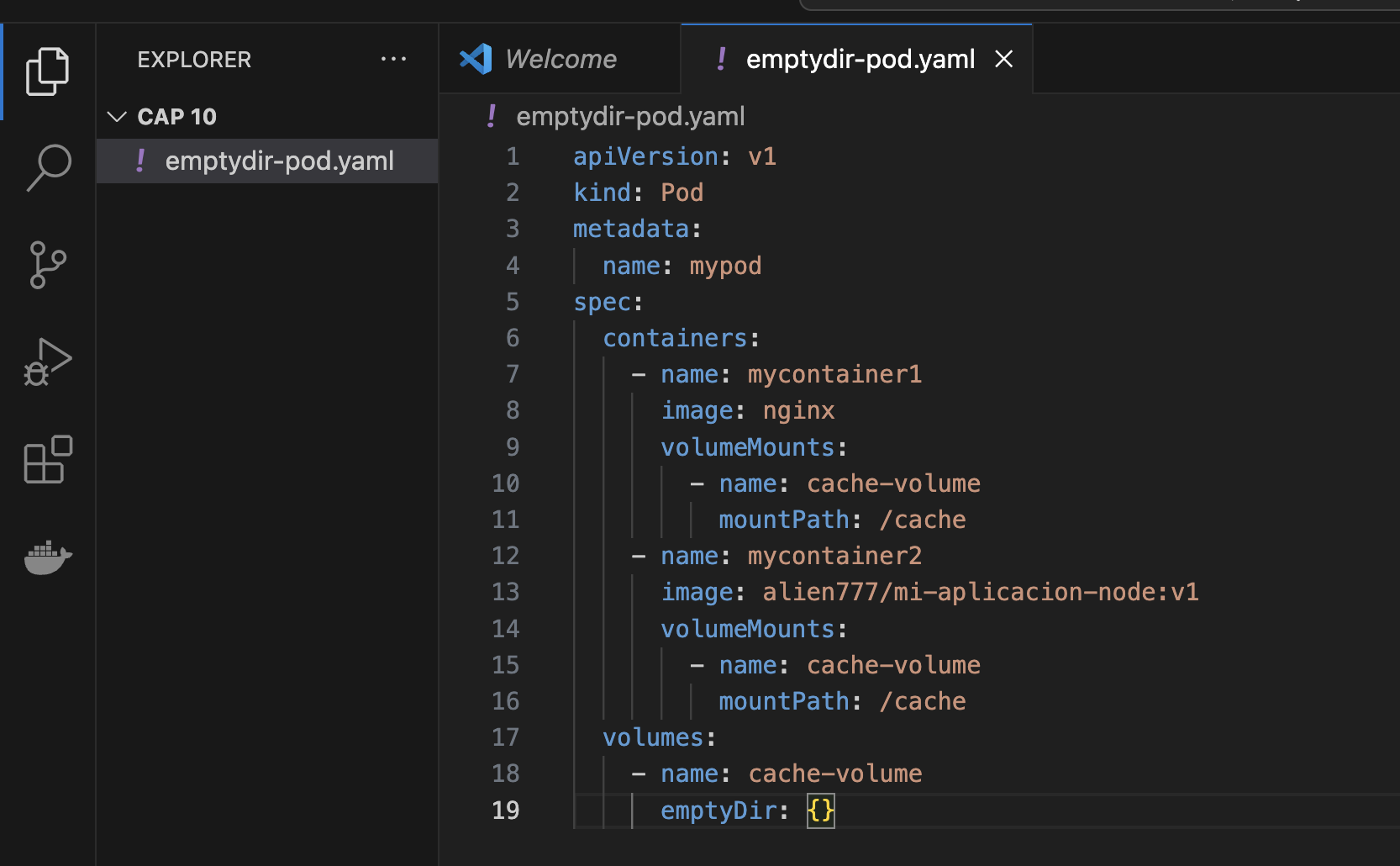
Yes. One of the primary use cases for emptyDir is sharing files between containers within the same Pod. You can mount the same emptyDir volume at different paths in multiple containers, allowing them to read and write to the same shared space.
How do I limit the size of an emptyDir?
You can use the sizeLimit parameter in your Pod specification under the volumes section. This limits the total amount of space that the emptyDir can consume, protecting the host node from storage exhaustion.
Is emptyDir encrypted?
By default, emptyDir is not encrypted at rest. If your application handles sensitive data, you must implement encryption at the application level before writing the data to the volume, or ensure that the underlying host disk is encrypted at the storage level.
What happens if the medium is set to Memory but the Pod exceeds its memory limit?
If a Pod with a memory-backed emptyDir exceeds its assigned memory limit—including the data stored in the volume—the Pod will likely be terminated by the kernel with an Out of Memory (OOM) error. Always ensure that memory requests and limits are configured with the volume size in mind.
Recommendation for Success
For your next Kubernetes deployment, start by mapping your application’s data requirements to their specific lifespans. If you require temporary workspace for log rotation, short-lived cache files, or inter-process communication, configure an emptyDir with a clearly defined sizeLimit to prevent node-level degradation. If the data needs to persist beyond the Pod's lifecycle, opt for a PersistentVolume instead. Always treat emptyDir as a transient convenience, never as a repository for mission-critical information.

Image Gallery
Select an image to open it in a new tab.



Akira Tanaka
International Academic Trends Correspondent
