
To identify and avoid Chime bank scams, verify that all communications originate from official channels, never share your one-time passwords (OTP) or login credentials with anyone, and remain skeptical of urgent demands for transfers. Chime will never ask for your password, PIN, or multi-factor authentication code, nor will it request that you send money to yourself or any other account to "reverse" a fraudulent transaction.
Understanding the Modern Landscape of Financial Fraud
As digital banking continues to displace traditional brick-and-mortar institutions, platforms like Chime—a financial technology company providing banking services through its partner banks, The Bancorp Bank, N.A. and Stride Bank, N.A.—have become prime targets for sophisticated bad actors. Because Chime operates almost exclusively through a mobile app and web portal, scammers rely on social engineering rather than physical theft.
Social engineering is the psychological manipulation of people into performing actions or divulging confidential information. In the context of your Chime account, this typically manifests as a fabricated sense of urgency designed to bypass your logical defenses. Whether through email, text message (SMS), or voice calls, the goal remains the same: to gain unauthorized access to your funds or to trick you into authorizing a fraudulent transaction yourself.
Identifying Phishing Attempts
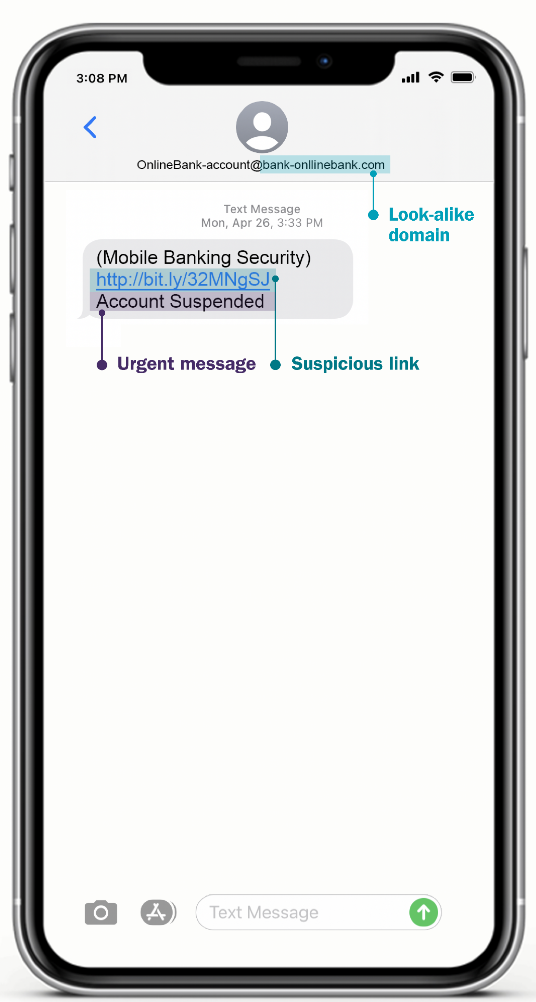
Phishing is the most prevalent form of financial fraud. Scammers send messages that appear to be from an official source—often using the Chime logo, color palette, and professional tone—to lure you into clicking a malicious link.
- Email Discrepancies: Always check the sender’s actual email address, not just the display name. Official communications come from domains ending in
@chime.com. Scammers often use look-alike domains like@chime-support-login.comor generic addresses like@gmail.com. - The "Urgent Alert" Tactic: Fraudsters rely on the "Fear, Uncertainty, and Doubt" (FUD) model. They may claim your account has been compromised, a suspicious transaction is pending, or your account will be permanently closed if you do not act immediately.
- Link Verification: Before clicking any link in an email or text, hover your mouse cursor over it (on a computer) or long-press it (on a mobile device) to reveal the actual destination URL. If the URL does not clearly lead to
chime.com, do not click it.
The Dangers of "Support" Scams and Impersonation
A growing trend in 2026 involves scammers posing as customer service representatives. This can happen through "phantom" support pages on social media or by placing fake contact numbers on search engine results pages.
When you search for "Chime customer service," ensure you are looking at the official Chime website. Scammers sometimes pay for advertisements that place their fake support numbers at the top of search results. If you call one of these numbers, the person on the other end will attempt to gain your trust, eventually asking you to "verify" your identity by providing your login credentials or the six-digit code sent to your phone.
Crucial rule: Never provide a six-digit verification code to anyone. This code is a temporary security key (OTP) that Chime sends to your mobile device to authorize a specific action, such as changing your password or adding a new device. If someone has that code, they have the key to your account.
How Scammers Use Peer-to-Peer (P2P) Transactions
Chime users often use features like Chime Checkbook or external transfer tools to move money. Scammers have adapted to these features by creating "recovery scams."
In this scenario, a fraudster might contact you claiming to be a Chime fraud prevention officer. They will tell you that a transaction on your account was fraudulent and that you need to "cancel" it. To do this, they will instruct you to send money to a specific account—often claiming it is a secure "holding" or "clearing" account.
Understand this clearly: Legitimate banks will never ask you to send money to yourself or to an external account to fix a fraud issue. If money is taken from your account through a P2P service, the transaction is often considered authorized by you, making it significantly harder for the bank to recover the funds.
Comparison Table: Legitimate Communication vs. Scams
| Feature | Official Chime Communication | Fraudulent Communication |
|---|---|---|
| Request for Password | Never asks for your password. | Asks for your password or PIN. |
| OTP/Security Codes | Only provided during your own login. | Asks you to read the code out loud. |
| Urgency | Professional, calm, informative. | High-pressure, threat of account loss. |
| Payment Requests | Never asks you to pay to "secure" funds. | Asks for transfers to "cancel" fraud. |
| Contact Channels | Always through the official app/site. | Directs you to DM, WhatsApp, or Telegram. |
Strengthening Your Account Security
Beyond recognizing scams, you must implement proactive security measures to harden your account against unauthorized access.
- Enable Push Notifications: Configure your Chime app to send real-time push notifications for every transaction. If you see a notification for a purchase you did not make, you can freeze your card immediately from the app.
- Multi-Factor Authentication (MFA): Ensure MFA is active. If someone attempts to log in from an unknown device, the app will require a code sent to your registered device.
- Unique Credentials: Use a unique, complex password for your Chime account that is not used on any other website. If another site you use suffers a data breach, your Chime account remains protected because the credentials do not match.
- Use Official App Only: Avoid logging into your account via browsers on public Wi-Fi. Always use the official Chime mobile app, which includes encrypted communication protocols.
What to Do If You Have Been Scammed
If you believe your account has been compromised, speed is your greatest asset. Follow these steps immediately:
- Freeze Your Card: Use the Chime app to immediately lock your debit card. This prevents any further physical or online purchases.
- Change Credentials: If you still have access, change your Chime password immediately and update your account recovery email.
- Contact Chime Directly: Only use the contact information provided inside the official Chime app or on the back of your physical Chime debit card. Do not trust numbers found in text messages or social media comments.
- Report the Fraud: File a report with the Federal Trade Commission (FTC) at ReportFraud.ftc.gov. This creates an official record of the fraud, which can be useful for any future investigations or bank claims.
- Monitor Other Accounts: If you used the same password for other financial accounts, change those immediately as well.
Frequently Asked Questions
Will Chime ever call me to ask for my verification code? No. Chime will never call, text, or email you to ask for a six-digit verification code. If you receive a code unexpectedly, ignore it and do not share it with anyone. The code is only for your use when you are actively logging into your own account.
How can I verify if an email is truly from Chime?
Check the sender’s address. It must end in @chime.com. Furthermore, Chime will typically address you by the name associated with your account rather than using generic greetings like "Dear Customer." If the email contains suspicious links or poor grammar, treat it as a potential scam.
If I send money to a scammer via Chime, can I get it back? Getting funds back after a scam is difficult, especially if you manually authorized the transfer. Contact Chime support immediately to report the transaction as unauthorized. While they will launch an investigation, there is no guarantee of reimbursement for transactions where the user was manipulated into sending the funds themselves.
Is it safe to give my debit card number to a third-party app? Only link your Chime card to reputable services that you fully trust. Before entering your card details into any application or website, verify that the platform is legitimate and has a secure, encrypted payment process.
What is the best way to contact Chime if I think I am being scammed? Use the "Help" section within your Chime mobile app. This ensures you are interacting with the genuine support system. Avoid searching for phone numbers on third-party websites or social media platforms, as these are often populated by scammers attempting to impersonate support agents.
Final Recommendation
The most effective defense against Chime bank scams is skepticism. Treat every unexpected contact—whether an urgent email about a blocked account or a text message about a fraudulent charge—as a potential trap. By keeping your security codes private, relying strictly on the official Chime mobile app for account management, and never transferring money to resolve "security issues," you can significantly reduce your risk profile. When in doubt, log out, go to the official Chime website or app independently, and check your status from within your secure dashboard.

Image Gallery
Select an image to open it in a new tab.



Declan O'Connor
Higher Education and Campus Culture Reporter
