How a Title Page Should Look: A Comprehensive Guide to Academic and Professional Standards

A properly formatted title page serves as the professional gateway to your document, providing essential metadata such as the title, author identity, institutional affiliation, and submission context. While specific requirements vary by discipline, a well-structured title page must be clean, balanced, and strictly compliant with the relevant style guide—such as APA, MLA, or Chicago—to ensure immediate credibility and accessibility for the reader.
Understanding the Purpose and Value of a Title Page
The title page is far more than a decorative cover sheet; it is a functional tool for information management. For an academic committee, a hiring manager, or a peer-review board, the title page acts as a snapshot that answers immediate questions: Who wrote this? What is the scope of the work? Where does this document originate, and when was it produced?
When a document lacks a professional title page, it risks appearing amateurish or unfinished. Conversely, a title page that adheres to established typographic and structural norms signals that the author understands the conventions of their field. It provides the necessary context to navigate large document repositories, assists in correct citation, and helps filing systems categorize information efficiently. Whether you are drafting a thesis, a white paper, or a professional report, the visual hierarchy of the page must prioritize clarity over creativity.
Determining Your Style Guide Requirements
Before placing a single character on the page, you must identify which documentation style your institution or organization mandates. Style guides are not arbitrary; they are systems designed to standardize communication.
APA (American Psychological Association)
APA style is the gold standard for social sciences. The 7th edition, which remains current in 2026, requires specific elements for student and professional papers. The title should be bolded, centered in the upper half of the page, and written in title case. You must include the author’s name, the department and university (or professional affiliation), the course number and name, the instructor’s name, and the due date.
MLA (Modern Language Association)
MLA style is distinct because it often foregoes a separate title page entirely, preferring a header block on the first page of the text. However, if your instructor specifically requests a title page, it should mirror the MLA header: your name, instructor’s name, course, and date, all centered in the middle of the page, with the title centered a few lines below.
Chicago Manual of Style (CMS)
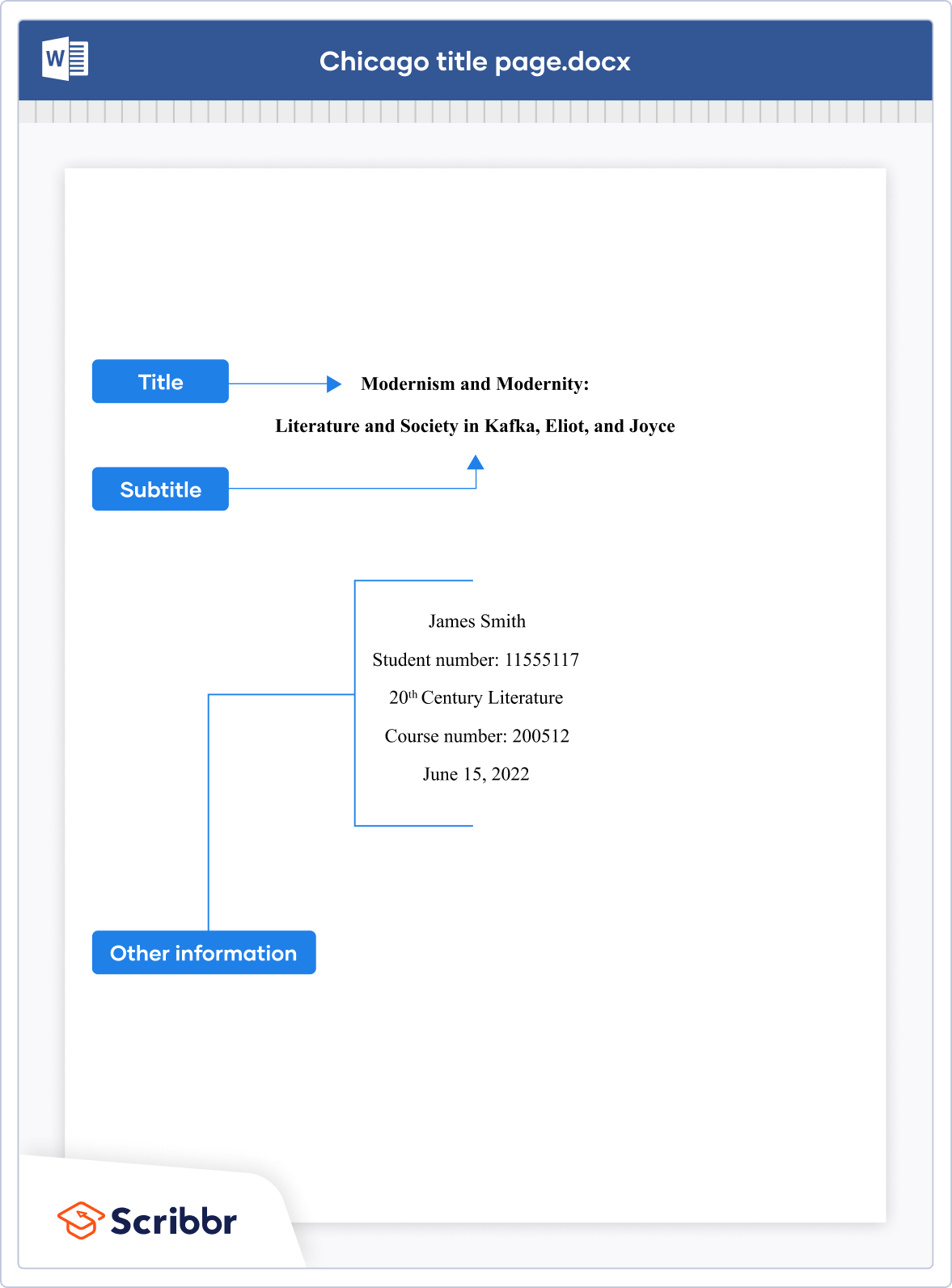
Chicago style is favored in history and business. It is perhaps the most formal. The title should be located about one-third of the way down the page, typed in all capital letters. Your name and the identifying information (course, date, institution) appear in the lower half of the page, usually centered with generous white space.
Anatomical Breakdown: What Goes Where?
Regardless of the specific style guide, every effective title page relies on the same core components. Understanding these parts allows you to troubleshoot layout issues quickly.
- The Title: This is the anchor. It should be descriptive, concise, and professional. Avoid "cute" titles unless in creative writing contexts. If you have a subtitle, it should be separated by a colon and often appears on the line below the main title.
- The Author Block: This includes your full name. Avoid using titles or degrees unless specifically required by your organization’s submission guidelines.
- Institutional Affiliation: This identifies the "home" of the work. If you are a student, this is your university and department. If you are writing a professional report, this is your company or consultancy name.
- Submission Context: This is the "why" and "when." It includes the course name, the name of the professor or stakeholder, and the submission date.
- Page Numbering: While often omitted on the title page itself, many styles require a header that persists throughout the document. Verify if your chosen style requires the page number to start on the title page or if it should be suppressed until the first page of the body text.
Formatting Comparison Table
| Feature | APA (Student) | MLA (If Required) | Chicago (Turabian) |
|---|---|---|---|
| Title Position | Upper Half | Center | Upper Third |
| Title Case | Title Case (Bold) | Title Case | ALL CAPS |
| Margins | 1 inch on all sides | 1 inch on all sides | 1–1.5 inches |
| Font | Standard (e.g., Times New Roman) | Standard | Standard |
| Page Number | Included (Top Right) | Not on Title Page | No (starts on p. 2) |
Visual Design and Typography Best Practices
Even when a style guide provides structural instructions, it rarely dictates every aesthetic nuance. Professionalism is defined by consistency.
Font Selection
Stick to highly readable, standard serif or sans-serif fonts. Times New Roman (12 pt), Arial (11 pt), or Calibri (11 pt) are safe, professional choices. Avoid decorative fonts, script, or anything that draws attention to the "design" rather than the "content." The page should be monochromatic; use black text on white paper.
White Space Management
White space is your best friend. A cramped title page suggests a lack of foresight. Use double-spacing throughout the page to match the body of the document. If your title is very long, break it into two logical lines rather than letting it run margin-to-margin. Ensure that the vertical spacing between the author name and the institutional information is sufficient to create clear "visual bins" of information.
Alignment and Centering
Centering is the standard for almost all title pages. Ensure your word processor's "Center" tool is applied to all elements. Do not manually space elements to the center using the space bar, as this will lead to alignment errors if you change fonts or margins later.
Common Mistakes to Avoid
Even experienced writers fall into common traps when formatting their title pages. Preventing these errors is easy if you conduct a pre-submission audit.
- Including Excessive Metadata: Do not include a list of your previous degrees, your contact information, or your address unless it is specifically requested (e.g., in a manuscript submission for publication). Keep it focused on the document itself.
- Incorrect Date Formatting: Always use the format preferred by your institution. In the United States, "Month Day, Year" (e.g., May 15, 2026) is standard. In international contexts, "Day Month Year" is often preferred. Consistency is more important than the specific regional choice, provided you follow the guideline provided by your recipient.
- Ignoring the Running Head: Some academic styles require a shortened version of the title to appear in the header on every page, starting with the title page. Failure to include this can lead to point deductions or rejection in professional settings.
- The "Floating" Element: If a piece of information is dangling at the very bottom of the page, adjust the margins or the vertical spacing. Every element should have a clear, intentional placement.
Troubleshooting Your Layout
If you find that your title page does not look right, follow these steps to isolate the problem:
- Check the "Show/Hide" Formatting Marks: In your word processor (such as Microsoft Word or Google Docs), turn on the non-printing characters (usually a button shaped like a paragraph symbol ¶). This will show you exactly how many paragraph returns you have inserted. Often, an extra return is the reason your title is shifted too far down.
- Verify Paragraph Spacing: Check to see if your word processor has "Space After" enabled for your paragraphs. This adds automatic space that you cannot see in the main editor window but that shifts your text downward. For a title page, you generally want this setting to be 0 pt.
- Review the Page Break: Ensure that you have used a proper "Page Break" after your title page rather than hitting "Enter" repeatedly until the next page. This keeps your document modular and prevents formatting on page two from affecting your title page.
Legal, Ethical, and Professional Considerations
While a title page is a document structure issue, it also carries professional weight. Accuracy in your affiliation and title is a matter of integrity. Never attribute your work to an institution you are not affiliated with, and ensure that the title of your work is an honest representation of the content within. Misleading titles on a professional document can be perceived as clickbait or academic dishonesty.
If you are submitting work for professional publication, the title page may also require a "Disclosure of Interest" or a "Funding Source" statement. While these are not part of standard student formatting, they are non-negotiable requirements for peer-reviewed journals. Always consult the "Instructions for Authors" provided by the specific publisher or organization you are targeting in 2026.
Next Steps for Success
To ensure your document starts on the right note, follow this workflow before printing or exporting to PDF:
- Select Your Guide: Confirm if you are using APA, MLA, or Chicago based on the specific syllabus or submission guidelines provided.
- Use a Template: If available, use the official template from your organization. It will have the margins and font settings pre-configured.
- Verify Line-by-Line: Use the checklist in this article to ensure every element—Title, Name, Affiliation, Date—is present and correctly aligned.
- Perform a PDF Test: Always save your final document as a PDF. This "locks" your formatting, ensuring that the person opening the file sees exactly what you intended, regardless of the software or device they are using.
By treating the title page as a professional summary rather than a hurdle to be jumped, you ensure that the substance of your work is presented with the authority it deserves. Focus on clean lines, standardized spacing, and strict adherence to the requirements of your specific field.
Image Gallery
Select an image to open it in a new tab.

Zara El-Hashem
Sociocultural Dynamics and Academics Writer
