
Choosing between a stop-loss order and a stop-limit order at Fidelity requires understanding how these mechanisms trigger market activity when your investment reaches a specific price point. While both serve as essential tools for managing potential losses or locking in gains, they behave very differently once they are activated. A stop-loss order becomes a market order once triggered, prioritizing execution speed, whereas a stop-limit order becomes a limit order, prioritizing price control.
Understanding the Mechanics of Stop Orders
At its core, a stop order is a conditional instruction to buy or sell a security once the price hits a predetermined level, known as the "stop price." Until that price is touched, the order remains inactive. Once the market hits the stop price, the order is triggered. The crucial distinction between a "loss" and a "limit" suffix lies in what happens immediately after that trigger.
In the Fidelity trading platform, these orders are designed to automate your risk management strategy, removing the need for manual monitoring of price fluctuations during market hours. By setting these orders, you establish a baseline for your portfolio’s volatility tolerance, ensuring that your automated trades align with your broader financial objectives.
The Stop-Loss Order: Prioritizing Execution
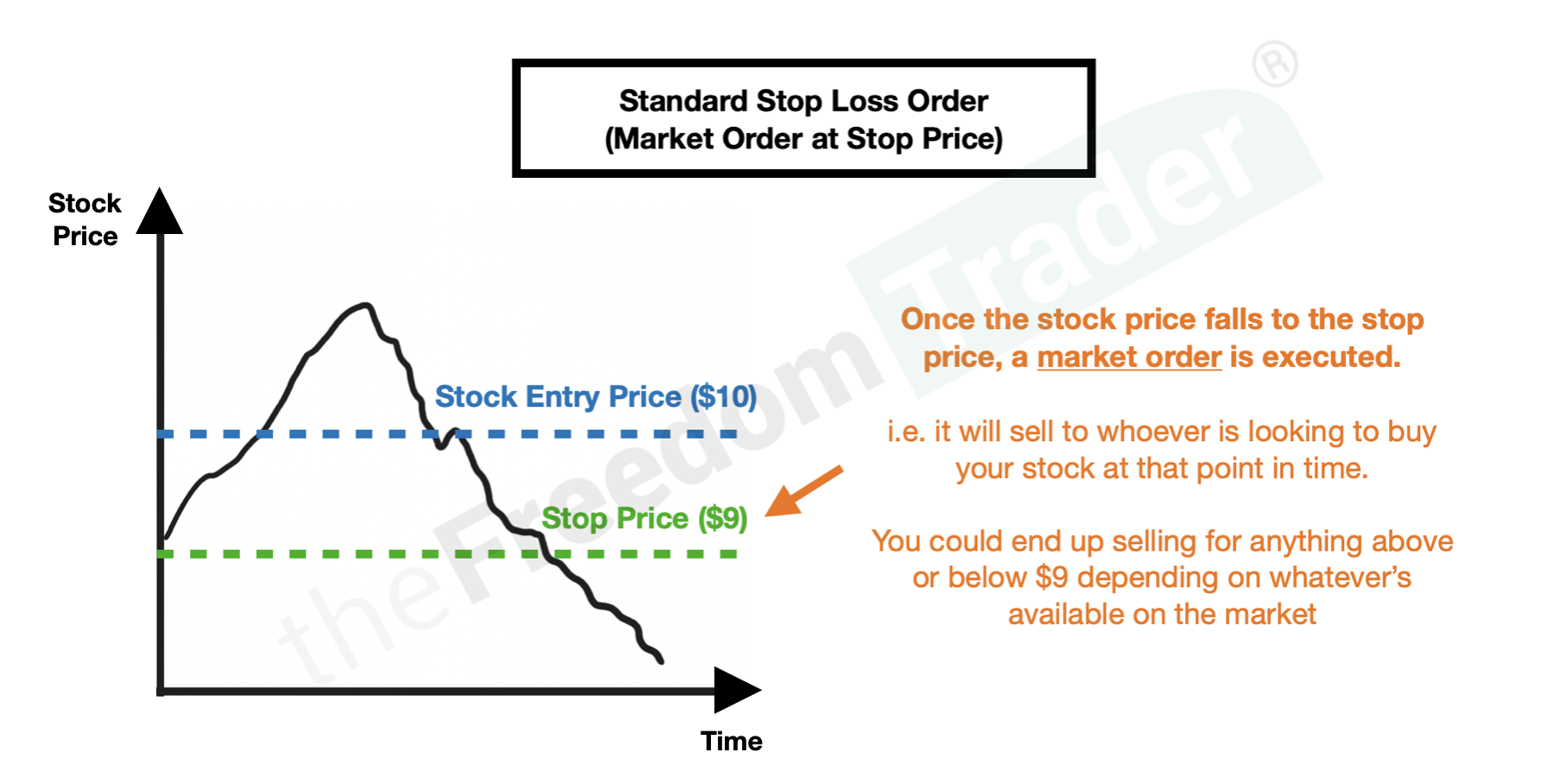
A stop-loss order, often referred to simply as a stop order, is designed to ensure that your position is closed—or opened—as quickly as possible once your trigger price is reached. When the last traded price of a security hits your designated stop price, the order is instantly converted into a market order.
The defining characteristic of a market order is that it seeks to execute at the best available current market price. Consequently, you are effectively prioritizing the completion of the trade over the specific price point you receive.
Advantages of Stop-Loss Orders:
- High Probability of Execution: Because these orders become market orders, they are almost certain to be filled as long as there is liquidity in the market.
- Simplicity: They are straightforward to set up, requiring only a stop price.
- Emergency Protection: In a fast-moving, declining market, these are the most reliable tools for exiting a position rapidly to prevent further losses.
The Risk of "Slippage": The primary disadvantage of a stop-loss order is slippage. If the market is moving downward very rapidly—such as during a market "flash crash" or a sudden drop on news—the price at which your order executes may be significantly lower than your stop price. You are essentially agreeing to accept the "market price," which may be unfavorable if the market is gapping down.
The Stop-Limit Order: Prioritizing Price Control
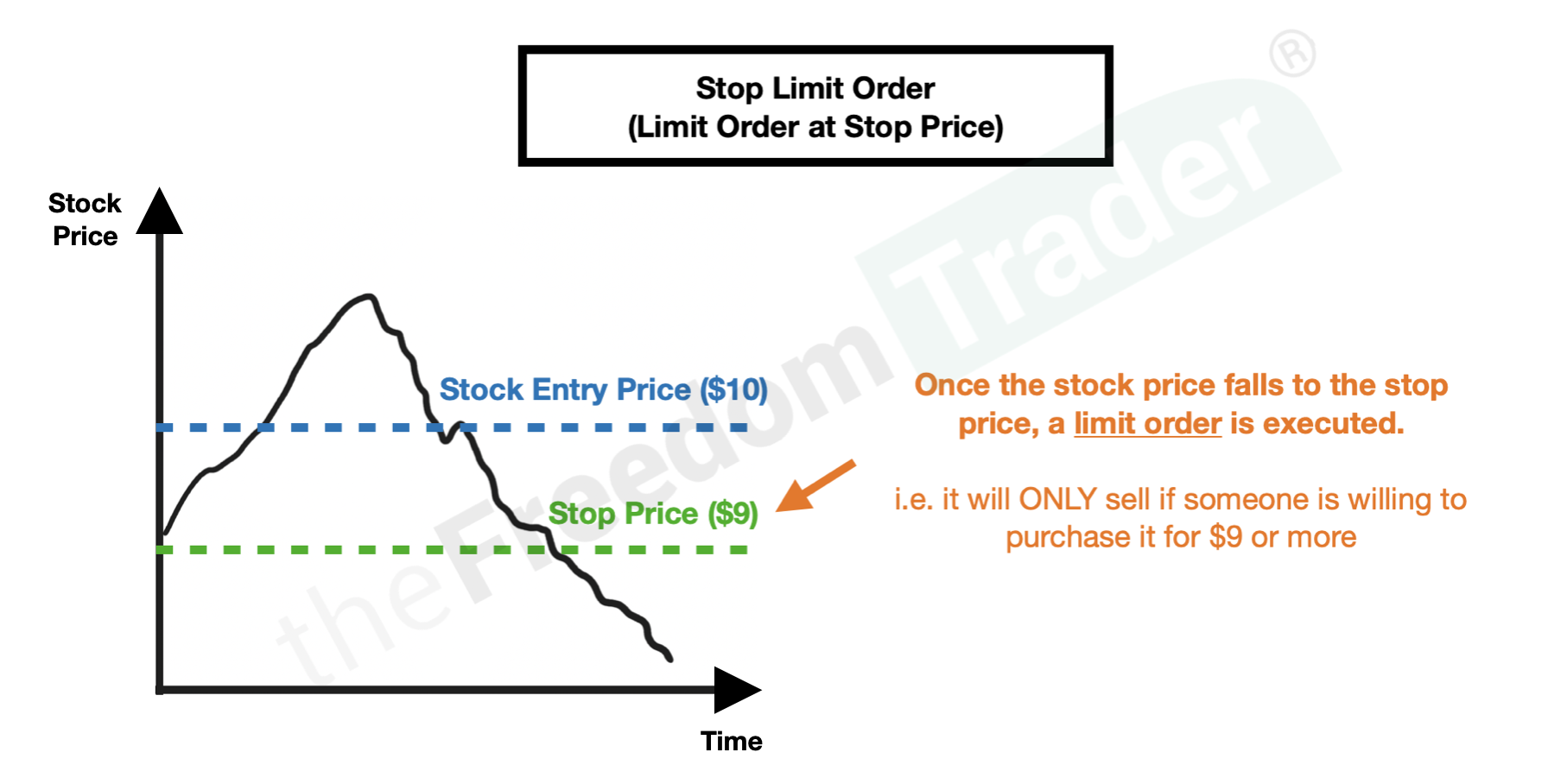
A stop-limit order adds a layer of precision to your exit strategy. Like a stop-loss, it requires a stop price that triggers the order. However, instead of becoming a market order, it converts into a limit order. This means you provide two prices: the stop price (the trigger) and the limit price (the minimum or maximum price at which you are willing to execute).
When the security reaches your stop price, the limit order is placed into the market. It will only execute if the stock can be traded at your limit price or better.
Advantages of Stop-Limit Orders:
- Price Protection: You maintain control over your trade execution. You will never sell for less than your specified limit price (if selling) or buy for more than your limit price (if buying).
- Predictability: You avoid the "bad execution" scenario where a market order sells your position at a fire-sale price during high volatility.
The Risk of "Non-Execution": The trade-off for this control is the risk that your order will not be filled at all. If the price of the security hits your stop price and immediately moves beyond your limit price, your order will sit in the order book unfilled. In a rapidly crashing market, this leaves you holding an asset that continues to decline in value, even though your original intention was to trigger an exit.
Comparison Table: Stop-Loss vs. Stop-Limit
| Feature | Stop-Loss Order | Stop-Limit Order |
|---|---|---|
| Primary Goal | Guaranteed execution | Price protection |
| Execution Trigger | Hits stop price | Hits stop price |
| Order Type After Trigger | Becomes Market Order | Becomes Limit Order |
| Risk of Slippage | High (you take market price) | Low (price is controlled) |
| Risk of Non-Execution | Very low | Moderate to High |
| Best Used When | You must exit the position | You want to avoid bad fills |
When to Use Which: A Tactical Framework
Deciding between these two tools depends heavily on the liquidity of the security and the volatility of the market environment.
When to choose a stop-loss: Use a stop-loss for highly liquid stocks—large-cap equities with high daily trading volumes—where the "bid-ask spread" is narrow. In these cases, the risk of significant slippage is lower, and the certainty of exiting the position is usually more valuable than the minor price difference you might gain with a limit order.
When to choose a stop-limit: Use a stop-limit when trading less liquid securities, such as smaller-cap stocks or ETFs with lower daily volumes, where the bid-ask spread is wide. In these cases, a sudden spike in volatility could cause a market order to trigger a fill at a price far outside the current trade range, resulting in a significantly worse exit price than you intended.
Setting Up Orders on the Fidelity Platform
Fidelity provides a robust interface for managing these orders. To place a stop or stop-limit order, navigate to the trade ticket for your specific security. Under the "Action" menu, select "Sell" (or "Buy"). In the "Order Type" dropdown, you will find options for "Stop Loss" and "Stop Limit."
- Selecting the Order Type: If you choose "Stop Loss," you will only be prompted to enter the "Stop Price." If you choose "Stop Limit," you must enter both the "Stop Price" and the "Limit Price."
- Time in Force: Fidelity requires you to select a "Time in Force" for these orders, such as "Day" or "Good 'til Canceled" (GTC). A Day order expires at the end of the current trading session, while a GTC order will remain active for up to 180 days (or until executed or canceled).
- Verification: Always review the order summary screen before confirming. This is your final chance to ensure your prices are correct. A common error is entering a limit price that is higher than the current market price for a sell order, which would cause the order to execute immediately as a limit order, rather than waiting for the stop price to be triggered.
Common Mistakes and How to Avoid Them
Investors often encounter pitfalls when setting up these orders due to misunderstanding the mechanics of market liquidity.
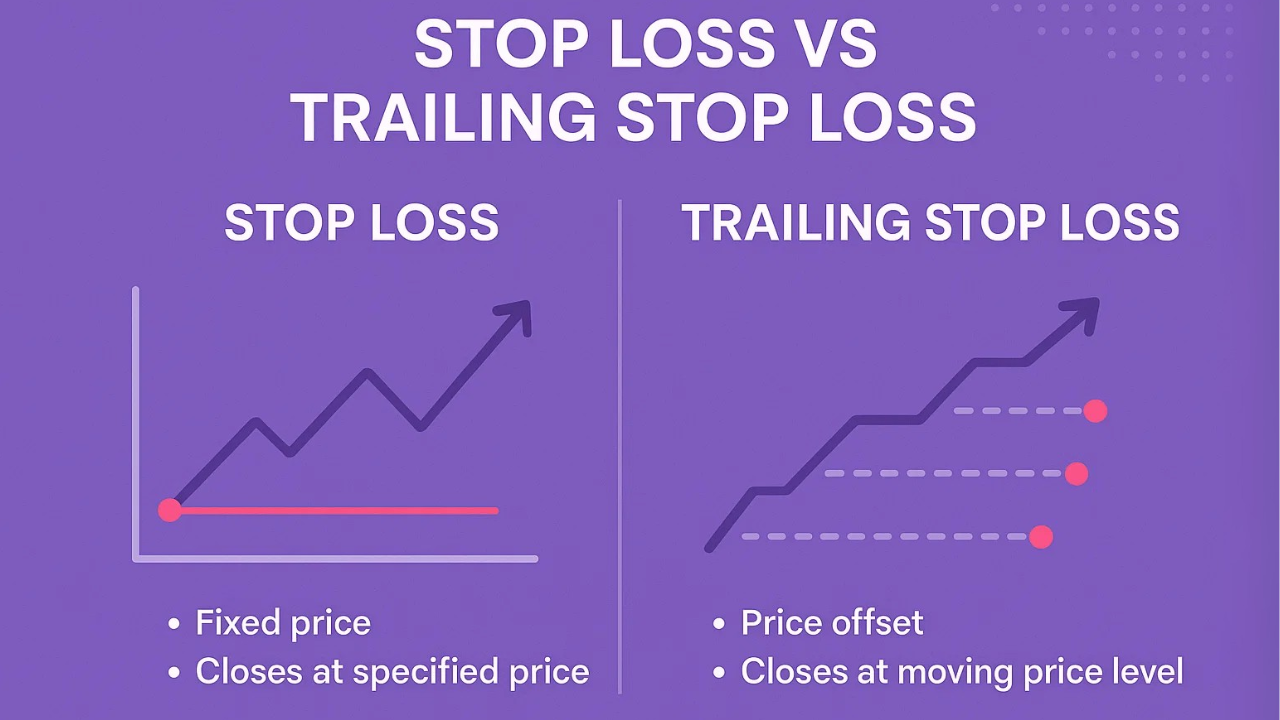
The "Market Price" Trap A common mistake is assuming that a stop-loss will execute exactly at the dollar amount you entered. In reality, the market price might jump over your stop price during a volatile session. If you are deeply concerned about the final exit price, avoid standard stop-loss orders in favor of stop-limits, or use "Trailing Stop" variations if you are attempting to protect gains.
Setting Limits Too Tight With stop-limit orders, if your stop price and limit price are identical, the order functions exactly like a stop-loss, but with the added risk of not filling if the price gaps past that point. Traders often widen the gap between their stop price and limit price to increase the likelihood of execution, accepting a slightly lower, yet acceptable, price to ensure the trade actually completes.
Ignoring Market Hours Many investors fail to account for how these orders behave outside of standard market hours. Standard orders at Fidelity typically execute during the regular session (9:30 AM to 4:00 PM ET). If you are trading in the extended-hours market, you must ensure that your order type supports these sessions, as liquidity is significantly thinner, increasing the risk of unexpected execution outcomes.
Professional Considerations and Disclaimer
Risk management tools like stop-loss and stop-limit orders are critical components of a disciplined investment strategy. However, they are not foolproof and cannot eliminate all investment risk. High-frequency trading and algorithmic activity can often move prices past your stop triggers in milliseconds, leading to execution outcomes that may differ from your expectations.
Financial Disclaimer: This article is for informational purposes only and does not constitute financial, investment, or tax advice. Market conditions change rapidly, and no order type guarantees a specific outcome. Consult with a qualified financial advisor to discuss how these tools align with your personal risk tolerance and long-term financial goals before executing trades in your brokerage account.
Frequently Asked Questions
1. Can a stop-limit order fill partially? Yes. If you are attempting to sell a large block of shares, a stop-limit order may fill partially at your limit price if there isn't enough volume at that specific price to accommodate your entire order. The remaining shares will stay in the market at your limit price until they are filled or the order expires.
2. What happens if the stock price never reaches my stop price? If the market price of the security never touches your designated stop price, the order will never be triggered. It will remain in your pending orders list as an inactive instruction until it reaches its expiration date (in the case of a GTC order) or until you manually cancel it.
3. Does Fidelity charge extra for these order types? Fidelity does not typically charge extra commissions for using stop-loss or stop-limit orders compared to standard market orders. However, always verify the current fee schedule on your specific account type, as some specialized account structures or international trading settings may have different pricing models.
4. Can I change my stop price after the order is submitted? Yes. You can modify an open, unfilled stop or stop-limit order through the "Orders" tab in your Fidelity account dashboard. Selecting "Modify" will allow you to adjust the stop and limit prices. Note that modifying an order effectively cancels the original and replaces it with a new one, which might move you to the back of the queue in terms of execution priority.
5. Why was my stop-limit order not executed even though the price hit my stop? This occurs because the market price dropped (or rose) past your limit price before the trade could be filled. Because you requested a limit price, the system cannot execute the trade at a price less favorable than your limit. In a fast-moving market, price gaps can occur where there is no trading volume at your specific limit price.
Next Steps for Investors
To effectively integrate these tools into your 2026 investment strategy, start by reviewing your current portfolio holdings. Identify which assets require strict downside protection versus those you are willing to hold through temporary volatility. For your most volatile or speculative positions, consider testing a stop-limit order with a wider "limit" range to balance the need for price control with the need for a definitive exit. Monitor your open orders daily within the Fidelity platform to ensure that your active stops still align with your current outlook on those specific securities.
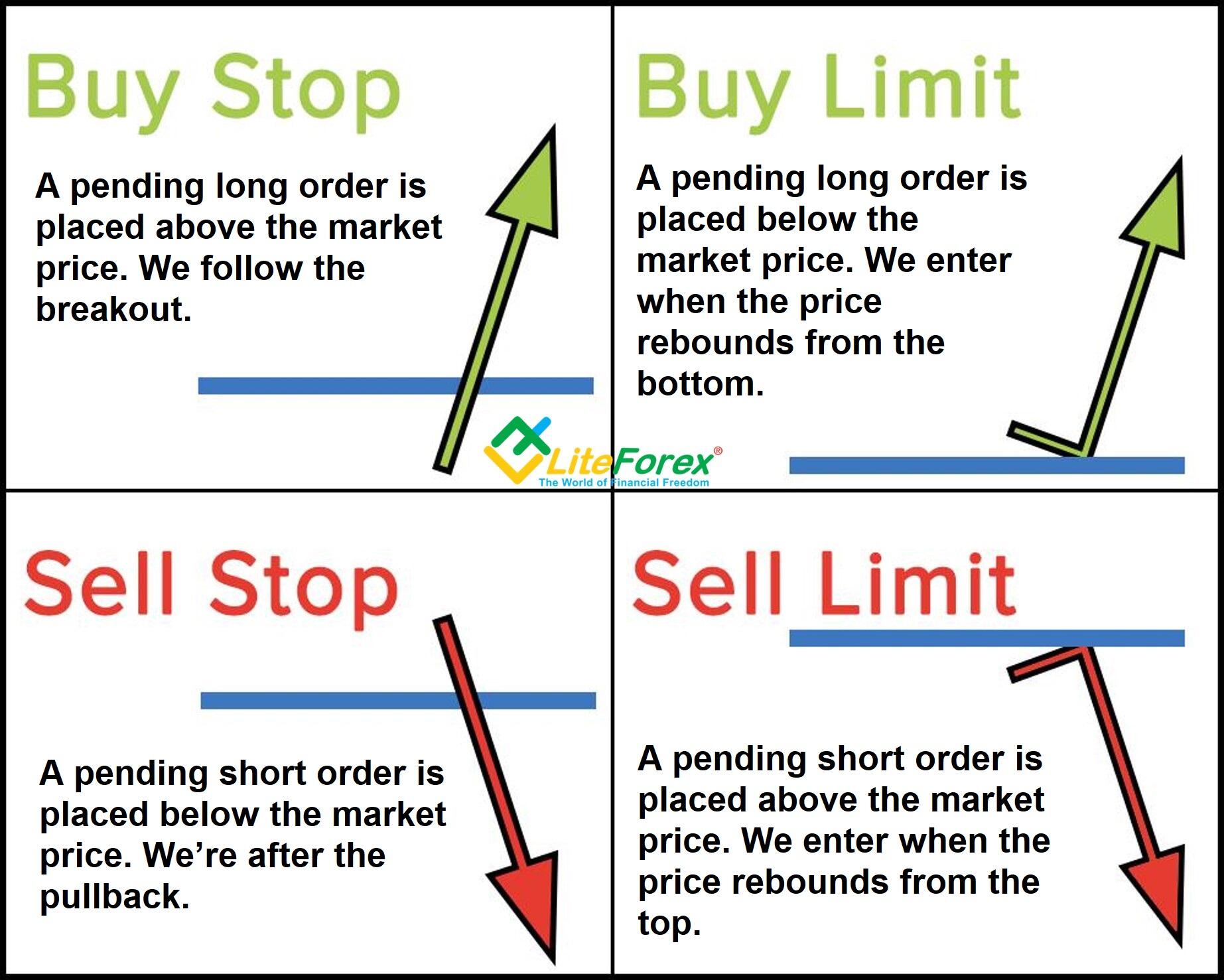
Image Gallery
Select an image to open it in a new tab.




Omar Farooq
EdTech Innovation and Virtual Pedagogy Journalist
