A Comprehensive Overview of Cloud-Based Data Centers
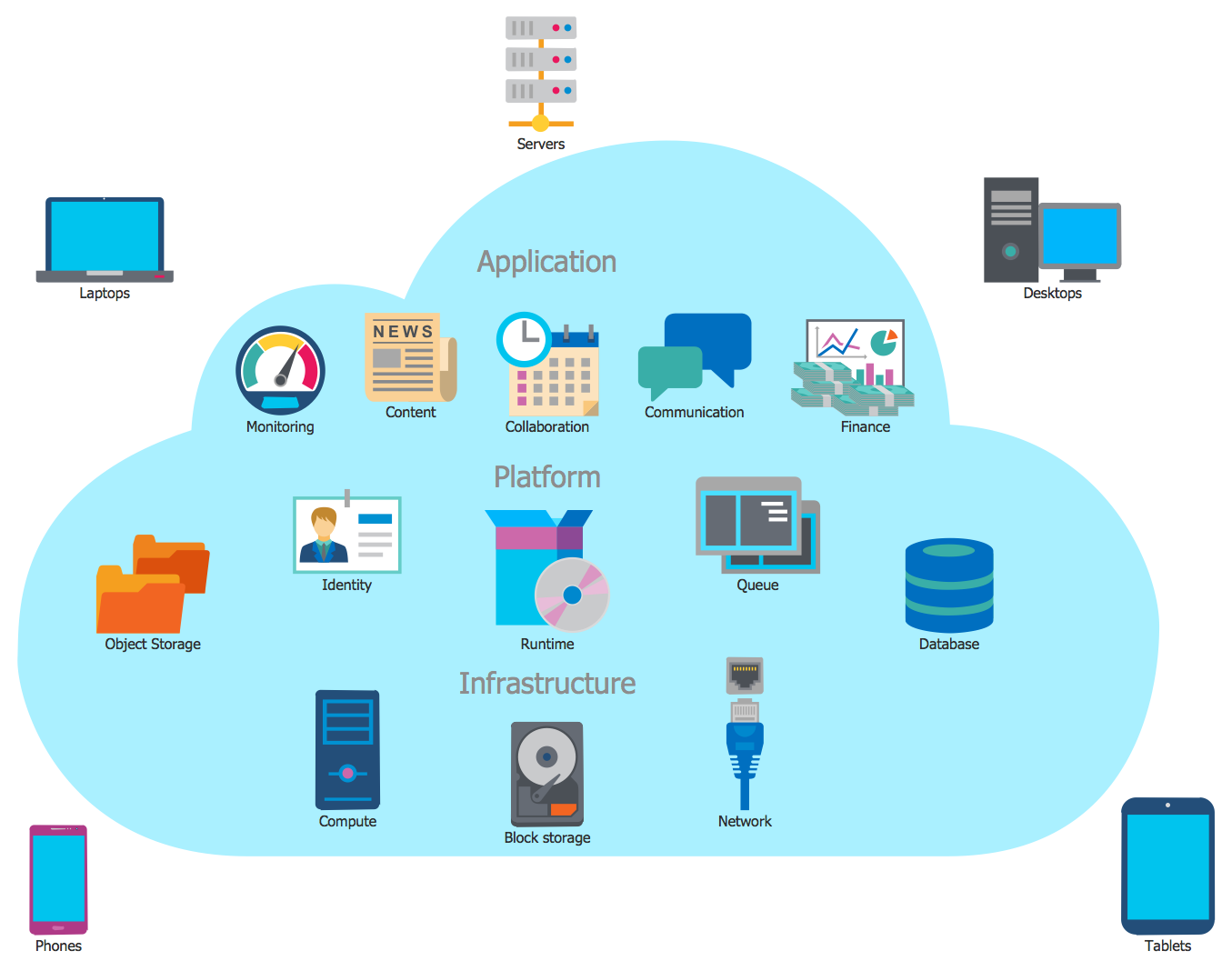
A cloud-based data center is a virtualized infrastructure model where computing, storage, and networking resources are delivered to users over the internet rather than residing solely in a physical, on-premises facility. By leveraging virtualization, automation, and distributed hardware, cloud providers offer scalable, on-demand IT services that allow organizations to shift from capital-heavy hardware ownership to a flexible operational expense model.
Understanding the Cloud Data Center Architecture
At its core, a cloud-based data center functions by abstracting physical hardware—servers, switches, and storage arrays—through a software layer known as a hypervisor. This process, called virtualization, allows multiple virtual machines (VMs) or containerized applications to run on a single physical host, maximizing hardware utilization and efficiency.
Unlike traditional, legacy data centers where hardware procurement and physical cabling dictate capacity, cloud data centers utilize software-defined architecture. This means the control plane is decoupled from the data plane. Network administrators can configure complex topologies, firewalls, and load balancers through APIs or web-based dashboards rather than manual intervention at the rack level. This agility allows for rapid provisioning, where developers can spin up entire application environments in minutes rather than weeks.
Core Components and Infrastructure Layers
A cloud data center is not a singular entity but a composite of several interconnected layers. Understanding these layers is essential for architects and IT managers determining how to migrate or build their digital footprints.
1. Physical Hardware and Facilities
Despite the "cloud" nomenclature, the foundation remains physical. This includes climate-controlled server rooms, redundant power supplies (UPS and backup generators), advanced fire suppression systems, and sophisticated physical security (biometrics, 24/7 surveillance). In the cloud model, the burden of maintaining these physical assets shifts from the enterprise to the cloud service provider (CSP).
2. The Virtualization and Orchestration Layer
This is the "intelligence" of the data center. Orchestration software manages the lifecycle of virtual resources. It handles auto-scaling—the ability to add or remove capacity based on real-time traffic spikes—and load balancing, which distributes workloads across available servers to prevent bottlenecks.
3. Storage and Data Management
Storage in cloud data centers is typically categorized into object storage (for unstructured data like images and logs), block storage (for high-performance database needs), and file storage (for shared network drives). Modern cloud centers use software-defined storage (SDS) to pool physical drives, allowing for elastic capacity that grows with the data volume.

Comparison: Traditional vs. Cloud-Based Data Centers
To assess the strategic transition to cloud environments, organizations must weigh the operational differences between conventional in-house facilities and modern cloud-based data centers.
| Feature | Traditional Data Center | Cloud-Based Data Center |
|---|---|---|
| Capital Expenditure (CapEx) | High (Hardware procurement) | Low (Pay-as-you-go) |
| Scalability | Manual, slow (Months) | Automated, instant (Minutes) |
| Maintenance Responsibility | In-house IT staff | Shared (Provider handles hardware) |
| Resource Utilization | Often low (Over-provisioned) | High (Optimized through virtualization) |
| Control | Full administrative control | Restricted to software/VM layer |
| Geographic Presence | Single site or limited sites | Global distribution availability |
Advantages of the Cloud Model
The primary driver for shifting to cloud-based data centers is agility. Businesses in 2026 operate in a highly volatile market where infrastructure must pivot instantly to meet user demand.
- Elasticity and Scalability: You pay only for what you consume. If an application experiences a 500% traffic increase, the data center scales horizontally across more instances to handle the load, scaling down once the surge subsides to minimize costs.
- Global Reach: Cloud providers operate "regions" and "availability zones" worldwide. This allows an organization to host its data geographically closer to the end-user, significantly reducing latency—a critical metric for high-performance web and mobile applications.
- Disaster Recovery and Continuity: Because cloud data centers are distributed, data can be replicated across different geographic zones. In the event of a localized power outage or natural disaster, traffic can be rerouted to a healthy zone without manual intervention, ensuring high availability.
Challenges and Operational Limitations
While the cloud model offers significant benefits, it is not without risks. Organizations must account for these factors when designing their cloud strategy.
Dependency and Vendor Lock-in
Once an architecture is deeply integrated into a specific provider's proprietary services (such as unique database engines or serverless functions), migrating to a different provider becomes costly and complex. This is known as vendor lock-in. To mitigate this, many enterprises adopt multi-cloud or hybrid-cloud strategies, using containers (like Kubernetes) to remain infrastructure-agnostic.
Security and Compliance
While providers like AWS, Azure, and Google Cloud invest heavily in security, the "Shared Responsibility Model" applies. The provider secures the infrastructure (the "cloud"), while the user is responsible for securing their data, access control, and application configurations (the "cloud"). Misconfigurations remain the leading cause of data breaches in 2026.
Latency and Data Egress Costs
For bandwidth-heavy applications, the cost of moving data out of the cloud (egress fees) can be substantial. Furthermore, despite high-speed fiber backbones, some real-time industrial applications require "edge computing"—processing data locally—rather than sending it to a centralized cloud data center.
Implementation Prerequisites: Moving to the Cloud
For organizations preparing to transition, the process requires more than just migrating virtual disks.
- Workload Assessment: Identify which applications are suitable for the cloud. Legacy monolithic applications may require "refactoring" (rewriting for the cloud) or "replatforming" (moving to a managed service) before they can operate efficiently.
- Security and Identity Management: Establish a robust Identity and Access Management (IAM) framework. Use the principle of least privilege—only grant employees the minimum access required to perform their specific tasks.
- Cost Governance: Implement automated monitoring and alerting for resource consumption. Without active management, idle instances and over-provisioned storage can lead to "cloud sprawl," where costs spiral out of control.
- Compliance Audit: Ensure the cloud provider meets the regulatory requirements specific to your industry, such as GDPR for data privacy, HIPAA for healthcare information, or PCI-DSS for financial transactions.
Frequently Asked Questions
What is the difference between a cloud data center and a private cloud?
A public cloud-based data center shares physical hardware across multiple customers (multi-tenancy), while a private cloud is dedicated infrastructure reserved exclusively for one organization. A private cloud provides more physical control but lacks the extreme elasticity of public offerings.
How do cloud data centers manage power consumption?
Modern hyperscale data centers use advanced power usage effectiveness (PUE) metrics. They employ liquid cooling, intelligent thermal management, and hardware designed to run at higher temperatures, combined with renewable energy sourcing to reduce their carbon footprint.
Can a cloud data center go offline?
Yes. While cloud providers guarantee high uptime (e.g., 99.99%), they are not immune to failures. These failures can result from software bugs, human error in configuration, or large-scale physical infrastructure outages. High availability architecture, such as deploying across multiple regions, is the standard defense.
What is "Serverless" in the context of cloud data centers?
Serverless computing allows developers to build and run applications without managing the underlying server infrastructure. The cloud provider dynamically manages the machine resource allocation. You pay only for the execution time of your code, not for the idle time of the server.
Are cloud data centers safer than on-premises?
For most small-to-medium organizations, cloud data centers are significantly more secure. Cloud providers employ dedicated security engineering teams and threat-detection systems that are often out of reach for a private firm’s limited IT budget.
Next Steps for Infrastructure Modernization
To begin your cloud transition, initiate a "Cloud Readiness Assessment." Evaluate your current IT landscape by categorizing your applications into three groups: those that can move immediately (Rehost), those that need adjustments (Refactor), and those that should remain on-premises due to regulatory or performance constraints.
Start with a pilot program—migrating a non-critical workload to a cloud environment to test performance, cost, and management workflows. As you gain experience, expand your footprint into production environments, prioritizing automation and Infrastructure-as-Code (IaC) to maintain consistent security and performance standards across your new, scalable architecture.
Image Gallery
Select an image to open it in a new tab.




Simon Caldwell
Enterprise Technology and Systems Editor
