Understanding Closed Shapes in Design: Principles, Psychology, and Technical Application

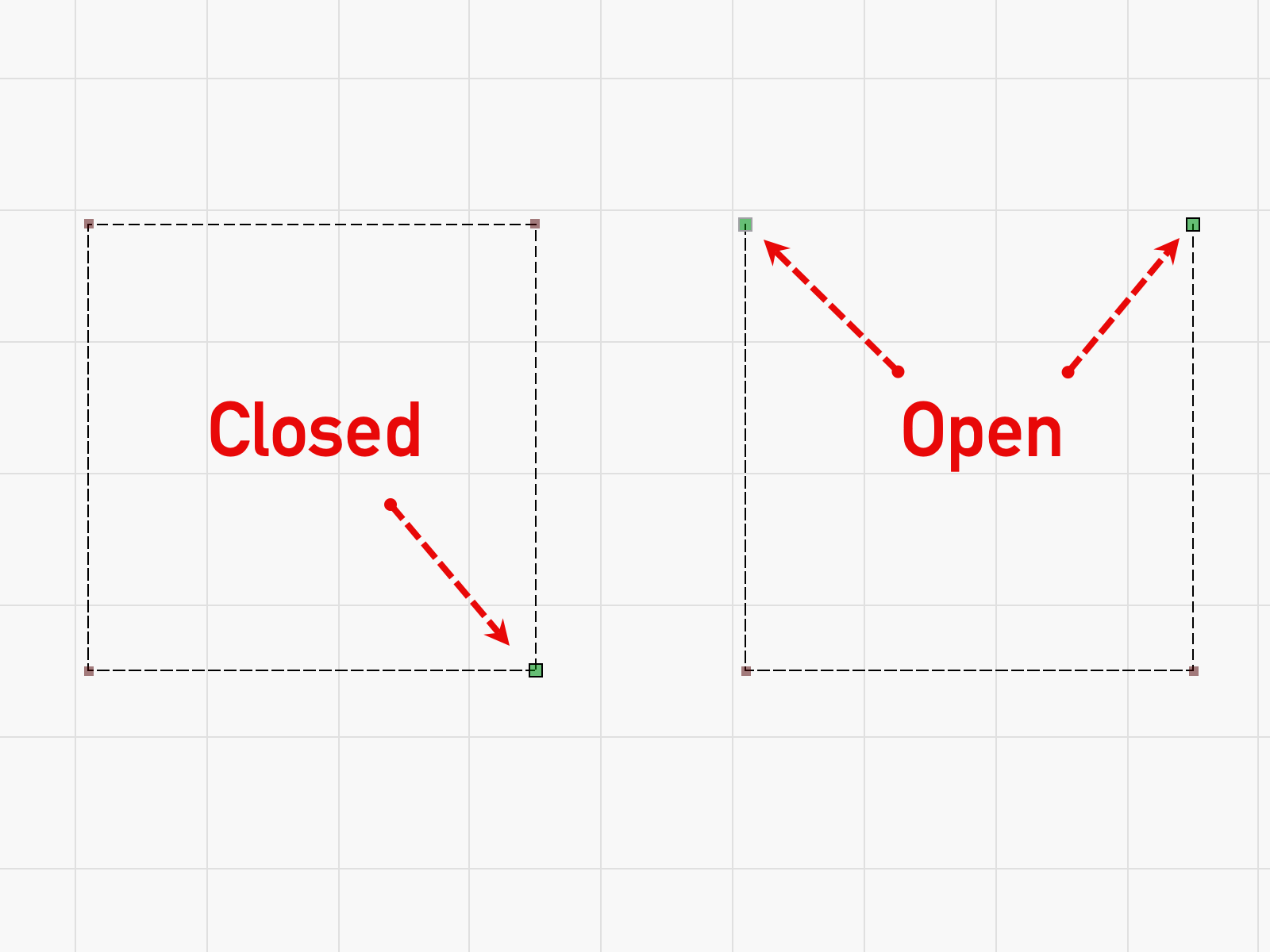
Closed shapes are fundamental design elements defined by a continuous path that starts and ends at the same point, effectively capturing a portion of space. In visual communication, these shapes serve as the primary vehicles for containment, providing structural integrity, defining focal points, and establishing a clear distinction between the subject and its surrounding environment.
The Foundational Nature of Closed Shapes
In the realm of two-dimensional design, a shape is created when a line is "closed." This distinguishes it from an open shape or a line, which may suggest a boundary but does not fully encapsulate an area. As we navigate the design landscape of 2026, the reliance on closed shapes has only intensified, particularly as digital interfaces demand higher levels of clarity and modularity.
When a path is closed, it creates a "fillable" area. This is a critical technical distinction. In vector-based software, an open path can have a stroke, but a closed path possesses a defined internal surface area that can hold solid colors, gradients, patterns, or textures. This internal space allows designers to manipulate visual weight—the perceived "heaviness" of an object on the screen or page. A solid, dark-colored closed square carries more visual weight than an open square of the same size, significantly impacting the hierarchy of a composition.
Furthermore, closed shapes create two distinct zones: the internal space (positive space) and the surrounding area (negative space). The relationship between these two is the bedrock of professional composition. By closing a shape, a designer explicitly tells the viewer's eye where to look and where one piece of information ends and another begins.
The Psychology of Closed Shapes: Gestalt and Perception
Understanding closed shapes requires a dive into the Gestalt Principles of Perception, specifically the Law of Closure. The human brain is hardwired to seek order and completeness. When we see a shape that is almost closed, our minds automatically fill in the gaps to perceive a whole object. However, when a designer uses an explicitly closed shape, it provides a sense of resolution and security.
The specific geometry of a closed shape dictates the emotional and psychological response of the audience:
Circles and Ellipses: Unity and Protection
Circles have no beginning and no end. Because they lack sharp angles or "points," they are perceived as friendly, safe, and inclusive. In branding, closed circular shapes often represent community, global reach, or perfection. In a UI context, rounded corners and circular buttons are used to make interfaces feel more approachable and less "industrial."
Squares and Rectangles: Stability and Order
The right angles of a square or rectangle suggest logic, professionalism, and reliability. These are the most common closed shapes in design because they mimic the physical world's structures—buildings, bricks, and screens. They provide a sense of "containment" that is essential for organizing complex information. In 2026, the "card-based" layout remains the dominant design pattern because the closed rectangle provides a perfect container for diverse content types.
Triangles: Direction and Conflict
Unlike squares or circles, triangles are inherently directional. Depending on their orientation, a closed triangle can represent stability (base at the bottom) or tension and movement (pointing sideways or downward). Because they have sharp points, they are often used in design to draw the eye toward a specific call to action or to denote "danger" or "warning" in iconography.

Technical Implementation in Modern Design
For a designer, understanding closed shapes is not just a matter of aesthetics; it is a technical requirement. Whether working in print or digital media, the "closed" status of a vector path determines how the file will be rendered and processed.
Vector Paths and SVG Logic
In digital design tools like Adobe Illustrator or Figma, a closed shape is defined by its path data. In a Scalable Vector Graphics (SVG) file, a closed path typically ends with the "Z" command, which instructs the rendering engine to draw a straight line back to the starting point. If a path is not closed, applying a fill can result in "leaked" colors or unpredictable rendering across different browsers or devices.
CSS and Web Layouts
In web development, the concept of a closed shape is often handled by the "box model." Every element on a webpage is essentially a closed rectangular box. Modern CSS properties, such as clip-path and border-radius, allow developers to transform these rectangular boxes into more complex closed shapes.
border-radius: Softens the corners of the closed rectangle, shifting the psychology from "rigid" to "friendly."clip-path: Defines a specific closed region that determines which parts of an element are visible. This is frequently used for hero sections or creative image masking.
Comparison of Closed Shape Characteristics
The following table outlines the primary differences between common closed shapes and their typical applications in 2026 design standards.
| Shape Type | Visual Weight | Psychological Association | Primary Use Case |
|---|---|---|---|
| Circle | Moderate | Unity, Wholeness, Infinite | Profile pictures, "Action" buttons, Brand marks |
| Square | Heavy | Stability, Trust, Formalism | Grids, Structural blocks, Corporate identity |
| Rectangle | High | Organization, Logic, Clarity | UI Cards, Navigation bars, Text blocks |
| Triangle | Dynamic | Motion, Risk, Direction | Icons, Wayfinding, Decorative accents |
| Organic | Variable | Nature, Creativity, Spontaneity | Background motifs, Illustration, Modern startups |
Closed Shapes in Branding and Logo Design
In logo design, the use of a closed shape can define the entire identity of a brand. An "enclosed" logo—where the brand name or icon is housed within a circle, shield, or square—suggests a self-contained, authoritative entity. Think of classic automotive badges or government seals; the closed boundary communicates that the organization is unified and robust.
Conversely, "open" logos can feel more modern or expansive, but they often struggle with legibility when placed on busy backgrounds. A closed shape provides a consistent "backing" or "container" for a logo, ensuring it remains legible regardless of whether it is placed on a photograph, a dark background, or a patterned surface. This is why "badge" style logos remain a staple for designers who need to ensure brand consistency across fragmented digital platforms.
The Role of Closed Shapes in UI/UX Design
User Experience (UX) design relies heavily on the "container" metaphor. In 2026, as interfaces become more cluttered with AI-generated data and real-time feeds, the closed shape serves as an essential tool for Information Architecture.
The Container Pattern
The most ubiquitous use of closed shapes in UI is the "card." A card is a closed rectangle (often with slightly rounded corners) that groups related information together. By closing the shape around a photo, a headline, and a button, the designer tells the user: "These three elements belong to the same object." Without the closed shape of the card, the user would have to work harder to understand the relationships between the elements.
Modals and Overlays
When a designer needs to interrupt a user's flow—such as for a login prompt or a confirmation—they use a modal window. This is a large closed shape that sits on top of the existing interface. The closure of this shape is psychological as well as visual; it creates a "room" within the app where the user must complete a task before they can leave.
Common Mistakes When Using Closed Shapes
While closed shapes are powerful, they can be misused in ways that degrade the quality of a design.
- Over-crowding: Placing too many closed shapes in a small area creates visual noise. Each shape competes for attention, leading to a "busy" layout that exhausts the viewer.
- Poor Proportions: A closed shape that is too large can overwhelm the content within it, while one that is too small can make the content feel cramped and unimportant.
- Ignoring White Space: Designers often forget that the space outside a closed shape is just as important as the space inside. Without adequate "breathing room" (margins), closed shapes can make a layout feel claustrophobic.
- Inconsistent Corner Radii: In modern UI, using a 4px corner radius on one closed shape and a 20px radius on another creates a disjointed experience. Consistency in how shapes are closed and rounded is key to a professional aesthetic.
Advanced Composition: Layering and Transparency
In high-end graphic design, closed shapes are rarely used in isolation. Instead, they are layered. By overlapping closed shapes and adjusting their opacity, designers can create a sense of depth and dimensionality (often called "Glassmorphism" or "Depth UI," which has seen a resurgence in 2026).
When two closed shapes overlap, they create a third, "intersection" shape. This technique is often used in modern illustration and complex logo marks to create sophisticated visual metaphors. The use of transparency allows the viewer to see the "closure" of the underlying shape while still perceiving the new shape created by the overlap.
Frequently Asked Questions
What is the difference between a geometric and an organic closed shape?
Geometric closed shapes are man-made and mathematically precise, such as circles, squares, and triangles. They suggest order and efficiency. Organic closed shapes are irregular, mimicking forms found in nature, like leaves or puddles. These are used to create a more human, approachable, or "hand-drawn" feel in a design.
Can a shape be "closed" without a visible border?
Yes. A shape is considered closed if the fill color or texture occupies a defined, enclosed area, even if there is no "stroke" or outline. In fact, many modern designs omit the outline entirely, relying on the contrast between the fill color and the background to define the shape's closure.
Why do designers use rounded corners on closed shapes?
Rounded corners (or "squcircles") are easier for the human eye to process than sharp 90-degree angles. Psychologically, they feel safer and more "touchable," which is why they are the standard for buttons and containers in mobile app design.
How do closed shapes affect accessibility in design?
Closed shapes are vital for accessibility because they provide a clear visual boundary for interactive elements. For users with visual impairments or cognitive disabilities, a closed "focus state" (like a box appearing around a selected link) provides necessary feedback on where they are within the interface.
Is a line a shape?
Technically, no. In design terminology, a line is a one-dimensional path. A shape is two-dimensional. A line only becomes a shape when it is closed (creating a surface area) or when it is "expanded" to have a measurable width and height that encloses space.
Final Recommendation
To master the use of closed shapes in your work, start by evaluating the "containment" needs of your content. If you are designing a complex data dashboard, utilize the stability of rectangular closed shapes to create a clear grid. If you are building a lifestyle brand, experiment with organic closed shapes to evoke a sense of movement and nature. Always ensure that your paths are technically "closed" in your source files to avoid rendering errors, and maintain consistency in your corner treatments to ensure a cohesive visual language. In 2026, the hallmark of a senior designer is not just the ability to create shapes, but the wisdom to know when a shape needs to be closed to provide the user with a sense of clarity and completion.
Image Gallery
Select an image to open it in a new tab.

Vivian Cho
Executive IT and Emerging Technologies Reporter
