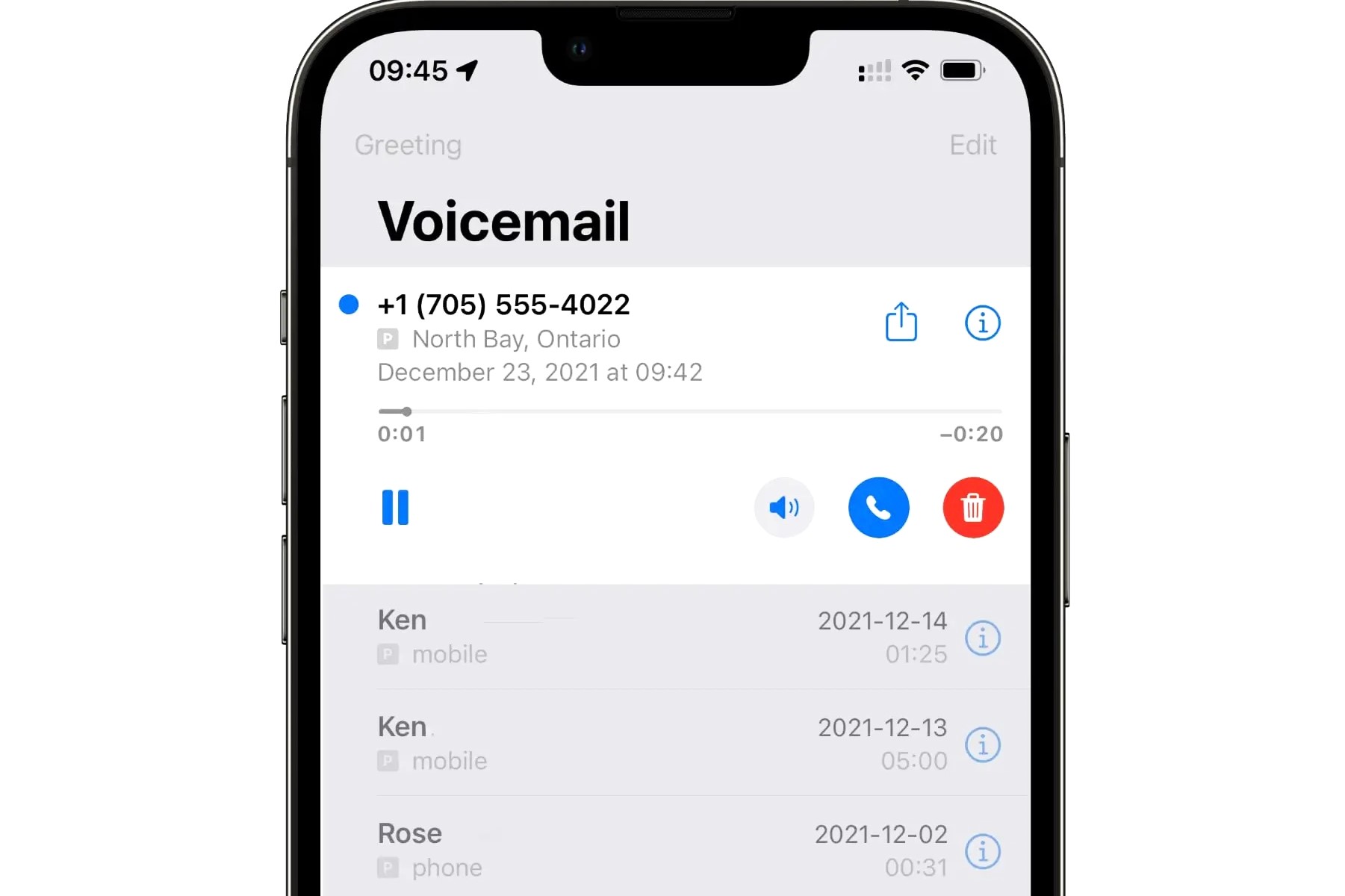
To reset your voicemail on an iPhone, navigate to Settings > Phone > Change Voicemail Password to update your PIN. To reset your greeting, open the Phone app, tap Voicemail, then Greeting, and select Default. For persistent technical issues, a network settings reset via Settings > General > Transfer or Reset iPhone may be necessary.
Voicemail remains a critical communication tool in 2026, even as asynchronous messaging and AI-driven transcriptions dominate our interactions. On an iPhone, the "reset" of a voicemail system can refer to three distinct actions: changing a forgotten or compromised password, reverting a custom greeting to the factory default, or clearing a glitchy system that refuses to play or receive messages. Because voicemail is a service provided by your cellular carrier but managed through the iOS interface, troubleshooting requires an understanding of how these two entities synchronize.
Understanding the Relationship Between iOS and Your Carrier
Before performing any reset, it is essential to understand that your voicemail does not live "on" your iPhone in the way a photo or a text message does. Instead, your iPhone acts as a window into a mailbox hosted on your carrier’s servers (such as Verizon, AT&T, or T-Mobile).
When you use Visual Voicemail, your iPhone downloads a copy of the audio file from the server so you can listen to it out of order. When you "reset" your voicemail, you are often sending a command from your device to the carrier's server to change a setting or clear a cache. Therefore, a stable cellular connection is almost always required for these changes to take effect. If you are on Wi-Fi without a cellular signal, many voicemail reset commands will fail silently.
How to Reset Your Voicemail Password
Resetting your voicemail password (or PIN) is the most common task users face, particularly when moving to a new device or if they haven't checked their mailbox manually in a long time.
Method 1: Using iOS Settings
If you know your current password or if your carrier supports Apple’s integrated password management, this is the most direct route.
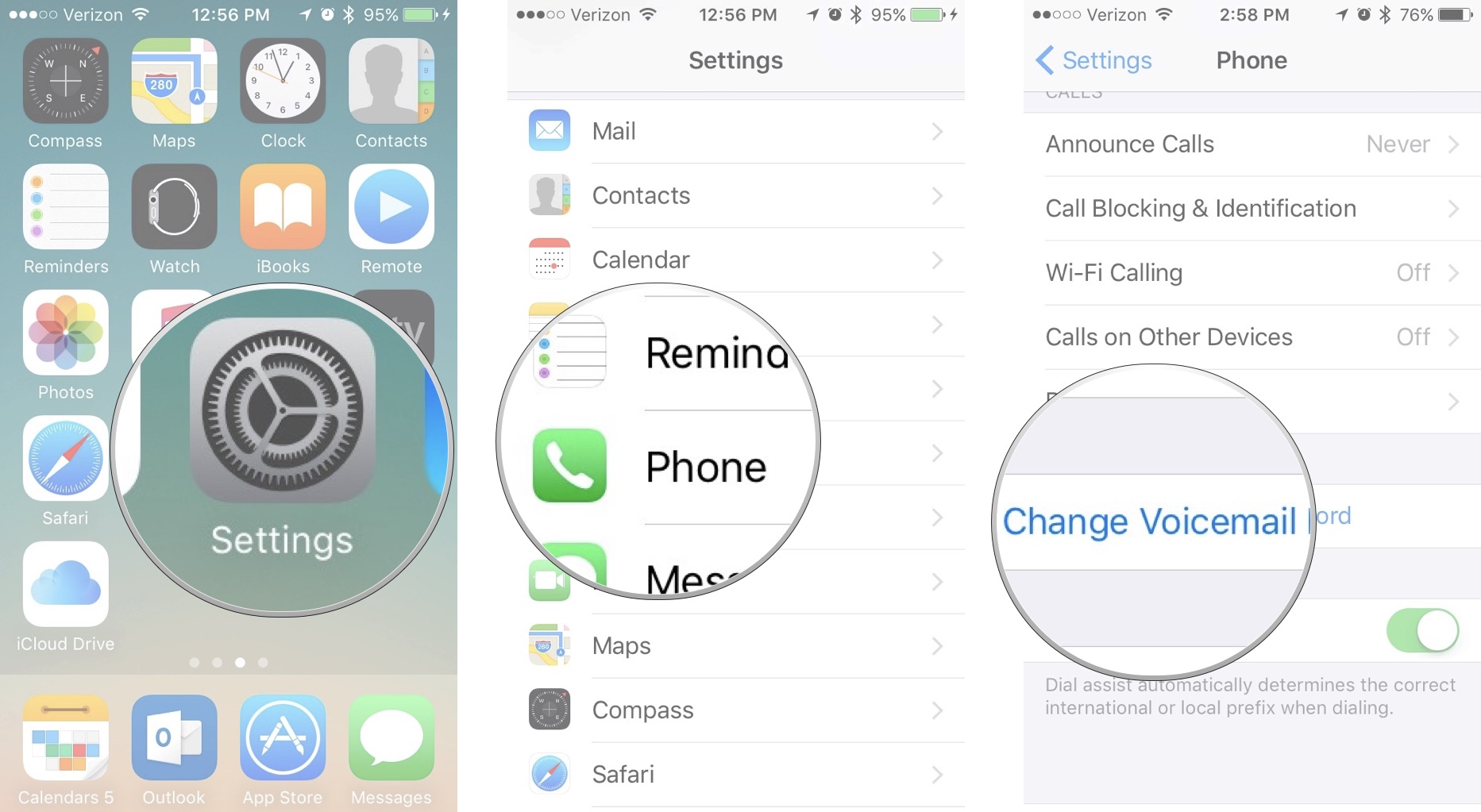
- Open the Settings app on your iPhone.
- Scroll down and tap on Phone.
- Scroll to the bottom and select Change Voicemail Password.
- Enter a new four-to-six-digit PIN.
- Tap Done, re-enter the new PIN to confirm, and tap Done again.
If the "Change Voicemail Password" option is greyed out or does not appear, it usually indicates a synchronization issue with your carrier or that your current cellular plan does not support Visual Voicemail.
Method 2: Resetting a Forgotten Password via Carrier
If you have forgotten your password entirely, the iOS Settings menu may not allow you to bypass the old PIN. In this case, you must reset it through the carrier’s automated system.
- AT&T: Log into your AT&T account online or use the myAT&T app. Navigate to "Wireless" > "Manage Device" > "Reset Voicemail Password."
- Verizon: Call *611 from your iPhone or use the My Verizon app. You can search for "Reset Voicemail Password" in the app's help bar.
- T-Mobile: Use the T-Mobile app or dial #793# on your keypad to reset your voicemail PIN to the last four digits of your phone number.

How to Reset Your Voicemail Greeting
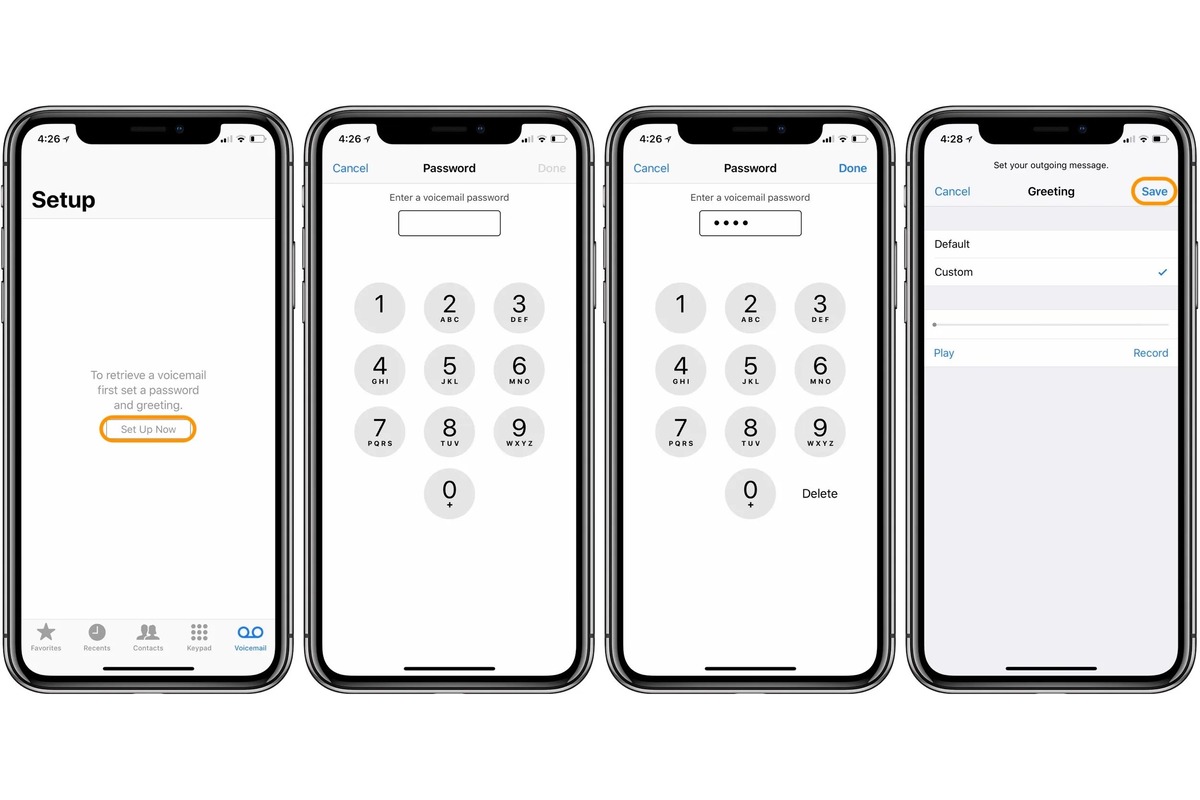
Sometimes a "reset" means you want to remove a custom-recorded greeting and return to the standard carrier greeting that simply reads your phone number or name.
- Open the Phone app.
- Tap the Voicemail tab in the bottom right corner.
- Tap Greeting in the top left corner.
- On this screen, you will see two options: Default and Custom.
- To reset, select Default. A checkmark will appear next to it.
- Tap Save in the top right corner.
By selecting Default, you are instructing the carrier's server to stop playing your recorded file and start playing the generic system greeting. If you wish to keep a custom greeting but want to "reset" it by recording a new one, select Custom, tap Record, speak your new message, and then tap Stop and Save.
Troubleshooting Technical Glitches: The Network Reset
If your voicemail isn't showing new messages, or if you receive an "Unavailable" error when trying to access the voicemail tab, you may need a deeper technical reset. This isn't a reset of the voicemail content, but rather a reset of the handshake between your iPhone and the cellular network.
Resetting Network Settings
This is a powerful troubleshooting step that often resolves Visual Voicemail sync issues.
Caution: Resetting network settings will erase your saved Wi-Fi passwords, Bluetooth pairings, and VPN configurations. Ensure you have your Wi-Fi passwords handy before proceeding.
- Go to Settings > General.
- Scroll to the bottom and tap Transfer or Reset iPhone.
- Tap Reset.
- Select Reset Network Settings.
- Enter your device passcode and confirm the action.
Your iPhone will restart. Once it reboots, it will re-establish a fresh connection with your carrier's towers, which often triggers the "pushed" voicemail data that was stuck in the system.
Updating Carrier Settings
Carriers occasionally release updates that improve how the iPhone communicates with their voicemail servers. To check for an update:
- Go to Settings > General > About.
- Wait on this screen for about 30 seconds.
- If an update is available, a pop-up will appear asking if you’d like to update your carrier settings. Tap Update.
Comparison of Voicemail Reset Methods
| Reset Objective | Primary Method | Requirements | Impact on Data |
|---|---|---|---|
| Change Password | Settings > Phone | Knowledge of current PIN | None |
| Forgotten Password | Carrier App / Dial Code | Account authentication | None |
| Revert Greeting | Phone App > Greeting | Cellular connection | Deletes custom audio link |
| Fix App Glitches | Reset Network Settings | Device Passcode | Deletes Wi-Fi/Bluetooth info |
| Clear All Messages | Manual Deletion | Visual Voicemail access | Permanently removes audio |
Managing "Deleted" Messages
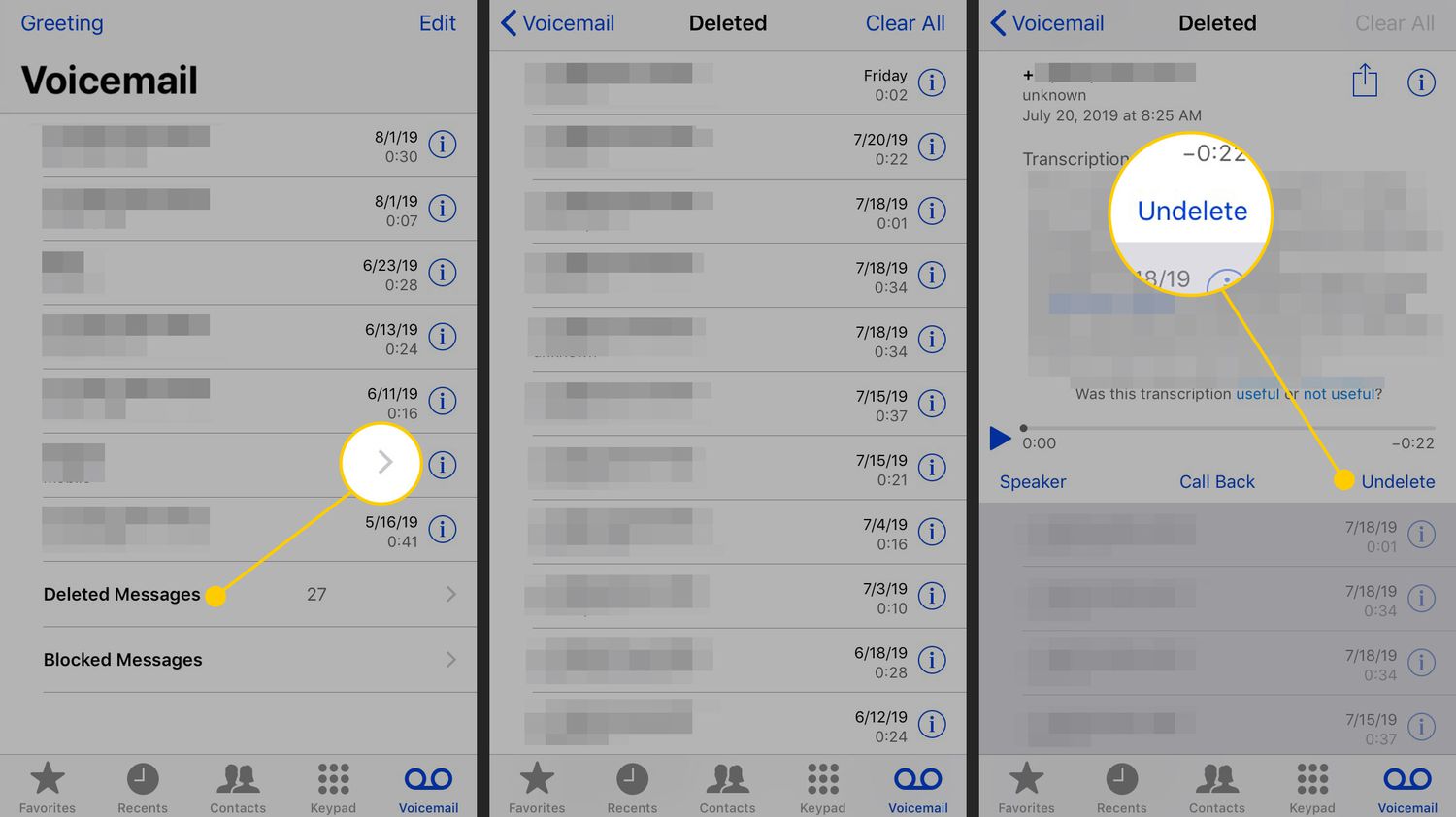
A common point of confusion is when a user "resets" their mailbox by deleting messages, only to find the mailbox is still "full." This happens because iOS moves deleted voicemails to a temporary folder rather than erasing them immediately.
To truly reset the capacity of your mailbox:
- Go to the Voicemail tab in the Phone app.
- Scroll to the bottom and tap Deleted Messages.
- Tap Clear All in the top right corner.
- Confirm the deletion.
Once this is done, the space is reclaimed on the carrier's server. In 2026, most carriers offer significant storage, but high-volume users or those receiving high-fidelity audio messages may still hit limits if the Deleted Messages folder isn't purged.
Advanced Issues: Live Voicemail in iOS 17 and Later
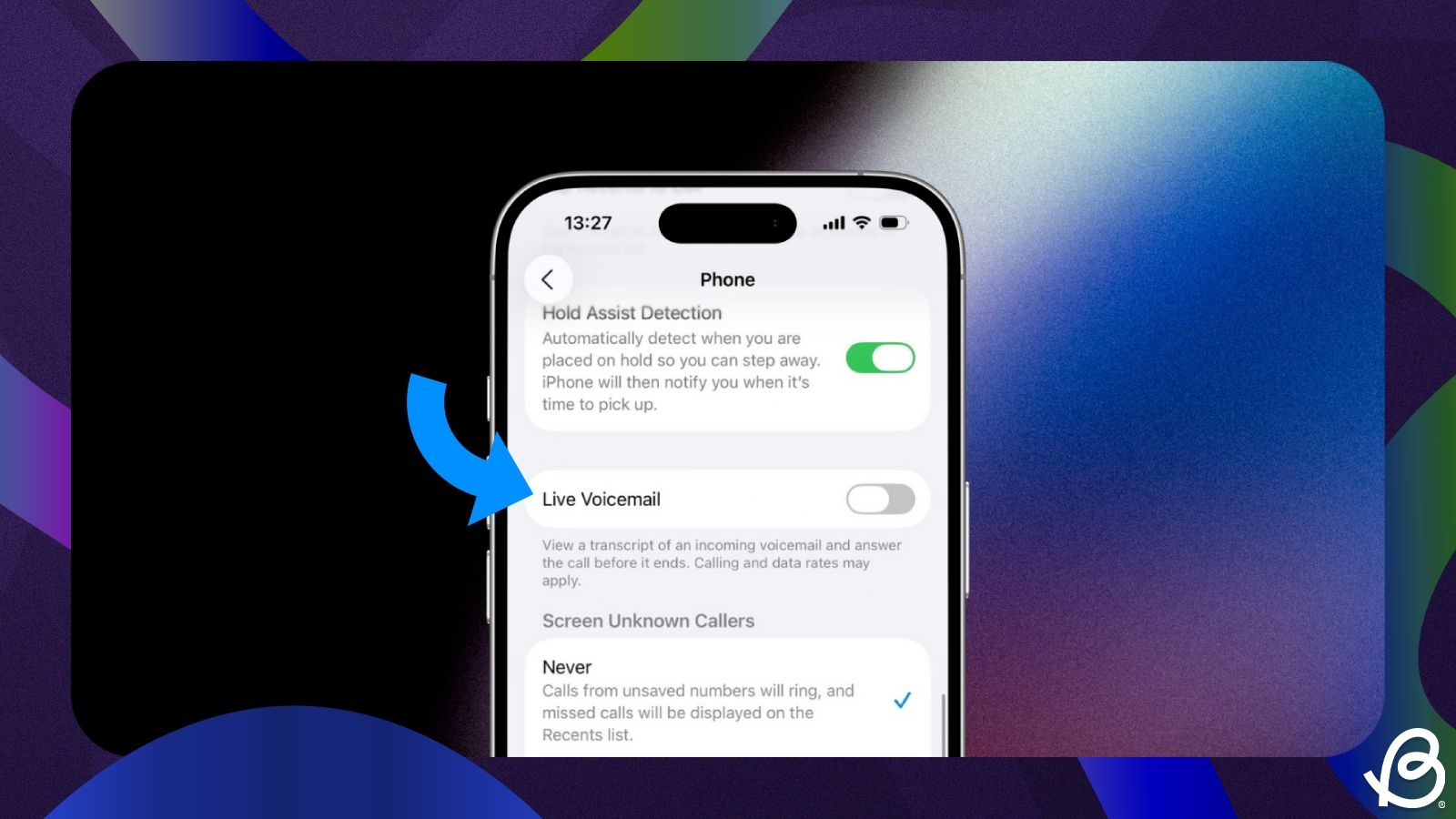
In 2026, most iPhone users are utilizing Live Voicemail. This feature allows the iPhone to transcribe a message in real-time as the caller is speaking. If you find that your "traditional" voicemail isn't working, it might be because Live Voicemail is intercepting the call.
To reset how Live Voicemail behaves:
- Go to Settings > Phone > Live Voicemail.
- Toggle it Off if you prefer the carrier-side voicemail to handle all calls.
- Toggle it back On to refresh the service.
Live Voicemail is handled on-device, whereas traditional voicemail is handled by the carrier. If you are trying to "reset" your voicemail because you aren't getting transcripts, the issue is likely with this setting rather than your carrier mailbox.
External Resources for Further Assistance
For specific carrier instructions and hardware support, refer to these official channels:
Frequently Asked Questions
Does resetting my iPhone delete my voicemails?
Performing a "Reset All Settings" or "Reset Network Settings" will not delete your voicemails, as they are stored on your carrier's servers. However, performing an "Erase All Content and Settings" (a factory reset) will remove the downloaded copies of voicemails from your device. You can usually retrieve them again once you sign back into your Apple ID and reconnect to your carrier, provided they haven't expired on the server.
Why can't I see the "Change Voicemail Password" option?
This usually occurs if your iPhone is not properly connected to the cellular network or if your carrier account has a block on Visual Voicemail. Try disabling Wi-Fi to force the phone onto cellular data. If the option still doesn't appear, you may need to contact your carrier to ensure your "provisioning" for Visual Voicemail is active.
How do I reset my voicemail if I'm traveling internationally?
Resetting via the Settings app may fail while roaming due to how local networks handle data. The most reliable way to reset your voicemail while abroad is to use your carrier’s web portal or mobile app over a stable Wi-Fi connection. Alternatively, you can call your own number from your iPhone (long-press "1" in the dialer) to access the traditional audio menu, where you can often change your greeting or PIN.
What is the default voicemail password for iPhone?
There is no universal default password. For many carriers, the default is set to either the last four digits of your phone number or the last four digits of your Social Security number. If neither works, you must use the carrier’s password reset tool to create a new one.
Can I reset my voicemail to disable it entirely?
There is no "Off" switch for voicemail within the iOS settings. To disable voicemail entirely, you must contact your carrier and ask them to remove the "Voicemail" feature from your line. Alternatively, you can use conditional call forwarding codes to send calls to a different number or a dead-end service.
Final Recommendation
If you are attempting to reset your voicemail due to a technical error, always start with the least intrusive method: toggle Airplane Mode on and off, then check for a Carrier Settings Update. If you are resetting for privacy reasons—such as a compromised PIN—use the Settings > Phone method immediately. For users who find their mailbox is consistently full despite deleting messages, the "Clear All" action within the "Deleted Messages" folder is the essential final step to fully resetting your storage capacity.
Image Gallery
Select an image to open it in a new tab.


Zara El-Hashem
Sociocultural Dynamics and Academics Writer
