
Securing access within a Microsoft environment requires a multilayered approach that integrates identity management, conditional access policies, and centralized visibility. By leveraging the Microsoft Entra ecosystem alongside Microsoft Defender for Cloud Apps, organizations can enforce Zero Trust principles, ensuring that only authenticated, authorized, and compliant users access sensitive corporate resources across hybrid and cloud infrastructures.
The Foundation: Identity as the New Perimeter
In a modern enterprise, the traditional network perimeter has dissolved. With the rise of remote work and the transition to SaaS-based workflows, the identity of the user has become the primary security boundary. In Microsoft environments, this identity is governed by Microsoft Entra ID (formerly Azure Active Directory).
Understanding cloud access security begins with acknowledging that identity is not just about credentials—it is about context. Organizations must move beyond static passwords and implement robust authentication frameworks. This starts with enforcing Multi-Factor Authentication (MFA) for every user. However, MFA is only the first step. True security in a Microsoft ecosystem requires the orchestration of signals—such as device health, user location, and sign-in risk levels—to determine whether a request for access should be granted, blocked, or challenged with an additional verification step.
Navigating Conditional Access Policies
Conditional Access is the core engine of Microsoft’s cloud security strategy. It functions as an automated policy-based gatekeeper. When a user attempts to access an application or data, Conditional Access evaluates several "if-then" signals before granting access.
Core Signals Evaluated
- User and Group Membership: Who is the user, and what are their role-based permissions?
- IP Location Information: Are requests originating from trusted corporate networks or known anonymous proxy servers?
- Device Platform and State: Is the device managed by the organization (Intune-compliant) or an unknown personal device?
- Application Sensitivity: What data is contained within the resource the user is trying to access?
By configuring these policies correctly, administrators can ensure that a user working from a coffee shop on a non-compliant device is automatically restricted, while the same user working from a corporate-managed device in a familiar location experiences seamless access. The goal is to minimize friction while maximizing security posture.
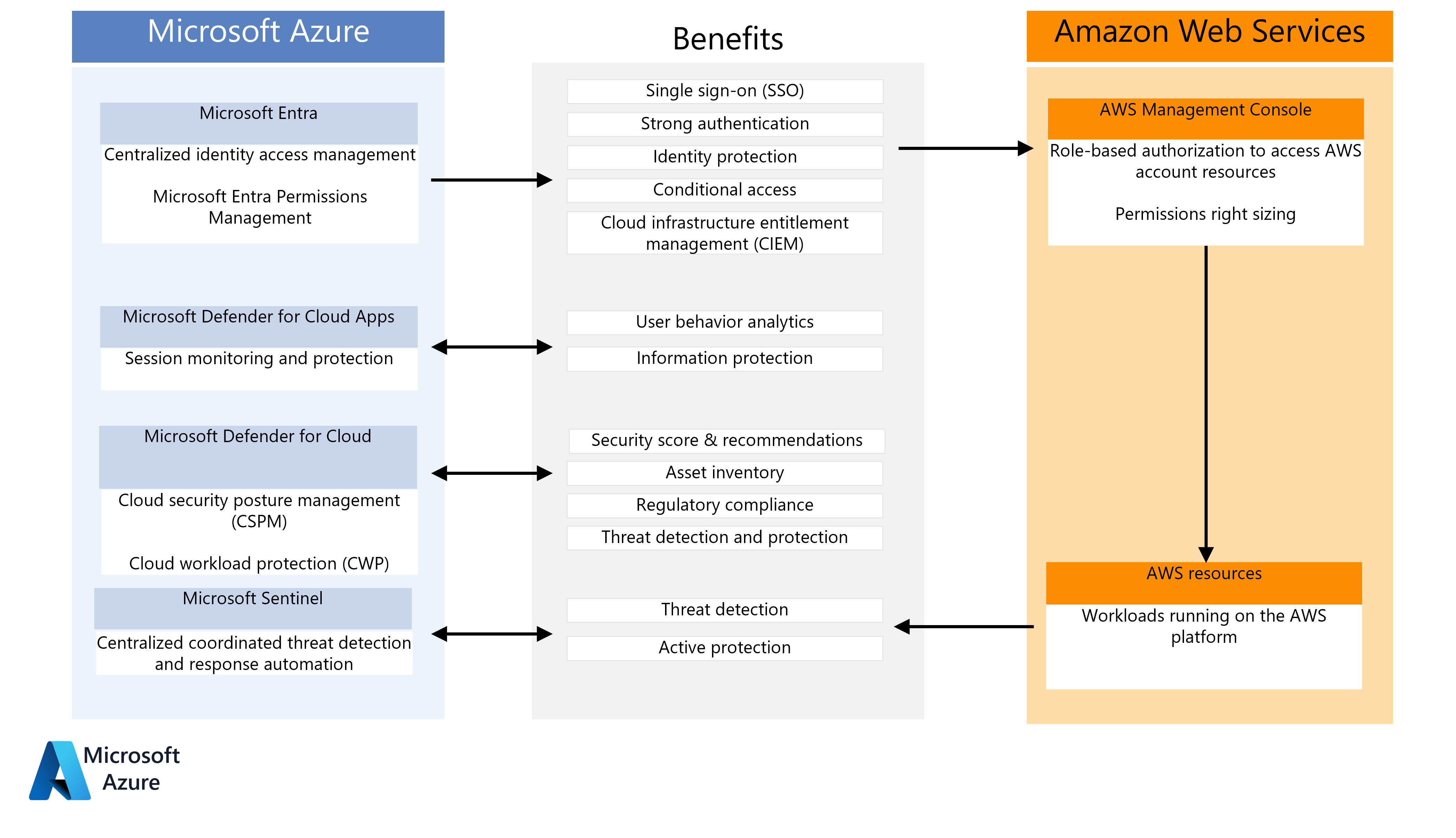
Visibility and Control with Microsoft Defender for Cloud Apps
While identity protects the user, Microsoft Defender for Cloud Apps serves as a Cloud Access Security Broker (CASB). It provides the deep visibility required to track how data is being moved, shared, and stored within your Microsoft 365 environment and other third-party SaaS applications.
Defender for Cloud Apps acts as a central hub for security monitoring. It excels at identifying "Shadow IT"—instances where employees use unauthorized cloud services to store corporate data. By monitoring traffic logs and API connections, the system detects anomalous behavior, such as a user downloading an unusual volume of files or accessing the system from a geolocated risk zone.
Furthermore, it allows for the implementation of session controls. This means that even after access is granted, the system continues to monitor the session. If a user attempts to download a file containing sensitive information (as labeled by Microsoft Purview Information Protection) to an unmanaged device, the system can block the download in real-time, regardless of where the user is located.
Comparing Security Components in the Microsoft Ecosystem
The Microsoft security stack is comprehensive, often leading to confusion regarding which tool handles which specific function. Understanding the distinction between these components is critical for effective deployment.
| Feature | Microsoft Entra ID | Defender for Cloud Apps | Microsoft Purview |
|---|---|---|---|
| Primary Goal | Identity & Access Management | CASB & App Governance | Data Governance & Compliance |
| Access Control | Enforces "Who" can enter | Monitors "What" happens inside | Defines "Sensitivity" of data |
| Typical Use | Login/MFA/Conditional Access | Shadow IT/Session Monitoring | Data Labeling/DLP |
| Integration | Foundation of the stack | Extends control to SaaS apps | Applies policy to the file level |
Implementing a Zero Trust Architecture
A Zero Trust approach assumes that breaches are inevitable or have already occurred. In the context of Microsoft environments, this means "never trust, always verify."
To implement this, organizations must first perform a data discovery exercise. You cannot protect what you do not know exists. Using Microsoft Purview, identify where your most sensitive data resides. Once identified, apply sensitivity labels. These labels act as metadata that follow the data, even if it is exported or shared outside the immediate environment.
Once the data is categorized, apply access policies that strictly limit access to the "principle of least privilege." A user should have the minimum level of access required to perform their current job function. Periodically reviewing access logs and adjusting permissions is not a one-time configuration but a recurring requirement for maintaining a resilient security posture.
Common Security Pitfalls and Misconfigurations
Even with advanced tools, organizations often stumble due to configuration oversights. One of the most common mistakes is "policy sprawl," where administrators create too many overlapping or contradictory Conditional Access policies. This leads to user frustration and potential security gaps where an unintended "allow" rule overrides a restrictive security policy.
Another frequent error is the neglect of service accounts. Service accounts—non-human identities used by applications and automated scripts—are high-value targets for attackers. These accounts often have overly broad permissions and are rarely monitored for anomalous activity. In a robust security architecture, service accounts must be governed by the same rigorous policies as human users, utilizing Microsoft Entra Workload ID to manage their lifecycle and credentials.
Finally, organizations often fail to act on the alerts generated by Defender for Cloud Apps. Security tools provide the data, but human intelligence is required to interpret the context. Establishing a clear incident response plan that dictates how to handle specific alerts—such as mass data deletion or impossible-travel scenarios—is essential.
Integrating External SaaS and Hybrid Components
Cloud access security does not stop at the edge of the Microsoft ecosystem. Many organizations rely on third-party SaaS applications, such as CRM tools or project management platforms. Integrating these into your Microsoft security framework is vital for holistic protection.
Using the built-in app connectors within Defender for Cloud Apps, you can extend your security policies to these external platforms. This creates a unified dashboard where you can see a user’s behavior across all platforms, not just Microsoft 365. For hybrid environments, where some servers remain on-premises, Microsoft Entra Application Proxy allows you to provide secure remote access to internal web applications without requiring a traditional VPN, keeping the access logic consistent across both cloud and on-premises resources.
Best Practices for Ongoing Maintenance
Security is a dynamic discipline. Microsoft regularly updates its security features, introduces new risk-detection algorithms, and modifies policy structures. To stay ahead:
- Audit Regularly: Use the Entra ID "Sign-in logs" and "Audit logs" to review access attempts monthly.
- Automate Compliance: Utilize Intune to ensure devices remain compliant with security baselines before they are granted access to corporate resources.
- Simulate Threats: Periodically conduct drills to test how your security infrastructure handles a compromised account scenario.
- Stay Informed: Monitor the Microsoft 365 Roadmap and official security blogs to understand upcoming deprecations or security feature changes that might impact your current configurations.
Frequently Asked Questions
What is the difference between Entra ID and Defender for Cloud Apps? Entra ID manages user authentication and authorization, deciding who gets in and how. Defender for Cloud Apps acts as a broker (CASB) that monitors what a user does within applications after they have successfully signed in, focusing on data exfiltration, shadow IT, and session security.
Do I need a third-party CASB if I have Microsoft Defender for Cloud Apps? For most organizations heavily invested in the Microsoft ecosystem, Defender for Cloud Apps provides comprehensive coverage. Whether you need a third-party tool depends on the complexity of your non-Microsoft application stack and specific regulatory requirements that might mandate specialized third-party monitoring.
How does Conditional Access impact user productivity? When configured properly, Conditional Access reduces friction. By using signals like "trusted device" and "known location," it allows users to access resources without repeated MFA prompts. Productivity is only impacted when a user attempts an action that deviates from standard secure patterns, which is a necessary trade-off for security.
What is the "Principle of Least Privilege" and why does it matter? It is a security philosophy where users are given only the bare minimum access required to complete their work. If an account is compromised, the "blast radius" is limited because the attacker only gains the restricted permissions assigned to that specific user, preventing lateral movement within the network.
How can I manage Shadow IT in my organization? Defender for Cloud Apps includes a "Discovery" feature that analyzes firewall and proxy logs to identify the SaaS applications currently in use by employees. Once discovered, you can block, sanction, or monitor these applications to regain control over corporate data.
Next Steps for Administrators
To strengthen your current posture, begin by auditing your existing Conditional Access policies. Ensure that every policy has a "Report-only" mode enabled before full deployment to verify its impact on users. Following this, prioritize the implementation of "Risk-based" policies within Microsoft Entra ID, which leverage automated threat intelligence to challenge users automatically when the system detects high-risk behavior. Finally, ensure that your data classification scheme in Purview is active, as this is the foundational layer upon which all session-based security controls depend.
Image Gallery
Select an image to open it in a new tab.




Vivian Cho
Executive IT and Emerging Technologies Reporter
