Salesforce as the Number One CRM Software on the Market: An Industry Analysis

Salesforce is recognized as the number one CRM software on the market due to its dominant global market share, highly scalable cloud architecture, comprehensive product ecosystem, and continuous innovation in enterprise automation and artificial intelligence. Independent market research firms, including International Data Corporation (IDC), consistently rank Salesforce as the global market leader in Customer Relationship Management.
The Market Leadership of Salesforce: Data and Industry Standing
Salesforce has maintained its status as the leading global Customer Relationship Management (CRM) provider for over a decade. According to tracking data published by International Data Corporation (IDC), Salesforce accounts for a larger share of the enterprise CRM market than its primary competitors combined, including Microsoft, Oracle, SAP, and Adobe.
Global CRM Market Share Distribution (Conceptual Overview)
| Segment | Market Share |
|---|---|
| [Salesforce] | ~21-23% Market Share |
| [Microsoft] | ~5-6% |
| [Oracle] | ~4-5% |
| [SAP] | ~4-5% |
| [Adobe] | ~3-4% |
| [Others / Specialized Niche Tools] | ~55-60% |
The foundation of this market dominance lies in Salesforce’s early transition to a Software-as-a-Service (SaaS) model. Founded in 1999 as a cloud-native CRM, Salesforce eliminated the need for complex on-premise hardware installations, software maintenance, and localized database management. This multi-tenant architecture allowed organizations of varying sizes to deploy sales tracking, lead management, and customer support databases directly through web browsers.
As enterprise demands evolved, Salesforce expanded beyond basic contact management into a multi-product enterprise platform. Market dominance is sustained through several structural advantages:
- Global Ecosystem Scale: A network of certified administrators, developers, and consulting partners that provides implementation and operational support.
- Acquisition Strategy: Strategic integration of key platforms, including Tableau for data visualization, MuleSoft for enterprise application integration, and Slack for workplace collaboration.
- Vertical Cloud Solutions: Industry-specific data models configured for financial services, healthcare, manufacturing, higher education, and the public sector.
- Data and AI Convergence: Integration of autonomous AI agents and real-time data ingestion through Data Cloud and Einstein.
Core Product Ecosystem: Cloud Capabilities
Salesforce operates as an interconnected set of specialized modules built on a central platform structure. Understanding why Salesforce leads the CRM space requires examining its primary application suites.
- Salesforce Platform
- Sales Cloud: Pipeline & Lead
- Service Cloud: Case Mgmt & Omnichannel
- Marketing Cloud: Journeys & Data
- Data Cloud & Einstein: Real-Time AI Platform
1. Sales Cloud
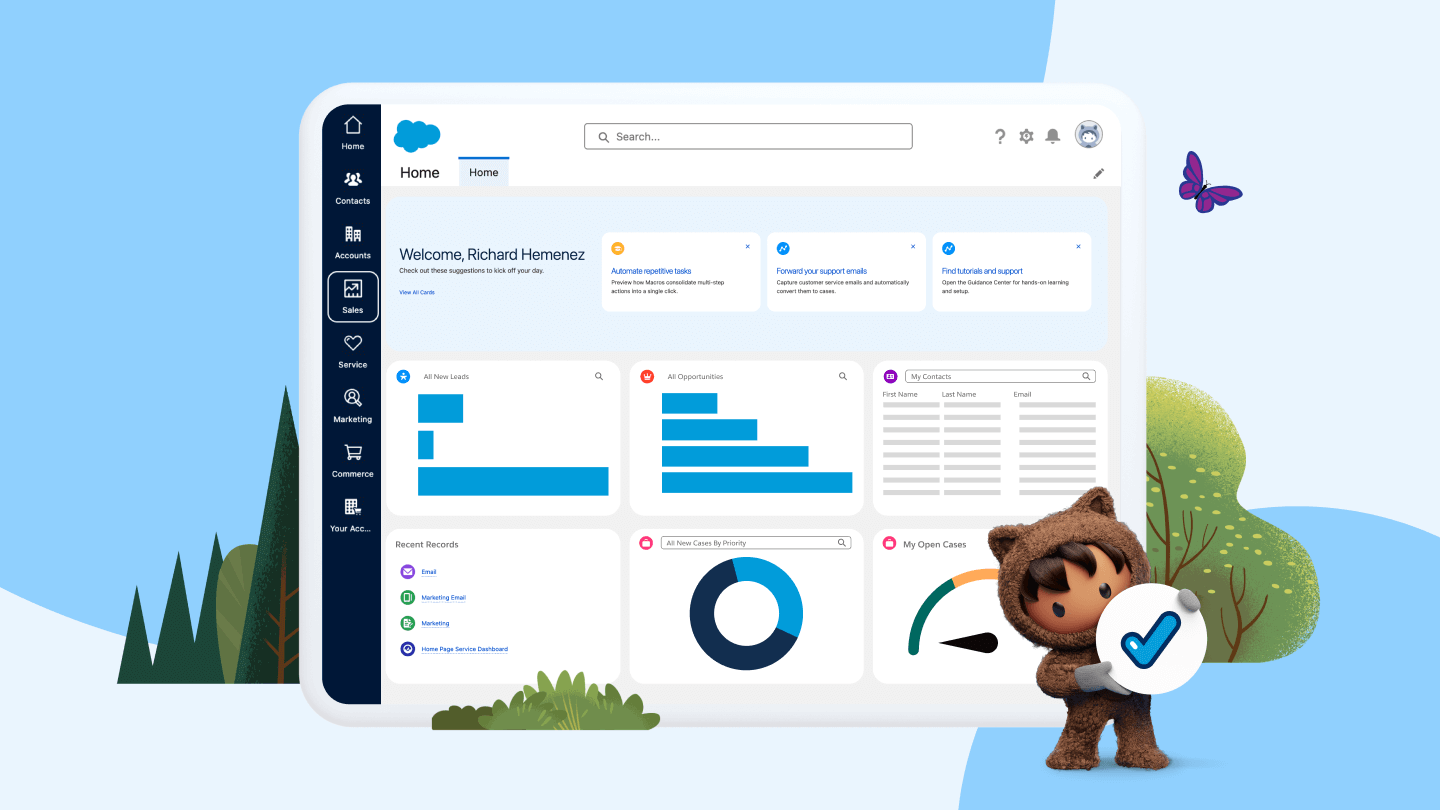
Sales Cloud is the foundational CRM module designed to manage revenue pipelines, contact records, sales leads, and deal velocity. Key functionality includes:
- Lead and Opportunity Management: Tracking buyer interactions from initial contact through proposal generation, quote approval, and contract signature.
- Pipeline Forecasting: Predictive revenue forecasting based on deal stage, historical win rates, and representative performance activity.
- Process Automation: Utilizing Salesforce Flow to automate deal assignment rules, escalation paths, and approval workflows.
2. Service Cloud
Service Cloud targets customer support teams, call centers, and field technicians. It consolidates support tickets across email, phone, web portals, live chat, and social messaging platforms into a unified agent workspace. Capabilities include:
- Case Management: Automated routing, prioritization, and resolution tracking based on Service Level Agreements (SLAs).
- Omnichannel Routing: Dynamic distribution of incoming inquiries based on agent availability, skill set, and channel priority.
- Field Service Management: Scheduling field technicians, dispatching inventory, and managing mobile work orders directly from mobile devices.
3. Marketing Cloud and Account Engagement (formerly Pardot)
Salesforce delivers automated marketing capabilities split across consumer (B2C) and business-to-business (B2B) operational models:
- Marketing Cloud Engagement: Manages multi-channel customer journeys across email, SMS, mobile push notifications, and advertising networks.
- Marketing Cloud Account Engagement: Focuses on B2B lead scoring, drip campaigns, prospect engagement tracking, and revenue attribution tied to sales pipelines.
4. Data Cloud and Einstein AI
Salesforce has centered modern operational developments on unifying enterprise data silos. Data Cloud ingests real-time data from internal databases, cloud storage, web activity, and external APIs into a unified customer profile.
This unified data layer powers Einstein AI, which provides predictive scoring, automated email generation, conversation sentiment analysis, and autonomous AI agents designed to handle routine service requests and qualifying actions.
Architectural Advantages and Technical Capabilities
Salesforce's continued leadership in CRM technology is driven by several architectural advantages that support enterprise operations.
- Salesforce Core Platform
- Metadata Driven Architecture
- AppExchange Marketplace & APIs
- Enterprise Security & Governance
Metadata-Driven Architecture
Unlike rigid systems where operational code and enterprise data are bound together, Salesforce uses a metadata-driven architecture. The user interface, business logic, security settings, and custom objects are stored as metadata layer definitions. This design ensures that platform updates deployed by Salesforce several times per year do not break custom configurations built by internal technical teams.
Development and Customization Frameworks
Organizations with complex workflows customize Salesforce using native operational layers:
- Lightning Web Components (LWC): A modern front-end framework using standard HTML, JavaScript, and Web Components to build custom user interfaces.
- Apex: A strongly typed, object-oriented programming language designed for executing flow and transaction control statements on Salesforce servers.
- Salesforce Flow: A low-code visual workflow editor that enables administrators to automate complex business processes without writing custom code.
Integration Capabilities via MuleSoft and Open APIs
Modern enterprise architectures rely on smooth data transfer across software platforms. Salesforce exposes REST, SOAP, and Bulk APIs for all custom and standard platform objects. Through its integration engine, MuleSoft, Salesforce acts as a enterprise hub, linking CRM data with Enterprise Resource Planning (ERP) databases, transactional accounting systems, and external human resources suites.
Ecosystem Scale and the AppExchange
The Salesforce AppExchange is an enterprise cloud marketplace containing thousands of pre-built integrations, third-party applications, and custom solutions. Whether a company requires specialized document generation, electronic signature integration, or enterprise telephony, third-party software vendors build natively supported apps for the Salesforce ecosystem.
Salesforce Editions, Features, and Licensing Models
Salesforce uses a seat-based subscription model priced per user, per month, billed annually. The following matrix outlines standard capabilities and configurations available across core Sales Cloud product editions.
| Feature / Capability | Starter / Suite | Professional | Enterprise | Unlimited / Einstein 1 |
|---|---|---|---|---|
| Primary Target Audience | Small teams seeking basic CRM functionality | Mid-sized teams needing full pipeline management | Large enterprises requiring complex customization | Global organizations needing advanced AI & automation |
| Lead & Opportunity Tracking | Included | Included | Included | Included |
| Custom Process Automation | Limited | Standard Flow capabilities | Advanced Flow, Apex execution, custom APIs | Unlimited process capabilities and execution limits |
| API Access for Integrations | Restricted | Add-on / Restricted | Full REST / SOAP API Access | Full high-volume API access included |
| Custom Objects & Fields Limit | Low operational cap | Moderate cap per organization | High custom object limits (up to 200+) | Maximum system allocation & sandbox access |
| AI Capabilities (Einstein) | Basic contact capture | Optional add-on | Optional add-on | Full access to native predictive AI & Data Cloud |
| Sandbox Environments | Developer sandbox only | Developer sandbox | Full sandbox + Developer sandboxes | Multiple Full, Partial, and Developer sandboxes |
Note: Pricing tier names and product bundling strategies are subject to modification based on organizational needs and contract negotiations.
Balanced Evaluation: Pros and Trade-Offs
While Salesforce remains the market leader, enterprise buyers must weigh platform advantages against operational requirements and licensing costs.
- Salesforce Enterprise Evaluation
- Key Advantages
- Massive Scalability
- Rich Developer Ecosystem
- Deep Ecosystem Integration
- Custom Data Architecture
- Operational Trade-Offs
- Total Cost of Ownership
- Administrative Complexity
- Technical Debt Risk
- Long Implementation Timelines
- Key Advantages
Key Advantages
- Unmatched Scalability: Salesforce easily scales from a ten-person startup to global operations managing tens of thousands of simultaneous users.
- Deep Extensibility: Almost every field, view, process, and validation rule can be customized to match precise business operations.
- Security and Governance Standards: Offers robust role-based security, field-level security, audit logging, and compliance certifications across healthcare (HIPAA), finance, and international privacy regulations.
- Talent Availability: Because of the platform's widespread adoption, hiring certified Salesforce administrators, developers, and solution architects is easier compared to niche platforms.
Operational Trade-Offs and Challenges
- Total Cost of Ownership (TCO): Base licensing costs represent only part of the overall investment. Implementation fees, third-party AppExchange subscriptions, storage overages, and ongoing administrator salaries make Salesforce an expensive investment.
- Implementation Complexity: Out-of-the-box configurations rarely meet complex business needs. Deployment often requires technical implementation partners and several months of data modeling and process discovery.
- User Adoption Barriers: Over-customization can result in clunky user interfaces, complex data entry requirements, and employee resistance if change management is neglected.
- Risk of Technical Debt: Unregulated creation of custom fields, redundant automation rules, and legacy code can slow database processing speed and make administrative upkeep difficult.
Salesforce vs. Key Market Competitors
Selecting a enterprise CRM system requires comparing Salesforce directly against major market alternatives.
- Salesforce
- Leader in Enterprise
- Massive Ecosystem
- HubSpot CRM
- Ease of use
- Fast rollout
- Mid-market focus
- Microsoft Dynamics 365
- Native Azure & Office 365
- Strong ERP links
Salesforce vs. HubSpot CRM
- Target Market: HubSpot focuses heavily on ease-of-use, fast implementation, and SMB to mid-market organizations. Salesforce leads in enterprise-level customization, complex security policies, and high-volume data handling.
- Total Cost curve: HubSpot often starts with lower licensing fees and minimal implementation requirements. Salesforce requires greater upfront investment but provides broader capability for global multi-currency and multi-entity operations.
Salesforce vs. Microsoft Dynamics 365
- Ecosystem Integration: Microsoft Dynamics 365 integrates cleanly with existing Microsoft architectures, including Azure, Office 365, Teams, and Power BI.
- Customization Flexibility: While Dynamics 365 is a strong enterprise platform—particularly for organizations using Microsoft ERP solutions—Salesforce retains an edge in developer adoption, pre-built integrations, and AppExchange availability.
Salesforce vs. Oracle & SAP CRM Solutions
- Legacy Systems: Oracle and SAP offer powerful CRM engines deeply tied to their respective ERP systems.
- Modern Usability: Salesforce was designed primarily as a cloud platform, whereas legacy database giants had to adapt existing on-premise software models to cloud environments.
Evaluating Suitability: Implementation Guidance
To determine whether Salesforce is the correct CRM choice, organizations should follow a structured evaluation framework:
- Requirements Scope Audit
- Data & Process Mapping
- ROI & Capacity Assessment
Step 1: Conduct a Requirements Scope Audit
Document key enterprise requirements before requesting software demonstrations. Identify whether operations require multi-currency support, custom API endpoints, complex security structures, or advanced service-level agreements.
Step 2: Evaluate Internal Administrative Capacity
Salesforce requires ongoing administration. Organizations must decide whether to hire dedicated internal admins, train existing staff through Salesforce Trailhead, or retain an external managed-services consultancy.
Step 3: Map Data Architecture and Migration Strategy
Audit existing database hygiene. Transitioning legacy customer records into Salesforce requires clean lead data, organized account hierarchies, and documented field mappings to prevent legacy data issues from degrading the new platform environment.
Step 4: Calculate Total Cost of Ownership (TCO)
Build a 3-to-5-year financial budget that accounts for:
- Per-user seat licenses across required cloud tiers (Sales, Service, Marketing).
- Implementation, data migration, and system architecture partner fees.
- Third-party software marketplace integration costs.
- Internal administrative salaries and ongoing team training.
Frequently Asked Questions
Why is Salesforce considered the number one CRM on the market?
Salesforce holds the top CRM position due to its global market share, multi-tenant cloud architecture, extensibility, and broad enterprise ecosystem. Independent analysis by firms like IDC consistently places Salesforce ahead of competitors in market share, revenue generation, and product depth across sales, customer service, and marketing automation domains.
Is Salesforce suitable for small businesses, or is it strictly for enterprise companies?
Salesforce offers editions designed for smaller organizations, such as the Starter and Pro suites. However, small businesses with straightforward sales processes may find lower-cost CRM alternatives easier to deploy. Salesforce provides the greatest value to growing businesses that require custom automation, advanced reporting, and scalable data architecture over time.
What is the difference between Sales Cloud and Service Cloud?
Sales Cloud focuses on pipeline management, lead conversion, opportunity tracking, and revenue forecasting for sales teams. Service Cloud is built for customer support operations, managing customer inquiries across channels, managing support ticket lifecycles, and supporting field technicians.
How long does a standard Salesforce implementation take?
Implementation timelines depend heavily on business complexity and system scope. Small business deployments using out-of-the-box features can take 2 to 6 weeks. Enterprise-level implementations involving custom Apex development, legacy ERP data migration, and third-party API integrations typically require 3 to 9 months.
What technical skills are required to manage Salesforce?
Basic system updates, standard business process automation via Salesforce Flow, custom field creation, and report building can be managed by a trained administrator. Advanced customizations, complex API connections, custom UI components, and batch data processing require developers proficient in Apex, JavaScript, and Lightning Web Components (LWC).
Strategic Recommendation
If your business requires a platform capable of supporting complex business workflows, enterprise security standards, multi-department alignments, and high-volume data analytics, Salesforce remains the industry standard.
To proceed, schedule a process discovery session with internal business leaders to map customer workflows, define technical integration requirements, and run a total-cost analysis against platform licensing tiers. Smaller teams should start by testing basic platform capabilities using Salesforce's standard trail options or starter editions before committing to enterprise-tier deployments.
Image Gallery
Select an image to open it in a new tab.

Zara El-Hashem
Sociocultural Dynamics and Academics Writer
