Understanding ISO A3 Paper Size: Dimensions, Specifications, and Practical Applications
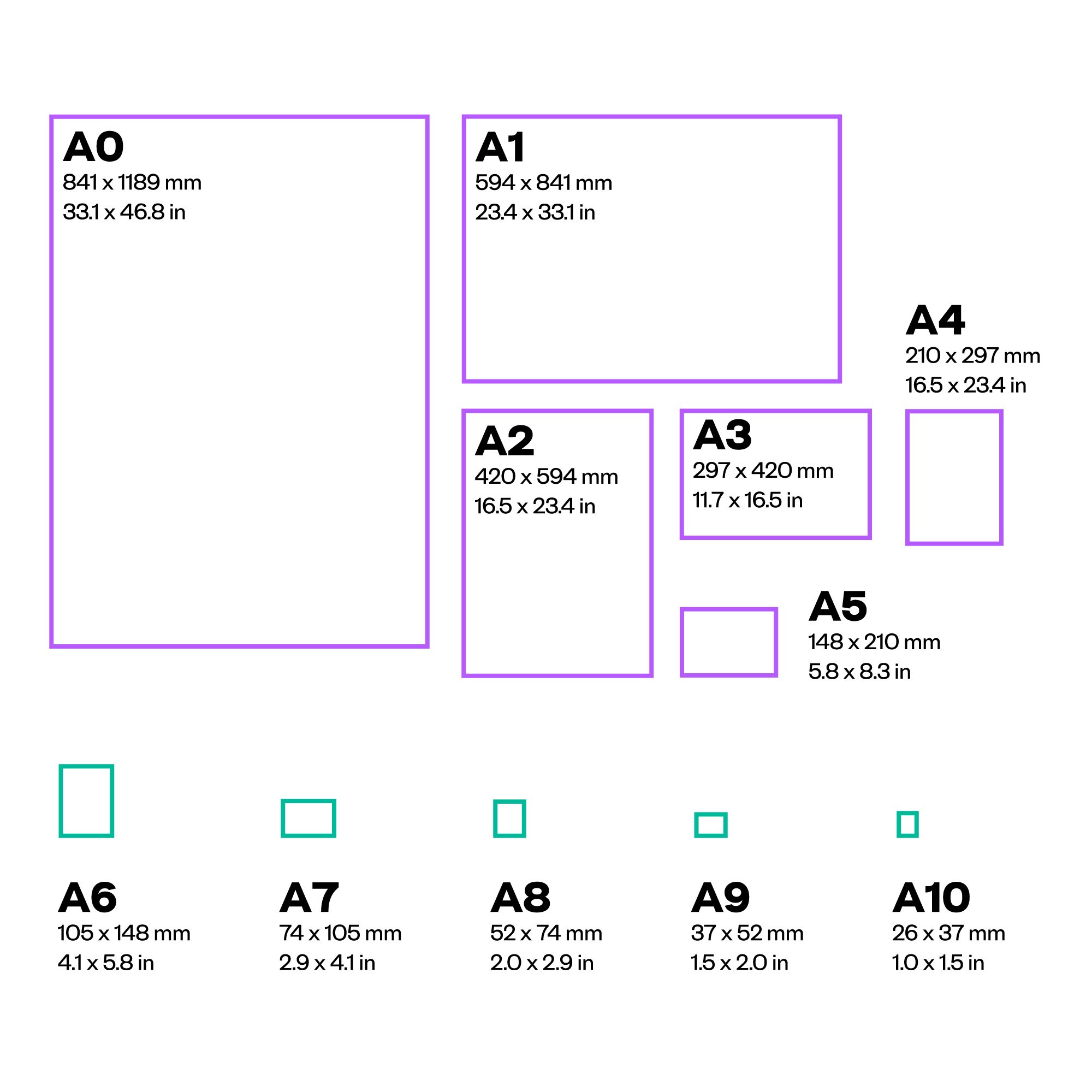
The ISO A3 paper size is a standardized international format measuring 297 x 420 millimeters (11.69 x 16.54 inches). As part of the ISO 216 standard, A3 is designed to be exactly half the area of A2 and twice the size of the common A4 sheet, making it a critical bridge between standard office documentation and large-format architectural or engineering layouts.
The Foundation of the ISO 216 Standard
The ISO 216 standard, which governs the A-series paper sizes, is built upon a simple yet mathematically elegant principle: the aspect ratio of every paper size is the square root of two (approx. 1.414). This specific ratio ensures that when a sheet of paper is folded in half parallel to its shorter side, the resulting two smaller sheets maintain the exact same aspect ratio as the original.
This system was first proposed by German scientist Dr. Walter Porstmann in 1922, based on earlier work by Georg Christoph Lichtenberg. The primary advantage of this geometric consistency is scaling; an A3 document can be photoreduced to A4 or enlarged to A2 without any loss of content formatting or distortion of margins. Because the area of an A0 sheet is defined as exactly one square meter, the progression down to A3 is mathematically fixed, ensuring that the paper weight—measured in grams per square meter (gsm)—remains a consistent metric for thickness and quality regardless of the sheet size.
Technical Dimensions and Precise Measurements
Precision is the hallmark of the ISO 216 standard. For users involved in graphic design, printing, or technical drawing, relying on these standardized measurements is essential to prevent alignment errors during the printing process.
- Millimeters: 297 mm x 420 mm
- Centimeters: 29.7 cm x 42.0 cm
- Inches: 11.69 in x 16.54 in
- Pixels (at 72 DPI): 842 x 1191 px
- Pixels (at 300 DPI): 3508 x 4961 px
When preparing files for professional output, it is standard practice to include "bleed" areas if the design extends to the edge of the paper. A standard A3 print usually requires a minimum bleed of 3mm on all sides, resulting in a physical trim size of 303 x 426 mm for the final digital file. Designers should always verify these requirements with their specific print service provider, as equipment limitations—specifically gripper margins on offset or digital presses—may necessitate slightly different margins for perfect binding or finishing.
Comparative Analysis: A3 in Context
Understanding where A3 fits in the hierarchy of paper sizes helps in choosing the right medium for a project. The following table provides a quick reference for the most common A-series dimensions.
| Format | Dimensions (mm) | Practical Usage |
|---|---|---|
| A5 | 148 x 210 | Notebooks, flyers, small brochures |
| A4 | 210 x 297 | Standard business documents, letters |
| A3 | 297 x 420 | Drawings, posters, large charts |
| A2 | 420 x 594 | Large technical drawings, wall calendars |
| A1 | 594 x 841 | Large posters, architectural drafts |
The jump from A4 to A3 is significant in terms of visual impact. While A4 is the standard for text-heavy communication, A3 provides four times the surface area of an A5 page and twice the area of an A4 page, allowing for high-density information display, such as complex flowcharts, multi-column infographics, or architectural floor plans that require a legible scale.
Practical Applications of A3 Paper
The versatility of the A3 format makes it a staple across several industries, from corporate offices to creative studios.
1. Architectural and Engineering Documentation
A3 is often considered the "workhorse" size for building site drawings. While large-scale blueprints are often printed on A1 or A0, these are bulky and difficult to transport on a construction site. Architects and engineers frequently utilize A3 "half-size" prints of their plans. These allow site managers to review specific sections of a project, structural details, or electrical schematics on-site without needing to unfurl large-format rolls.
2. Advertising and Promotional Materials
For retail and local advertising, A3 is a preferred size for posters. It is large enough to capture the attention of passersby but compact enough to fit on standard notice boards, shop windows, or menu boards in cafes. Because most modern office printers are equipped to handle A4, many small businesses utilize A3 printers specifically for these internal marketing needs.
3. Graphic Design and Presentations
Artists and designers often use A3 for storyboarding, mood boards, or initial sketches. The size offers enough room for multiple iterations or detailed thumbnails to be displayed on a single sheet, facilitating a comprehensive overview of a project’s visual direction. In professional presentations, A3-sized booklets or "leave-behinds" can lend a sense of importance and quality that standard A4 documents may lack.
Operational Considerations and Troubleshooting
Integrating A3 into a workflow that is primarily set up for A4 can present logistical challenges. Before committing to a print run or purchasing hardware, consider the following technical and operational factors:
Hardware Compatibility Standard home and office printers are typically limited to A4 (210 x 297 mm). To print A3, you require a wide-format printer. When shopping for office equipment, check the "paper capacity" specifications; specifically, ensure the paper tray or the manual bypass feed can accommodate a 297 mm width.
Paper Weight (GSM) Because A3 is a larger surface area, a lightweight paper (e.g., 70–80 gsm) may feel flimsy and prone to curling. For high-quality prints, such as posters or presentation materials, use a paper weight of at least 120–160 gsm. This increased thickness provides the rigidity required to maintain the shape of the paper when handled or mounted on a wall.
Scanning and Archiving Scanning A3 documents is often the most significant pain point for offices. Standard flatbed scanners are A4-sized. To digitize an A3 document without specialized equipment, users often perform "stitching"—scanning one half of the document and then the other—and using software like Adobe Photoshop or dedicated stitching utilities to merge the images. If your organization frequently handles A3, consider investing in a scanner with an A3-capable ADF (Automatic Document Feeder) or a large-format flatbed scanner.
Common Mistakes
- Scaling Errors: A common mistake is printing an A4 design onto A3 paper without adjusting the print settings, leading to small content centered on a large sheet with massive white borders. Always check the "Scale to Fit" or "Actual Size" settings in your print driver.
- Orientation Mismatches: Because A3 is essentially two A4 pages side-by-side, failing to account for landscape versus portrait orientation can result in half-cut prints or misaligned margins.
- Resolution Loss: When enlarging an image from A4 to A3, the effective DPI (dots per inch) is halved. Ensure your source images are high-resolution (at least 300 DPI at the target size) to avoid pixelation.
Frequently Asked Questions
Is A3 paper size compatible with standard household printers? No, most standard household printers are limited to A4 or Letter sizes. You must verify if your specific printer model lists "A3" or "ledger" capability in its technical specifications. If you only print A3 occasionally, it is often more cost-effective to use a professional printing service.
How does ISO A3 compare to North American "Ledger" or "Tabloid" sizes? The ISO A3 size (297 x 420 mm) is not the same as the North American Tabloid or Ledger size (11 x 17 inches or 279.4 x 431.8 mm). They are similar in scale, but the dimensions do not match. If you are preparing a document for an international audience, ensure you set your document size to A3 specifically, rather than relying on "Tabloid" defaults, to ensure proper page breaks and margin alignment.
What is the best way to bind A3 documents? For A3 documents, spiral or comb binding is often preferred as it allows the document to lay flat when open. Saddle stitching (stapling in the middle) is also an excellent option for creating A3 brochures, as the folded A3 creates a booklet consisting of A4-sized pages.
Does printer paper weight affect print quality on A3? Yes. Larger sheets are more susceptible to heat-related warping in laser printers. Using higher-quality, heavier-weight paper helps keep the page flat as it passes through the fuser unit, reducing the likelihood of paper jams or skewed images.
Can I use A3 paper for formal business reports? While A4 is the industry standard for reports, A3 is often used for accompanying "pull-out" sections, such as large maps, complex project timelines, or detailed technical diagrams. It is generally not recommended to print the entirety of a text-heavy report on A3, as it can be cumbersome for the reader to hold and navigate.
Next Steps for Implementation
If your workflow requires the frequent use of A3, the first step is to assess your printing infrastructure. For teams, purchasing or leasing a multi-function office printer (MFP) capable of handling A3 is the most efficient long-term solution. If you are an individual freelancer or student, confirm the availability of A3 printing at local copy shops before starting your project. Always design your digital files at the final output size from the beginning to avoid the quality degradation that occurs when trying to upscale A4 designs.
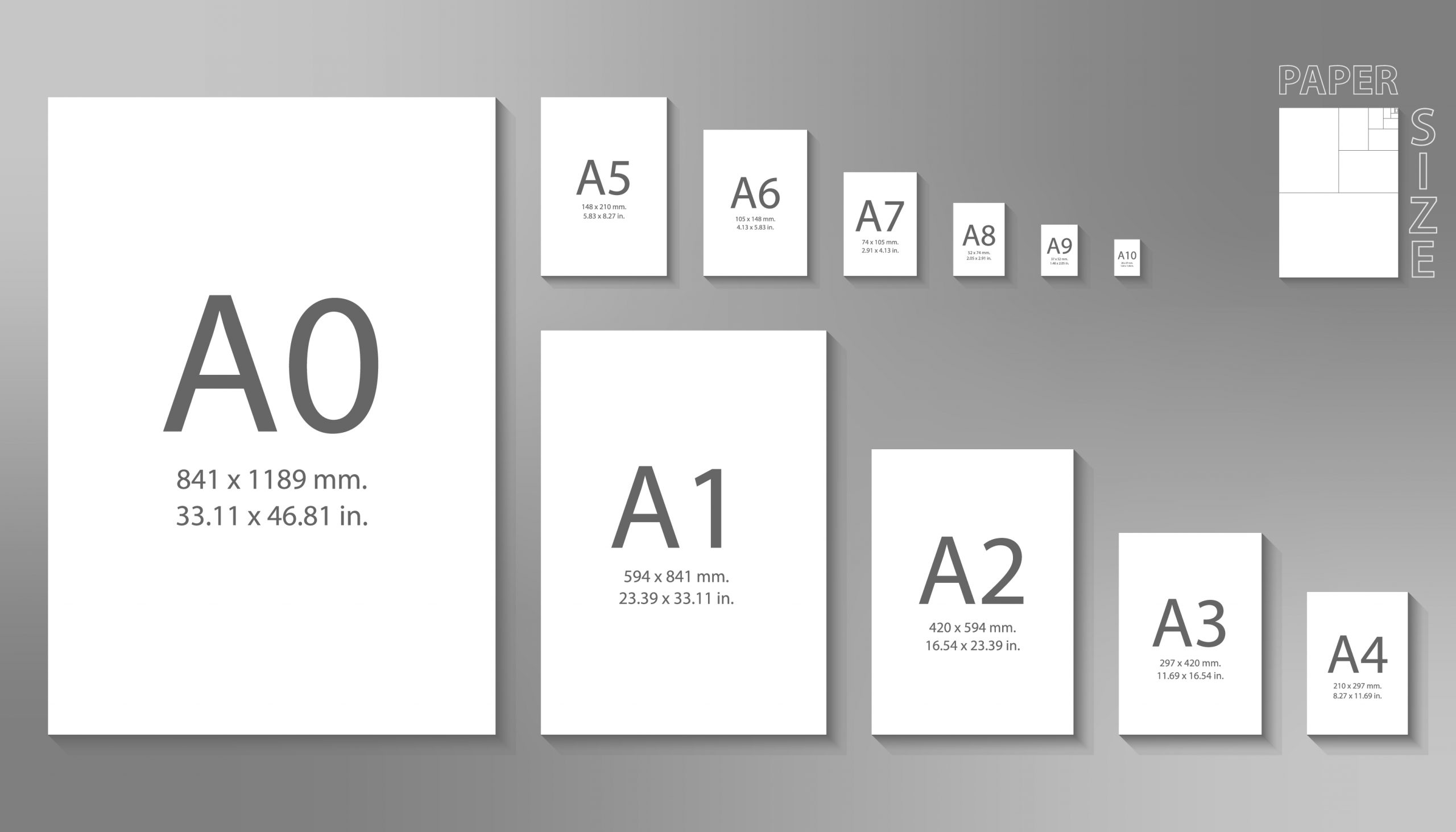
Image Gallery
Select an image to open it in a new tab.





Celine Dubois
Contemporary Living and Global Arts Columnist
