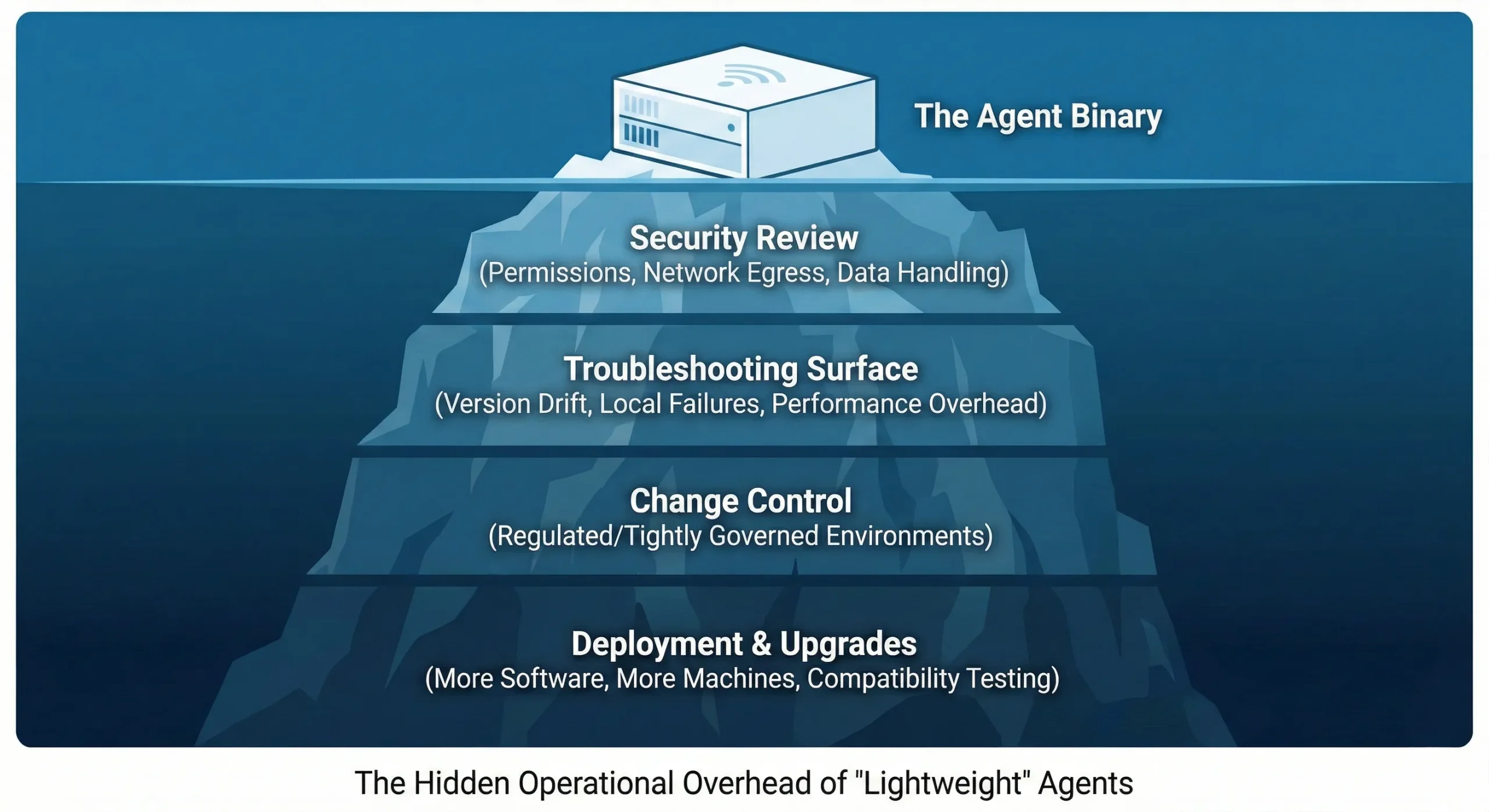
Admin overhead in home security refers to the cumulative time, effort, and technical configuration required to maintain, update, and monitor a security ecosystem. While modern smart home systems promise automation and "set-it-and-forget-it" convenience, the reality involves managing firmware updates, user permissions, cloud subscription tiers, and intermittent connectivity issues. Failing to account for this administrative burden often leads to "security fatigue," where systems go unpatched, default settings remain unchanged, and critical vulnerabilities are ignored, ultimately compromising the very protection the system was purchased to provide.
The Hidden Labor of Modern Security
The transition from legacy analog security systems—often managed by third-party professionals—to DIY smart home ecosystems has shifted the administrative burden directly onto the homeowner. In 2026, a typical home security setup involves a mesh of integrated devices, including doorbells, exterior cameras, smart locks, and localized hub controllers. Each component functions as an independent node that requires periodic maintenance.
Admin overhead manifests in several distinct layers. First, there is device lifecycle management: tracking which cameras are approaching their end-of-support date or require a firmware patch to mitigate known CVEs (Common Vulnerabilities and Exposures). Second, there is identity and access management (IAM). Many homeowners fail to regularly audit who has "guest access" to their smart locks or camera feeds. If a neighbor or a former service provider retains access to your home network, the system’s effectiveness is nullified. By ignoring the administrative aspect of these permissions, users inadvertently expand their attack surface.
Technical Debt and Firmware Maintenance
In the context of IoT (Internet of Things) devices, "technical debt" occurs when updates are skipped or deferred. Manufacturers release firmware updates to patch security holes discovered by researchers. When an administrator—the homeowner—fails to apply these updates, the device remains vulnerable to documented exploits.
Administrative overhead increases proportionally with the number of different manufacturers in a single home. If you use a camera from one brand, a lock from another, and a central hub from a third, you are managing three separate software ecosystems. Each has its own notification cadence, update mechanism, and user interface. Maintaining a consistent security posture across these disparate platforms requires a dedicated schedule, much like managing a home office IT environment.
The Role of Cloud Subscriptions and Data Governance
Modern security services often rely on cloud-based storage for video surveillance. Administering these accounts involves more than just paying monthly fees; it involves data governance. Homeowners must understand their retention policies: how long is footage saved, who has access to the cloud storage, and what happens to that data if the service provider experiences a breach?
Effective administration requires periodic reviews of subscription tiers. Over-provisioning leads to unnecessary costs, while under-provisioning can result in gaps in video history during a critical event. Furthermore, users must manage their privacy settings, deciding which data points (like facial recognition logs or motion triggers) are shared with the manufacturer for "service improvements." Navigating these consent forms is a foundational, yet often overlooked, part of administrative security.
Comparing Managed vs. DIY Administrative Burdens
The following table illustrates the shift in responsibility between traditional monitored services and self-managed systems.
| Responsibility | Managed Professional Security | Self-Managed (DIY) Systems |
|---|---|---|
| Firmware Updates | Handled automatically by provider | User must initiate or verify |
| User Permissions | Managed via provider portal | Manual audit required by user |
| Connectivity Monitoring | 24/7 central station oversight | User alert monitoring |
| Privacy Compliance | Governed by service contract | User-defined privacy settings |
| Hardware Upgrades | Proactively managed/suggested | User research and installation |
| Incident Response | Professional dispatcher contact | Self-verification and police dispatch |
Reducing Administrative Complexity
To minimize the "admin tax" of your security setup, standardization is the most effective strategy. Attempting to manage a heterogeneous collection of smart devices inevitably leads to fatigue. By choosing a single, cohesive ecosystem where devices are designed to communicate and update through a unified interface, you significantly reduce the amount of time required to maintain the system.
Automated alerts are another administrative tool. Configuring your hub to send an alert when a device goes offline or when a firmware update is pending prevents the need for manual, daily checks. However, balance is required: "alert fatigue" is a real phenomenon where users become so overwhelmed by notifications that they begin to ignore them entirely, including genuine security warnings. Tailor your notifications to prioritize critical events—such as unauthorized access or smoke detection—rather than routine status updates.
Privacy and Policy Management
Administrative overhead also extends to the documentation of your home network. In 2026, smart home privacy is as much about policy as it is about hardware. Maintaining a current inventory of every connected device allows for rapid troubleshooting. If an unauthorized device appears on your network, you must be able to identify it quickly. A simple logbook or digital file containing the MAC addresses, device types, and last maintenance dates for every security-connected item is an essential administrative asset.
Furthermore, consider the physical access requirements. If your home security relies on mobile applications, your smartphone becomes the master key. The security of that device—ensuring it has a strong biometric lock, up-to-date OS, and no unauthorized background apps—is now the primary administrative duty for your physical home security.
Common Pitfalls in System Administration
The most common mistake homeowners make is the "fire and forget" mentality. Many assume that because a camera was expensive and branded, it is inherently secure. In reality, security is a process, not a state.
- Default Credentials: Failing to change the default username and password for a newly installed device remains the leading cause of unauthorized access.
- Account Shared Passwords: Using the same password for your security camera portal as you do for your social media or email accounts makes you a high-risk target for credential stuffing.
- Ignoring Notifications: Dismissing "system update available" prompts as nuisances rather than security patches leaves your hardware exposed to publicly known exploits.
- Neglected User Audits: Adding family members or contractors to your system and failing to revoke access once their need for it has passed is a frequent oversight.
Troubleshooting and When to Scale Back
If your administrative burden exceeds your capacity to manage it, the security system is actively working against you. When maintenance tasks like clearing storage, checking logs, and managing guest access feel like a second job, it is time to simplify.
Start by auditing your current devices. Are there cameras that rarely provide useful footage but require constant attention? Is your Wi-Fi network unstable, causing devices to drop off and trigger false "offline" alerts? Moving from a complex, multi-hub setup back to a simpler, more robust system can actually increase your overall security by reducing the opportunities for administrative error. Always prioritize the reliability of a few core devices over the perceived benefit of a vast, unmanageable network of complex sensors.
FAQ: Navigating Security Administration
How often should I audit my security device users? At a minimum, perform a user access audit every six months, or immediately after any major change in household occupancy, such as a roommate moving out or a contractor finishing a renovation project.
Are firmware updates really that important for home security? Yes. In 2026, manufacturers frequently release patches that close specific loopholes discovered by cybersecurity researchers. Ignoring these updates leaves your hardware vulnerable to automated bots that scan for known security flaws.
What is the best way to handle "alert fatigue" without losing security? Customize your notification thresholds. Instead of receiving an alert for every motion event, configure alerts only for specific areas (like an entryway) or specific times (when the alarm system is armed).
Does having a professional monitoring service eliminate all admin work? No. While it reduces the burden of system monitoring and emergency response, you are still responsible for the local maintenance of physical sensors, changing batteries, and updating your contact information within the service provider’s portal.
What should I do if I suspect an unauthorized device on my network? Immediately isolate the device from your network via your router settings. Change the password to your primary Wi-Fi network and verify the access logs of your smart home hub to identify when the device first connected.
Next Steps for Secure Management
To take control of your home security administration, start by creating a simple "Security Inventory" document. List every camera, sensor, and hub, noting the date of the last firmware update and the primary account associated with each device. Once you have this baseline, set a recurring calendar reminder for the first of each month to perform a "Security Health Check." During this time, check for software updates, audit your user list, and review your cloud storage usage. By treating your home security as an active management project rather than a static purchase, you ensure that your protective measures remain effective against evolving digital threats.
Image Gallery
Select an image to open it in a new tab.


Celine Dubois
Contemporary Living and Global Arts Columnist
