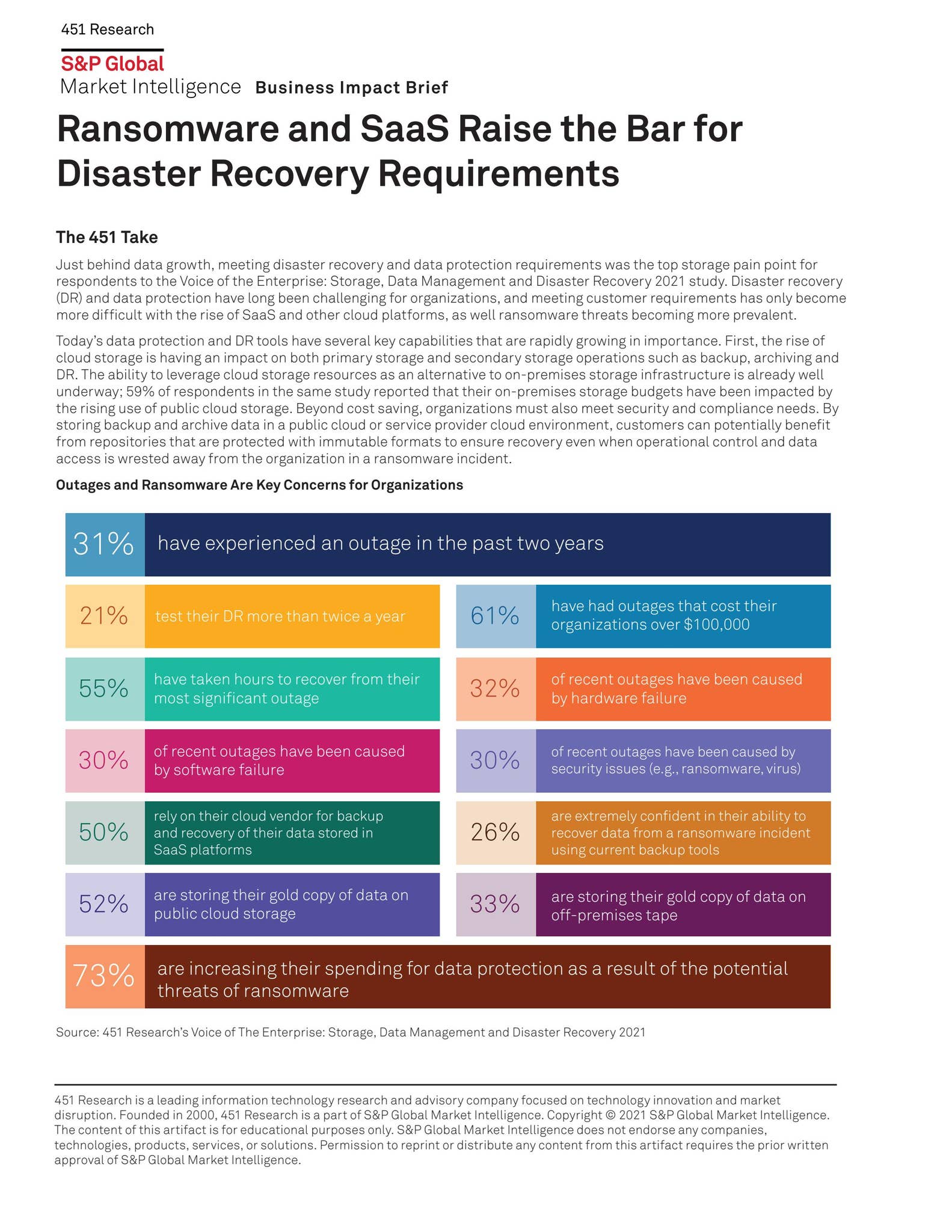
Ransomware disaster recovery is the systematic process of restoring business operations, data integrity, and system access following a malicious encryption event. It relies on immutable backups, tested recovery time objectives (RTOs), and air-gapped storage to ensure that organizations can resume services without paying ransoms or succumbing to permanent data loss.
The Shift in Disaster Recovery Paradigms
In 2026, the threat landscape has shifted from simple data encryption to "double" and "triple" extortion models, where attackers exfiltrate data, threaten public release, and launch secondary DDoS attacks. Consequently, traditional disaster recovery (DR) plans designed for hardware failure or natural disasters are insufficient. Modern ransomware disaster recovery requires an assumption of breach—operating under the premise that backups might be targeted or that the production environment is actively hostile.
Effective recovery begins before an attack occurs. It necessitates a transition from "data protection" to "cyber resilience." While legacy DR focused on how quickly a server could be brought back online, current best practices emphasize data cleanliness—ensuring that the restored environment is free of the dormant malware or backdoors that likely triggered the initial encryption.
Core Prerequisites for Resilient Recovery
To successfully recover from a ransomware incident, organizations must meet three foundational technical requirements. Without these, recovery is often a choice between prolonged downtime and paying a ransom.
- Immutable Backups: These are data snapshots that cannot be modified, encrypted, or deleted, even by an administrator account, for a set retention period. By using WORM (Write Once, Read Many) storage, you ensure that even if an attacker gains domain admin credentials, your baseline data remains untampered.
- The 3-2-1-1 Strategy: The standard 3-2-1 rule—three copies of data, on two different media types, with one offsite—must now include an additional "1": one copy must be air-gapped or logically offline. This prevents network-based propagation from reaching your final line of defense.
- Defined RTO and RPO: The Recovery Time Objective (RTO) dictates how long you can afford to be down, while the Recovery Point Objective (RPO) dictates how much data loss is acceptable. In ransomware scenarios, RPO is often measured in minutes, while RTO is heavily dependent on the throughput of your restoration target.
Steps to Executing a Recovery Protocol
When an active ransomware infection is detected, the recovery workflow must be deliberate to prevent "re-infection loops," where restored systems are immediately re-encrypted because the primary vulnerability remains unpatched.
- Isolation and Containment: Before any data is restored, disconnect infected segments from the network. Do not power down machines immediately, as this may clear volatile memory (RAM) that contains forensic evidence or decryption keys, but do prevent communication between hosts.
- Root Cause Analysis (RCA): Identify how the attacker gained access. Was it an unpatched VPN vulnerability, a compromised service account, or a phishing-induced credential theft? If you restore data without closing the entry point, the recovery will fail.
- Clean Room Restoration: Rather than restoring data directly into the production environment, utilize an isolated "clean room" or a sandboxed virtual network. Scan all restored datasets using heuristic and behavioral analysis tools to ensure no malicious binaries are bundled with the backup.
- Phased Re-entry: Prioritize systems based on business criticality. Identity services (Active Directory), email, and core databases should be restored first, followed by ancillary operational tools. Verify service integrity after each tier is restored.
Comparing Recovery Methods
The following table outlines the efficacy of various recovery strategies when facing modern ransomware threats.
| Strategy | Speed of Recovery | Data Integrity | Cost | Complexity |
|---|---|---|---|---|
| Cloud-based Immutable Snapshots | Fast | High | Moderate | Low |
| Air-gapped Tape Storage | Very Slow | Highest | Low | High |
| Local Disk-based Backups | Very Fast | Variable | Low | Low |
| Full Environment Rebuild | Slow | Guaranteed Clean | High | Very High |
Common Pitfalls and Troubleshooting
A common mistake in 2026 is failing to account for "backup pollution." This occurs when an organization triggers a restore of a system, only to discover that the backup itself was taken after the attacker had already established persistence.
To troubleshoot this:
- Implement Integrity Verification: Use automated sandbox tools that mount backups and check for the presence of known Indicators of Compromise (IoCs).
- Validate Identity Stores: Ransomware attackers often modify group policies or domain settings. When restoring a domain controller, you must audit the Active Directory configuration to ensure no new "backdoor" admin accounts were created.
- Manage Bandwidth Constraints: In a full-scale restoration, the local network or internet connection is often the bottleneck. Calculate your total data volume and identify which systems can be restored over local 10Gbps links versus those that require cloud-bursting.
Frequently Asked Questions
Is paying the ransom a form of disaster recovery? No. Paying a ransom is a business decision, not a technical recovery strategy. It carries no guarantee of data return, provides no assurance that the data wasn't exfiltrated, and marks the organization as a target for future attacks. It should never be treated as a substitute for a tested backup plan.
How often should we test our recovery plan? At minimum, organizations should conduct a full, end-to-end recovery simulation (a "fire drill") once per year. However, high-value data segments should undergo automated, non-disruptive restoration tests monthly to ensure the data integrity of the backup chain.
What is the role of legal counsel in recovery? Legal counsel should be involved the moment a ransom demand is identified. They help navigate the regulatory landscape, including data breach notification requirements under laws like the GDPR or HIPAA, and facilitate communication with insurers to ensure that restoration actions do not void cyber-insurance coverage.
Can we recover from ransomware using only cloud synchronization? Standard cloud sync (like OneDrive or Dropbox) is generally not a backup; it is a file-mirroring service. If a file is encrypted on your local machine, the encrypted version will sync to the cloud, overwriting the healthy files. True recovery requires versioning and immutable storage policies.
Recommended Next Actions
To ensure your organization is prepared, begin by conducting a comprehensive audit of your "last-line" backups. Verify that the credentials used for your backup software are not stored on the same domain as your production environment. If you do not have an air-gapped or immutable off-site copy of your critical data, prioritizing the establishment of this architecture is your most urgent technical obligation. Schedule a tabletop exercise with your IT and leadership teams to walk through a hypothetical ransomware event, ensuring that every stakeholder understands their communication and technical responsibilities during a crisis.

Image Gallery
Select an image to open it in a new tab.

Lars Thomsen
Global Labor Markets and Economic Strategy Editor
