
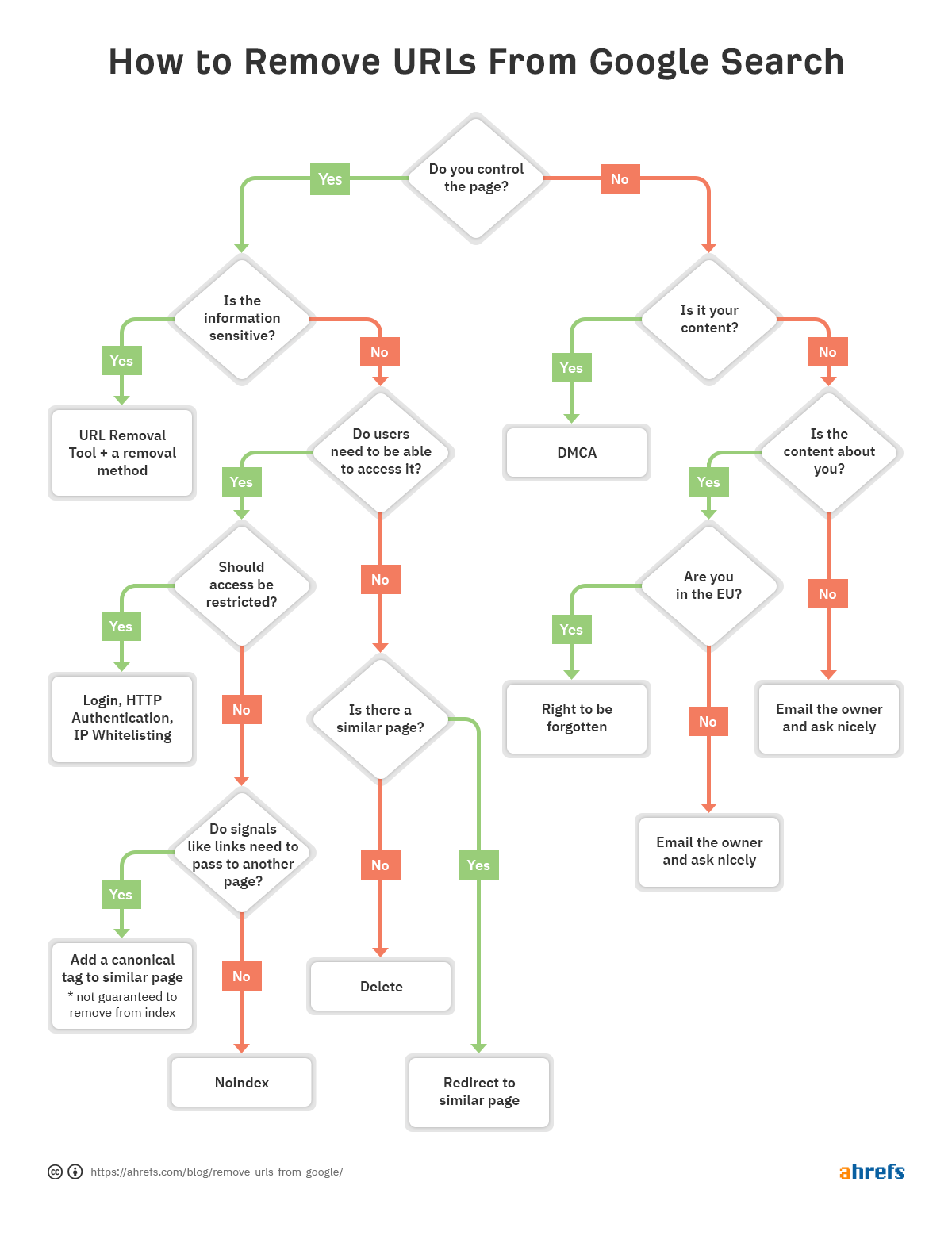
To remove your name from Google Search, you must first determine if the information is hosted on a site you control or a third-party page. For third-party sites, you can use Google’s "Results about you" tool to request the removal of personal contact information or submit a formal policy-based request for sensitive data like financial records or non-consensual imagery.
The visibility of your name in search results is often a matter of digital hygiene and privacy management. In 2026, the tools available for managing your digital footprint have become more streamlined, but the fundamental distinction between "de-indexing" a result from Google and "deleting" the source content remains the most critical concept to understand. Google is a search engine, not a host; removing a link from Google does not erase the information from the underlying website.
Understanding the Difference Between Search Removal and Content Deletion
Before taking action, it is essential to distinguish between Google Search and the World Wide Web. Google acts as a library card catalog. If you remove a card from the catalog, the book still exists on the shelf. Similarly, if Google removes a search result (de-indexing), the original webpage still exists and can be accessed via other search engines like Bing or DuckDuckGo, or by typing the URL directly into a browser.
To completely erase your name from the internet, you must contact the owner of the website where the information is hosted. However, for many users, the primary goal is "search invisibility"—making it so that a casual search of their name does not yield sensitive or embarrassing results. This is where Google’s removal tools and policies are most effective.
Using Google’s "Results About You" Tool
As of 2026, Google’s "Results about you" dashboard is the primary interface for individuals looking to monitor and remove their personal contact information from search results. This tool is designed to address the proliferation of "people search" sites and data brokers that scrape public records.
Step-by-step process for using the dashboard:
- Access the Tool: Open the Google app on your mobile device or navigate to your Google Account settings on a desktop.
- Locate Privacy Settings: Select your profile picture and click on "Results about you."
- Identify Results: The tool will often automatically show you results that contain your phone number, home address, or email address. You can also manually search for your name to see what Google’s crawlers have found.
- Submit Removal Requests: For each result that contains your private contact info, you can click "Request to remove."
- Monitor Status: The dashboard provides a "Status" tab where you can track whether the request is "In progress," "Approved," or "Denied."
In 2026, this tool includes a proactive monitoring feature. Once enabled, Google will notify you whenever new results containing your contact information appear in the index, allowing you to request removal immediately rather than performing periodic manual audits.
Requesting Removal of Sensitive Personally Identifiable Information (PII)
Beyond general contact information, Google has strict policies regarding the removal of highly sensitive data that could lead to identity theft, financial fraud, or physical harm. If your name is associated with any of the following, you can submit a formal request through Google’s legal and policy removal portal.
Qualifying types of sensitive information include:
- Government ID Numbers: Social Security numbers (SSN), Single Tax ID numbers, or National Identification numbers.
- Bank Account and Credit Card Numbers: Any data that could facilitate unauthorized financial transactions.
- Handwritten Signatures: Images of your physical signature found on public documents.
- Medical Records: Private healthcare documents that have been leaked or posted without consent.
- Confidential Login Credentials: Usernames and passwords displayed in plaintext.
When submitting these requests, you must provide the specific URLs of the search results and the URLs of the images (if applicable). Google’s team reviews these requests manually to ensure they meet the criteria for "significant risk."
Removing Non-Consensual Explicit Imagery and Doxxing Content
Google maintains specific protections for individuals targeted by malicious online behavior. If your name appears in search results alongside "revenge porn" (non-consensual explicit imagery) or "doxxing" content, the removal process is prioritized.
Non-Consensual Imagery: If explicit photos or videos of you were shared without your consent, or if you are a victim of "involuntary synthetic imagery" (AI-generated deepfakes), Google will remove these links upon request. This policy also covers "extortionate" sites that charge a fee to remove content.
Doxxing: Google defines doxxing as the sharing of contact information with "malicious intent." If your name and address are posted on a forum with a call to harass or threaten you, Google will remove the content if it meets two criteria: your contact information is present, and there is an explicit or implicit threat of harm.
The "Right to be Forgotten" and Legal Takedowns
For users in the European Union (EU), United Kingdom (UK), and several other jurisdictions like Brazil and Argentina, the "Right to be Forgotten" (RTBF) provides a legal pathway to remove search results that are "inadequate, irrelevant, or no longer relevant."
Under GDPR (General Data Protection Regulation), you can request that Google delink certain results associated with your name. This is common for old news articles about minor crimes or outdated professional information. However, this is not an absolute right. Google must balance your right to privacy against the public’s "right to know."
Common grounds for RTBF approval:
- Information about a spent criminal conviction.
- Old news stories that are no longer of public interest.
- Information that is factually inaccurate or misleading.
In the United States, there is no federal "Right to be Forgotten." However, states like California (CCPA/CPRA) have introduced "Right to Delete" provisions that allow residents to request that businesses delete their personal data. While this applies more to data brokers than search engines directly, it helps stop the information at its source.
Dealing with Data Brokers and "People Search" Sites
One of the most common reasons a name appears in Google is the presence of data broker websites like Whitepages, Spokeo, and MyLife. These sites aggregate public records to create profiles. Even if Google removes a specific result, these sites often generate new URLs or have their information scraped by other brokers.
The "Source" Strategy: To effectively remove your name, you must opt-out of the data brokers themselves. Most of these sites have a "Privacy" or "Opt-Out" link at the bottom of their homepage.
- Search for your profile on the specific site.
- Copy the URL of your profile.
- Go to the site's opt-out page and submit the URL.
- Verify the removal via email (use a burner email for this to avoid giving them more data).
Once the site deletes your profile, the Google result will eventually disappear. You can accelerate this by using the Google Refresh Outdated Content tool.
Comparison of Removal Methods
| Method | Best For | Effectiveness | Technical Effort |
|---|---|---|---|
| "Results about you" Tool | Phone, Email, Address | High (for contact info) | Low |
| PII Policy Request | SSN, Bank info, Medical records | Very High | Medium |
| Website Owner Contact | Blogs, News, Forums | Permanent | High |
| Right to be Forgotten | EU/UK Residents (Old info) | Moderate (case-by-case) | Medium |
| Data Broker Opt-Out | "People Search" sites | High (stops the source) | High |
| De-indexing (SEO) | Irremovable content | Moderate (buries info) | Very High |
Using the "Refresh Outdated Content" Tool
Sometimes, a website owner does delete your name from their page, but the old information still shows up in the Google search "snippet" (the short description under the title). This happens because Google hasn’t re-crawled the page yet.
You can force an update using the Refresh Outdated Content tool. You provide the URL of the page and a word that was removed (e.g., your name). Google’s automated system checks the page; if it confirms the word is gone, it will wipe the cached version of the page and the search snippet immediately.
What to Do If the Content Cannot Be Removed
In some cases, Google will refuse to remove a result. This typically happens with information of public record, such as legitimate news articles, government filings, or court documents that are not protected by specific privacy laws. If removal is not an option, the best strategy is Suppression (often called "Reverse SEO").
Suppression involves creating a wealth of positive, high-authority content that ranks higher than the negative result, effectively pushing the unwanted link to the second or third page of search results—where few people ever look.
Effective Suppression Tactics:
- Professional Profiles: Create and optimize profiles on LinkedIn, Twitter (X), and industry-specific platforms.
- Personal Website: Launch a site under your name (e.g.,
YourName.com) and post regular, high-quality content. - Medium or Substack: Write articles on topics relevant to your career to build "authority" in Google’s eyes.
- Public Speaking/Interviews: Engage in activities that generate new, positive mentions of your name on reputable sites.
Maintaining Your Privacy Long-Term
Removing your name is often a recurring task rather than a one-time fix. To keep your name out of Google Search in the future, adopt the following habits:
- Audit Social Privacy: Set your Facebook, Instagram, and other social profiles to "Private." Ensure they are opted-out of search engine indexing in their internal settings.
- Use Pseudonyms: When posting on public forums or commenting on news articles, use a nickname or just your first name.
- Be Cautious with Public Records: When registering a business or purchasing property, inquire about using an LLC or a "Registered Agent" to keep your personal name off the public deed or filing where legal.
- Set Google Alerts: Create a Google Alert for your name (including variations) so you are notified the moment a new result is indexed.
FAQ
How long does it take for Google to remove a result after I submit a request? For automated tools like "Results about you," the process can take anywhere from a few hours to a few days. Manual reviews for PII or legal takedowns typically take 1–3 weeks, depending on the complexity and volume of requests Google is handling.
Does removing a result from Google also remove it from Bing or Yahoo? No. Each search engine has its own removal policies and tools. However, most major search engines follow similar guidelines for PII. If you remove content from the source website, it will eventually disappear from all search engines.
Can I hire a company to remove my name from Google? Yes, "Reputation Management" firms specialize in this. However, they often use the same tools available to the public. Be wary of companies that promise "guaranteed permanent removal" of news articles or government records, as these are often impossible to delete without legal grounds.
What if my name is part of a news article that is true but embarrassing?
Google rarely removes factually accurate news articles unless you are in a jurisdiction with "Right to be Forgotten" laws. In the US, your best option is to contact the editor of the publication and politely ask for an "un-indexing" (using a noindex tag) or to use suppression techniques to bury the article.
Is there a fee for Google to remove my information? No. Google does not charge for removal requests. If you find a website that asks for money to remove your information from Google, it is likely a scam or an extortionate site, and you should report it to Google’s "Extortionate Removal" department.
Final Recommendation
The most effective path to removing your name from Google is a multi-pronged approach: use the "Results about you" dashboard for immediate contact info removal, submit policy requests for sensitive PII, and proactively opt-out of data broker sites to kill the information at its source. For content that cannot be legally removed, focus on building a robust, positive digital presence that pushes unwanted results into obscurity.

Image Gallery
Select an image to open it in a new tab.



Zara El-Hashem
Sociocultural Dynamics and Academics Writer
