Integrating EDI with SAP for Streamlined Commerce

Integrating Electronic Data Interchange (EDI) with SAP automates business-to-business document exchange—such as purchase orders, invoices, and advance shipping notices—directly into enterprise resource planning workflows. This eliminates manual data entry, reduces transaction errors, accelerates order-to-cash cycles, and establishes a reliable digital foundation for global supply chain operations.
Understanding the Foundation: What is SAP EDI Integration?
Electronic Data Interchange represents the computer-to-computer exchange of business documents in a standard electronic format between trading partners. When integrated with SAP systems—ranging from classic SAP ECC (Enterprise Central Component) to modern SAP S/4HANA—organizations replace error-prone manual document handling with automated data processing.
In a traditional supply chain environment, a trading partner sends a purchase order via a value-added network (VAN) or Application Programming Interface (API). Without integration, an internal team member must manually key this data into the SAP system. Integrating EDI automates this entire pathway. Incoming documents route through a translation layer, map directly into SAP IDoc (Intermediate Document) structures, and post transactions automatically into the database. Outbound documents follow the reverse trajectory, extracting data from SAP tables, translating it into standard formats like ANSI X12 or EDIFACT, and transmitting it securely to customers or suppliers.
This level of automation transforms operational efficiency across enterprise landscapes. By bridging disparate enterprise applications and external partner networks, organizations achieve real-time visibility into inventory movements, customer demands, and financial settlements. The integration layer acts as a universal translator, ensuring that different corporate systems communicate seamlessly without requiring customized interfaces for every individual trading partner.
Core Architecture and Components of SAP EDI
Successfully connecting an EDI subsystem to an SAP environment requires a structured understanding of internal architectural components, communication protocols, and translation software. The architecture typically consists of four primary tiers: the external trading partner network, the middleware or translation engine, the SAP integration framework, and the core SAP application layer.
The Role of IDocs and BAPIs
Within SAP ecosystems, the Intermediate Document (IDoc) serves as the standard data container for electronic data interchange. An IDoc consists of three distinct parts:
- Control Record: Contains metadata including document type, sender, receiver, and transmission direction.
- Data Records: Contains the actual business data, split into segments and fields (such as line items, material numbers, and pricing conditions).
- Status Records: Tracks the processing state of the IDoc within SAP (e.g., syntax error, successfully posted, ready for dispatch).
When processing inbound messages, translation software converts incoming EDI files (such as an X12 850 Purchase Order) into an inbound IDoc. SAP then processes this IDoc using standard function modules or Business Application Programming Interfaces (BAPIs) to create the corresponding sales order or purchase requisition. Outbound processes initiate when an application document changes—such as creating a delivery note—which triggers an output control message, generates an outbound IDoc, and sends it to the translation software for formatting into an outbound EDI document.
Communication Protocols and VANs
Data transmission between external partners and the SAP landscape requires secure, standardized communication protocols. Historically, Value-Added Networks (VANs) provided secure, closed networks for document exchange. Modern enterprise architectures increasingly leverage secure internet protocols:
- AS2 (Applicability Statement 2): The industry standard for secure, reliable data transmission over the HTTP/HTTPS protocol using digital certificates and encryption.
- SFTP / FTPS: Secure File Transfer Protocol utilized for batch file exchanges.
- REST APIs / Webhooks: Increasingly adopted for real-time, event-driven integrations alongside traditional batch EDI processing.
| Component | Function in SAP EDI Integration | Primary Technology Standards |
|---|---|---|
| Translation Engine | Converts EDI standards to/from SAP-readable formats | ANSI X12, EDIFACT, XML, JSON |
| Middleware / Integration Suite | Manages data routing, transformations, and connectivity | SAP Integration Suite, Dell Boomi, MuleSoft |
| SAP IDoc Framework | Standardized data structure for internal SAP posting | ALE (Application Link Enabling), RFCs, BAPIs |
| Communication Protocol | Ensures secure transit over networks | AS2, SFTP, HTTPS, API endpoints |
Strategic Benefits of Streamlined Commerce via EDI and SAP
Organizations implement SAP EDI integration to secure measurable operational improvements across their supply chains. Manual data processing introduces significant friction, high labor costs, and operational bottlenecks that inhibit scaling.
Error Reduction and Data Integrity
Manual data entry is inherently vulnerable to human error. A transposed digit in a material number, an incorrect pricing tier, or a misread delivery address can result in costly chargebacks, shipping delays, and strained customer relationships. Automated EDI integration enforces strict validation rules at the translation and posting stages. If an incoming purchase order contains an unrecognized material number or missing tax data, the integration middleware captures the exception and routes it to an exception-handling queue before it corrupts core SAP data.
Accelerated Order-to-Cash and Procure-to-Pay Cycles
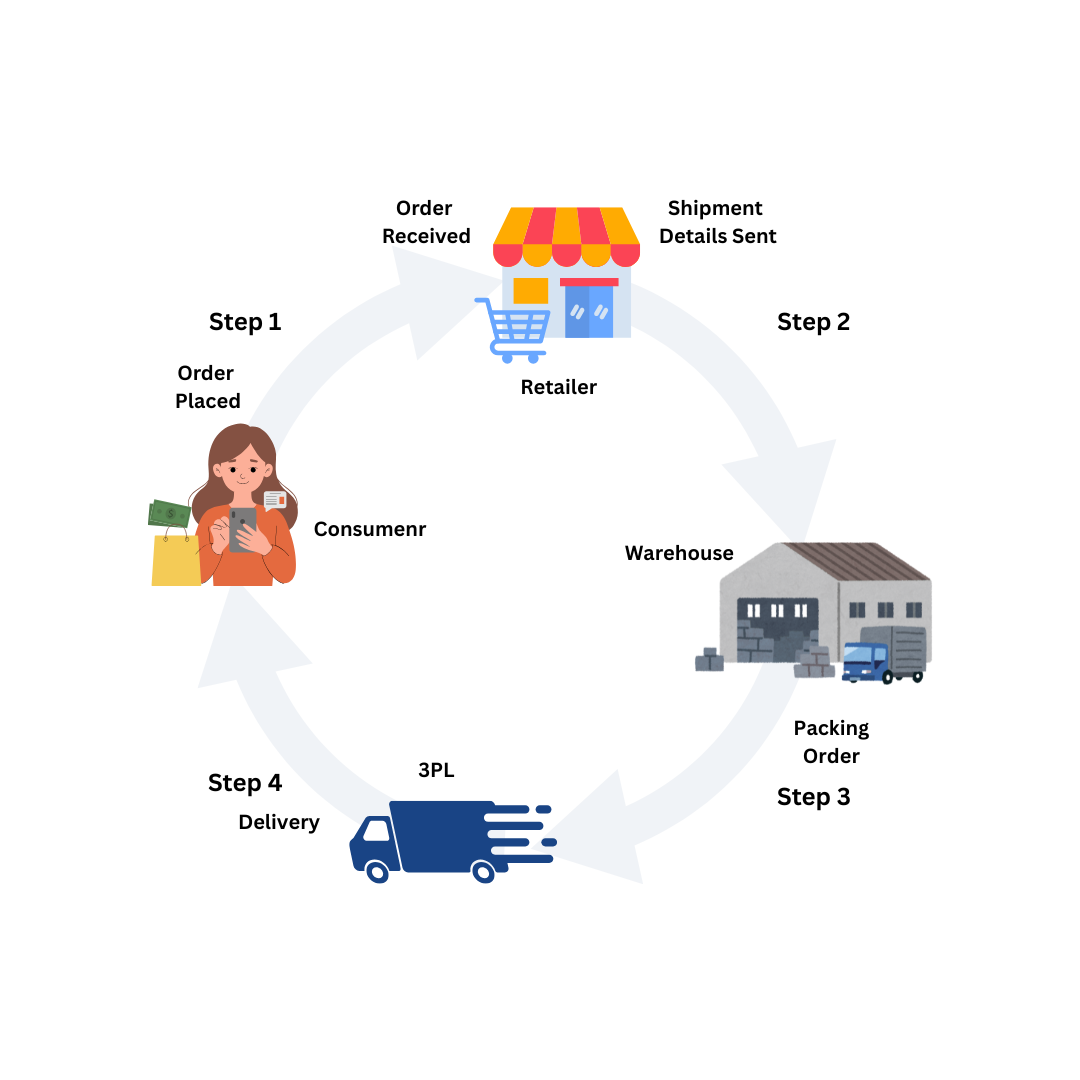
Speed defines competitive advantage in modern commerce. Traditional order processing involving manual paper trails or email confirmations often takes days to clear internal reviews. Integrating EDI with SAP collapses order intake timeframes to mere seconds.
- Order-to-Cash (O2C): An incoming purchase order (850) automatically generates a sales order in SAP, triggers inventory allocation, and fires an electronic acknowledgement (855) back to the customer.
- Procure-to-Pay (P2P): Purchase orders (850) generated in SAP automatically transmit to vendors, followed by automated ingestion of advance shipping notices (856) and electronic invoices (810) matched against goods receipts.
Financial Impact and Labor Optimization
Beyond operational speed, automated integration delivers direct financial returns. Eliminating manual data entry reallocates administrative headcount from repetitive clerical tasks to exception management, customer service, and strategic vendor negotiations. Furthermore, automated matching of purchase orders, receiving documents, and invoices (three-way matching) minimizes invoice processing costs and captures early payment discounts.
| Traditional Manual Processing | Integrated SAP EDI Processing |
|---|---|
| High labor cost and data entry overhead | Automated ingestion with minimal manual intervention |
| Processing time measured in hours or days | Processing time measured in seconds |
| High error rates leading to chargebacks | High accuracy through automated validation rules |
| Delayed inventory visibility | Real-time updates to stock levels and order status |
Implementation Methodologies and Deployment Options
Deploying an integrated EDI and SAP environment requires careful selection of architecture and deployment models. Organizations can choose between on-premises middleware, cloud-based integration platforms (iPaaS), or fully managed EDI service providers.
On-Premises Middleware vs. Cloud Integration (iPaaS)
Historically, enterprises deployed on-premises mapping and translation software—such as classic gentran or dedicated SAP NetWeaver Process Integration (PI) / Process Orchestration (PO)—within their local data centers. While this model offered total control over infrastructure and security, it required significant capital expenditure and internal IT expertise to maintain.
Modern digital transformation initiatives favor cloud-native Integration Platform as a Service (iPaaS) solutions, such as the SAP Integration Suite. Cloud integration platforms offer pre-packaged integration content, reduced maintenance overhead, rapid partner onboarding, and seamless scalability. These solutions handle document translation in the cloud and securely communicate with backend SAP instances via secure cloud connectors.
Managed Services and Hybrid Models
Many organizations choose to outsource the operational overhead of EDI partner onboarding, mapping maintenance, and VAN management to third-party managed service providers (B2B Managed Services). In a hybrid model, the enterprise retains control over core SAP business logic and IDoc configurations, while the managed service provider handles partner-specific mapping variations, communication protocols, and day-to-day error monitoring.
Step-by-Step Implementation Framework
Executing a successful SAP EDI integration project requires a disciplined methodology covering discovery, technical mapping, testing, and go-live deployment.
1. Requirements Gathering and Partner Analysis
Identify all current and prospective trading partners, required document types (e.g., 850, 810, 856, 846), volume projections, and specific customer compliance mandates (chargeback rules, unique label requirements). Map internal business processes within SAP to determine which transaction codes and sales/purchasing organization structures will be affected.
2. IDoc Configuration and Extension in SAP
Configure standard SAP partner profiles (transaction code WE20), port definitions (WE21), and logical systems. If business requirements demand data fields not supported by standard SAP IDoc segments, design custom IDoc extensions using transaction WE31 and implement user exits or Business Add-Ins (BAdIs) to populate custom fields during inbound and outbound processing.
3. Mapping and Translation Development
Build and configure the translation maps within the middleware solution. This involves defining how source elements from an EDI document map to target IDoc segments, and vice versa. Establish cross-reference tables for data translation, such as mapping customer-specific material numbers to internal SAP material numbers.
4. Comprehensive Testing and Validation
Execute rigorous unit, system integration, and user acceptance testing (UAT). Test scenarios must include:
- Successful processing of standard happy-path transactions.
- Error handling for missing mandatory fields, invalid partner numbers, or locked database records.
- Volume and performance testing to verify system stability under peak transaction loads.
5. Go-Live and Ongoing Monitoring
Transition to production environments with a phased partner rollout plan. Monitor incoming and outgoing traffic closely using SAP monitoring tools (WE02, WE05, SM58) and middleware dashboards to quickly identify and resolve transmission failures or mapping exceptions.
Common Operational Challenges and Troubleshooting
Despite careful planning, organizations frequently encounter specific operational hurdles during and after SAP EDI deployment.
Handling Translation Errors and Failed IDocs
When an inbound EDI file fails translation, the issue typically resides in the middleware layer due to syntax errors or missing mandatory data elements in the partner's transmission file. If the translation succeeds but SAP rejects the resulting IDoc, the failure occurs at the application posting level. Administrators must use SAP transaction codes WE02 (Display IDoc) or WE05 to inspect status 51 (IDoc recorded, error in application) logs, identify missing master data (such as unassigned pricing conditions or locked customer accounts), correct the underlying data, and retrigger IDoc processing via transaction BD87.
Managing Trading Partner Compliance and Version Changes
Trading partners frequently update their EDI guidelines, implementation guides, or version standards (e.g., transitioning from older ANSI X12 versions to newer releases or adopting distinct subsets). Maintaining partner compliance requires an agile mapping change-management process and clear communication channels with trading partners before deploying updates to production environments.
Frequently Asked Questions
What is the difference between an IDoc and an EDI document?
An EDI document is a standardized electronic business document formatted according to public standards like ANSI X12 or EDIFACT for transmission across external networks. An IDoc (Intermediate Document) is SAP's proprietary internal data container structure used to transport data between SAP and external systems. Integration middleware translates between these two formats.
Do I need a Value-Added Network (VAN) to integrate EDI with SAP?
Not necessarily. While VANs historically provided secure transmission lines, modern integrations frequently utilize AS2 (Applicability Statement 2) over HTTPS, SFTP, or direct API connections to exchange documents securely and cost-effectively over the internet without VAN subscription fees.
How are custom business fields handled in SAP EDI integration?
When standard SAP IDoc segments lack fields required by a trading partner or internal workflow, developers create custom IDoc segment extensions using SAP transaction WE31. Custom ABAP code, user exits, or BAdIs are then implemented to extract data from or write data into these custom segments during runtime.
What SAP tools are used to monitor EDI traffic?
Key SAP monitoring transactions include WE02 and WE05 for viewing IDoc statuses, SM58 for transactional RFC (Remote Function Call) errors, and BD87 for reprocessing failed IDocs. Modern middleware platforms also provide dedicated operational dashboards for real-time tracking.
How does SAP S/4HANA affect existing EDI integrations?
SAP S/4HANA maintains robust support for traditional IDoc and ALE frameworks, ensuring backward compatibility for existing EDI interfaces. However, S/4HANA also introduces modern integration paradigms, including expanded OData APIs and event-enabled messaging via the SAP Integration Suite, allowing organizations to complement batch EDI with real-time API-driven workflows.
Conclusion and Next Actions
Integrating electronic data interchange with SAP systems provides the operational agility required to succeed in modern digital commerce. By replacing manual processes with automated document exchange, organizations eliminate costly errors, accelerate cycle times, and build resilient supply chains. To begin, audit your current partner portfolio, document your core transaction volumes, evaluate your internal SAP IDoc readiness, and engage with integration specialists to design an architecture tailored to your long-term growth objectives.
Image Gallery
Select an image to open it in a new tab.

Omar Farooq
EdTech Innovation and Virtual Pedagogy Journalist
