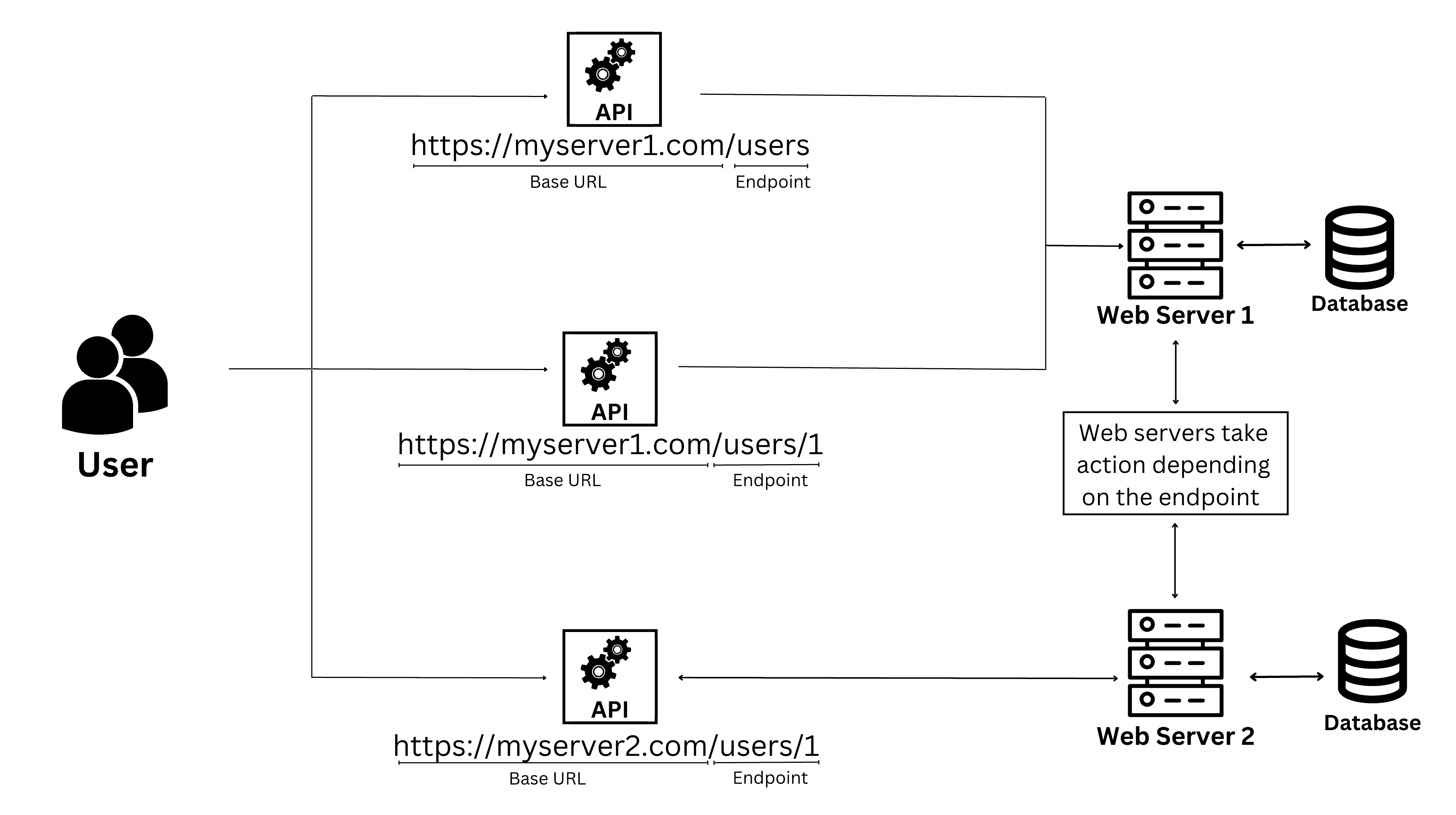
An Application Programming Interface (API) is a set of defined rules and protocols that allows different software applications to communicate and exchange data with one another. By acting as a standardized intermediary, an API enables developers to integrate third-party functionality, automate processes, and access remote data without needing to understand the underlying implementation details of the target system.
Understanding the Core Concept
At its most fundamental level, an API is a contract between two pieces of software. In the vast architecture of modern computing, it is rare for a single program to exist in complete isolation. Most applications need to fetch data from a server, process a payment, or display location-based information. An API serves as the bridge that manages these requests and responses.
Think of an API like a waiter in a restaurant. You (the user or the client application) are sitting at a table looking at a menu of choices. The kitchen (the server or the underlying database) is the part of the system that prepares your order. You cannot go directly into the kitchen to prepare your meal; instead, you provide your request to the waiter. The waiter takes your request to the kitchen, ensures the instructions are clear, and brings the final dish back to your table. The waiter is the interface that connects the consumer to the provider, hiding the complexity of how the food was actually cooked.
The Technical Anatomy of an API
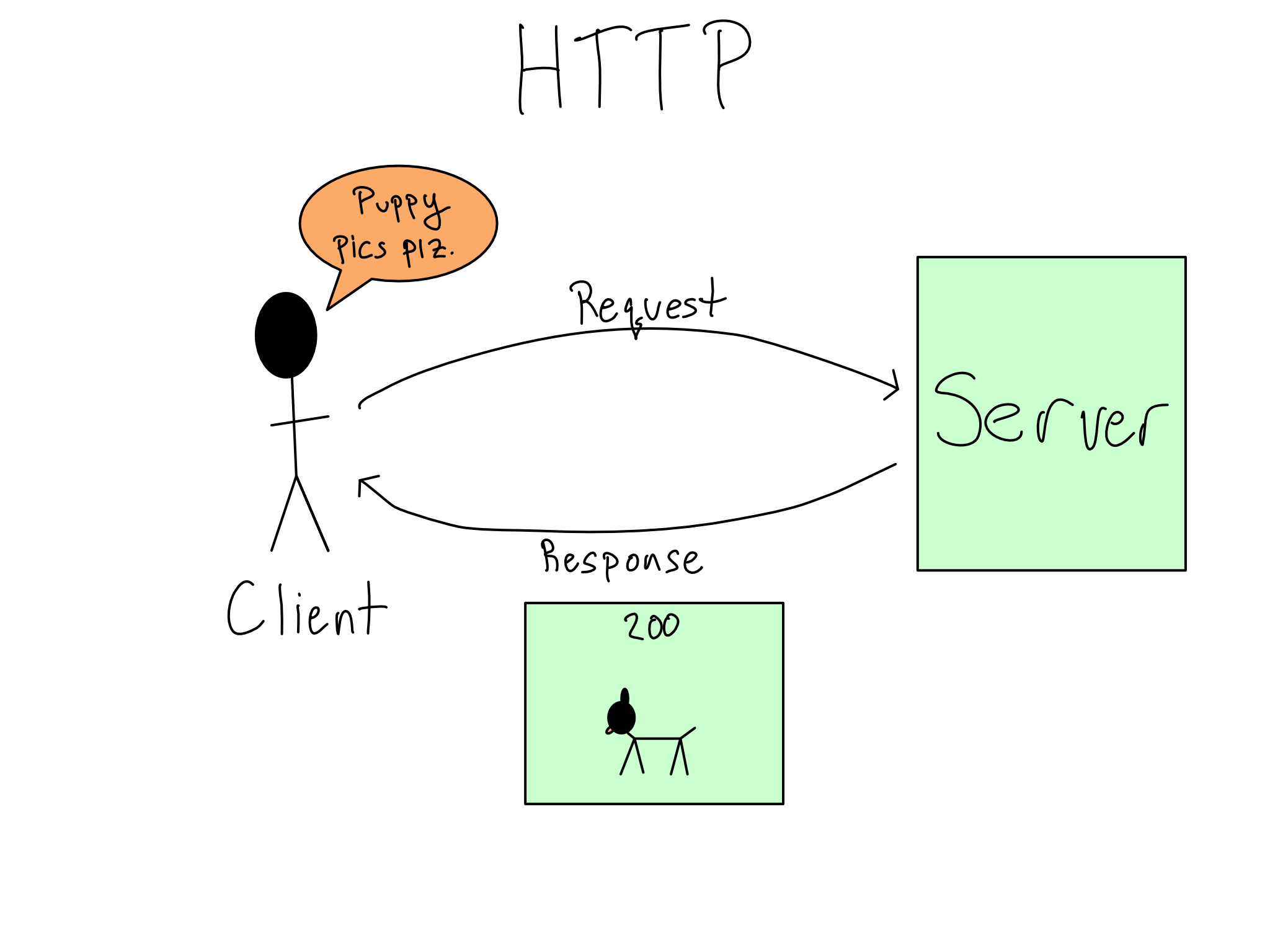
In computer science, an API is defined by its endpoints, request methods, and response formats. An endpoint is a specific URL or URI where an API service can be accessed. When a developer builds an application that talks to an API, they send a request to a specific endpoint, typically using standardized protocols like HTTP.
Common HTTP Request Methods
APIs commonly use the following methods to perform operations, often referred to as CRUD (Create, Read, Update, Delete) operations:
- GET: Retrieves data from the server. This is the most common method, used whenever you load a web page or fetch information like a user profile.
- POST: Sends new data to the server to create a new resource, such as submitting a registration form.
- PUT/PATCH: Updates existing resources. PUT replaces the entire resource, while PATCH makes partial modifications.
- DELETE: Removes a specific resource from the server.
Why APIs Are Essential for Software Development
The primary advantage of the API in computer science is abstraction. Without APIs, every developer would have to write custom code to interface with every single service or hardware component they use.
- Modularity and Reusability: Developers can build complex applications by stitching together pre-existing services. For example, a travel application does not need to build its own mapping software; it simply calls the Google Maps API.
- Security and Control: APIs provide a controlled gate through which data can be accessed. Instead of giving an application direct access to a database, a developer provides an API that exposes only the necessary data points, ensuring that sensitive information remains protected.
- Language Agnostic Communication: Because APIs often use standard formats like JSON (JavaScript Object Notation) or XML (eXtensible Markup Language), a program written in Python can communicate seamlessly with a service written in Java or Go.
Architectural Styles of APIs
Not all APIs are built the same way. The architectural style determines how the API handles communication, state, and data formats.
- REST (Representational State Transfer): This is the most widely used architectural style for web APIs. It relies on a stateless, client-server communication model and uses standard HTTP methods. RESTful APIs are favored for their scalability and simplicity.
- GraphQL: Developed by Meta, this query language for APIs allows clients to request exactly the data they need—no more, no less. It solves the "over-fetching" problem found in many traditional REST APIs.
- SOAP (Simple Object Access Protocol): A more rigid, protocol-based style that uses XML exclusively. While less popular today than REST, SOAP remains standard in highly secure enterprise and financial environments due to its built-in compliance and security features.
- Webhooks: Unlike traditional APIs that wait for a request, webhooks are "push" APIs. They automatically send data to a specified URL when a specific event occurs, such as a payment being processed.
Comparison of API Architectural Styles
| Feature | REST | GraphQL | SOAP |
|---|---|---|---|
| Data Format | JSON, XML, Plain text | JSON | XML only |
| Flexibility | Moderate | High | Low |
| Learning Curve | Low | Moderate | High |
| Security | Standard (HTTPS/OAuth) | Standard | Advanced (WS-Security) |
| Best Use Case | Web/Mobile apps | Complex frontends | Banking/Enterprise |
Managing API Access: Keys, Tokens, and Authentication
Because APIs often provide access to private data or paid services, they require authentication. You cannot simply ping a server and expect it to return data; you must prove your identity.
- API Keys: These are unique strings assigned to a developer when they register for an API. They act as a digital ID card, allowing the service provider to track usage, set rate limits, and block malicious traffic.
- OAuth 2.0: A more sophisticated industry standard for authorization. Rather than giving an application your password, OAuth allows you to grant limited access to your resources (like your Google Drive files) via "tokens," which can be revoked at any time.
Limitations and Challenges
While APIs are transformative, they come with operational risks. The most significant challenge is versioning. If an API provider changes the structure of their responses (e.g., changing a field name from user_id to account_uid), it can break every application currently consuming that API. Professional APIs maintain multiple versions (e.g., v1, v2) to ensure backward compatibility for as long as possible.
Additionally, developers must account for Rate Limiting. To prevent server overload or abuse, most public APIs limit how many requests an application can make per second or per day. Applications that exceed these limits receive a 429 Too Many Requests status code, forcing the developer to implement "throttling" or "caching" mechanisms.
Common Troubleshooting Steps
When an API integration fails, it is usually due to one of three issues: authentication errors, malformed request bodies, or network timeouts.
- Check the Status Code: Always look at the HTTP status code returned.
401 Unauthorizedmeans your credentials are wrong;403 Forbiddenmeans your credentials are valid but you lack the necessary permissions;404 Not Foundmeans the endpoint URL is incorrect. - Verify Headers: APIs often require specific headers, such as
Content-Type: application/jsonor an Authorization bearer token. A missing header is the most frequent cause of failed requests. - Inspect Payload: Ensure the data you are sending matches the documentation's expected format. An extra comma in a JSON object can lead to a
400 Bad Requesterror.
Frequently Asked Questions
What is the difference between an API and a Web Service? An API is a broad concept that describes any interface between two programs. A Web Service is a specific type of API that requires a network connection to operate. While all web services are APIs, not all APIs are web services (e.g., a software library API that runs locally on your machine is not a web service).
How does an API handle concurrent requests? APIs typically run on high-performance servers that use multi-threading or asynchronous processing to handle thousands of requests simultaneously. The server puts incoming requests into a queue and processes them in order, returning the results to the respective clients as quickly as possible.
Is it safe to use third-party public APIs? Generally, yes, provided you trust the provider. However, you should never expose your private API keys in client-side code (like in your frontend JavaScript), as they can be easily stolen. Always perform sensitive API calls from a secure backend server.
What is an API Documentation? API documentation is the manual for a specific API. It lists all available endpoints, the format for requests, the structure of the expected responses, and any rate limits. Modern developers rely on interactive documentation tools like Swagger or Postman to test requests before writing code.
Getting Started with Your First API Call
To start working with APIs, begin by exploring a public, free-to-use service like the JSONPlaceholder or a public weather API. Use a tool like Postman or cURL (a command-line tool) to send your first GET request. Once you see the response in your terminal or window, you will have completed the first step in understanding the language of the modern web. When you are ready to integrate an API into a project, always review the provider's Terms of Service and their documentation to understand the limits and requirements specific to your implementation.
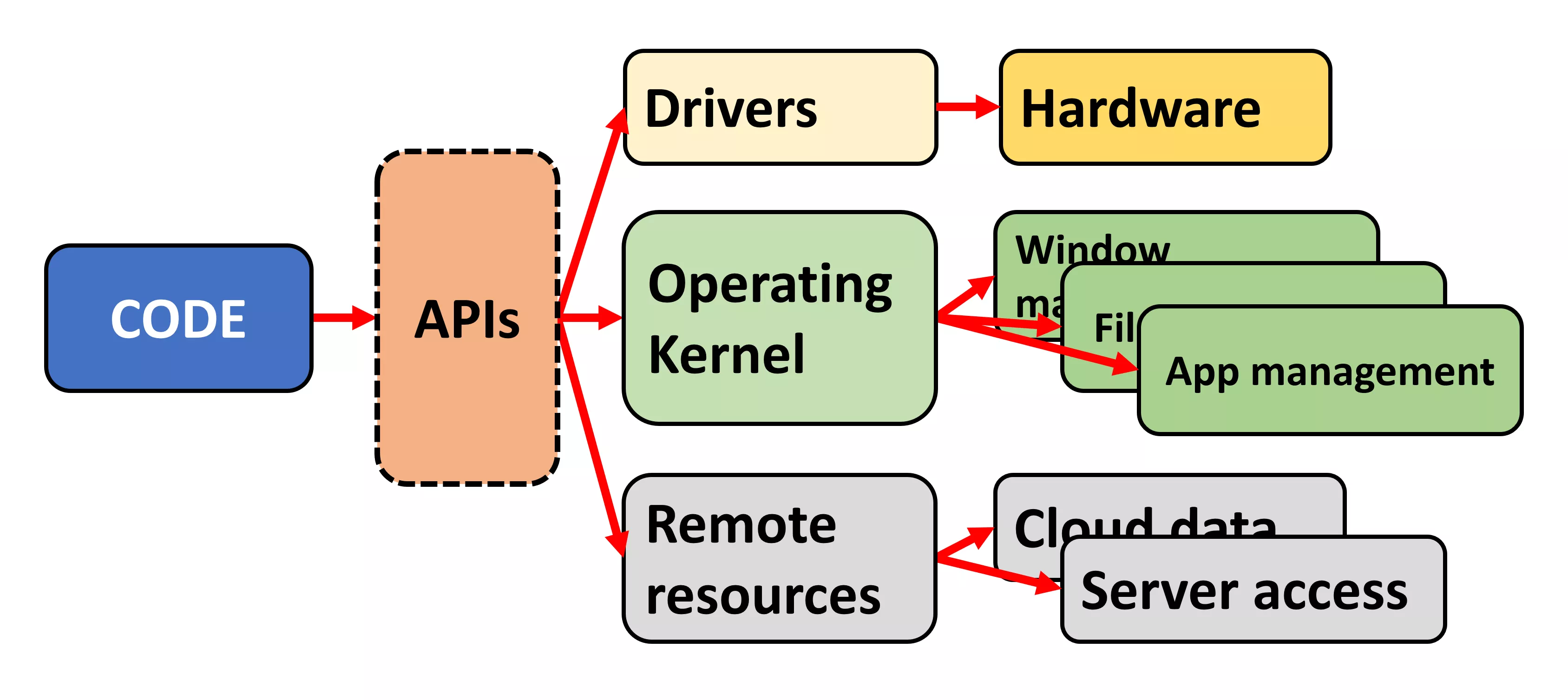
Image Gallery
Select an image to open it in a new tab.

Ingrid Bjornson
Global Cyber Policy and Regulation Analyst
