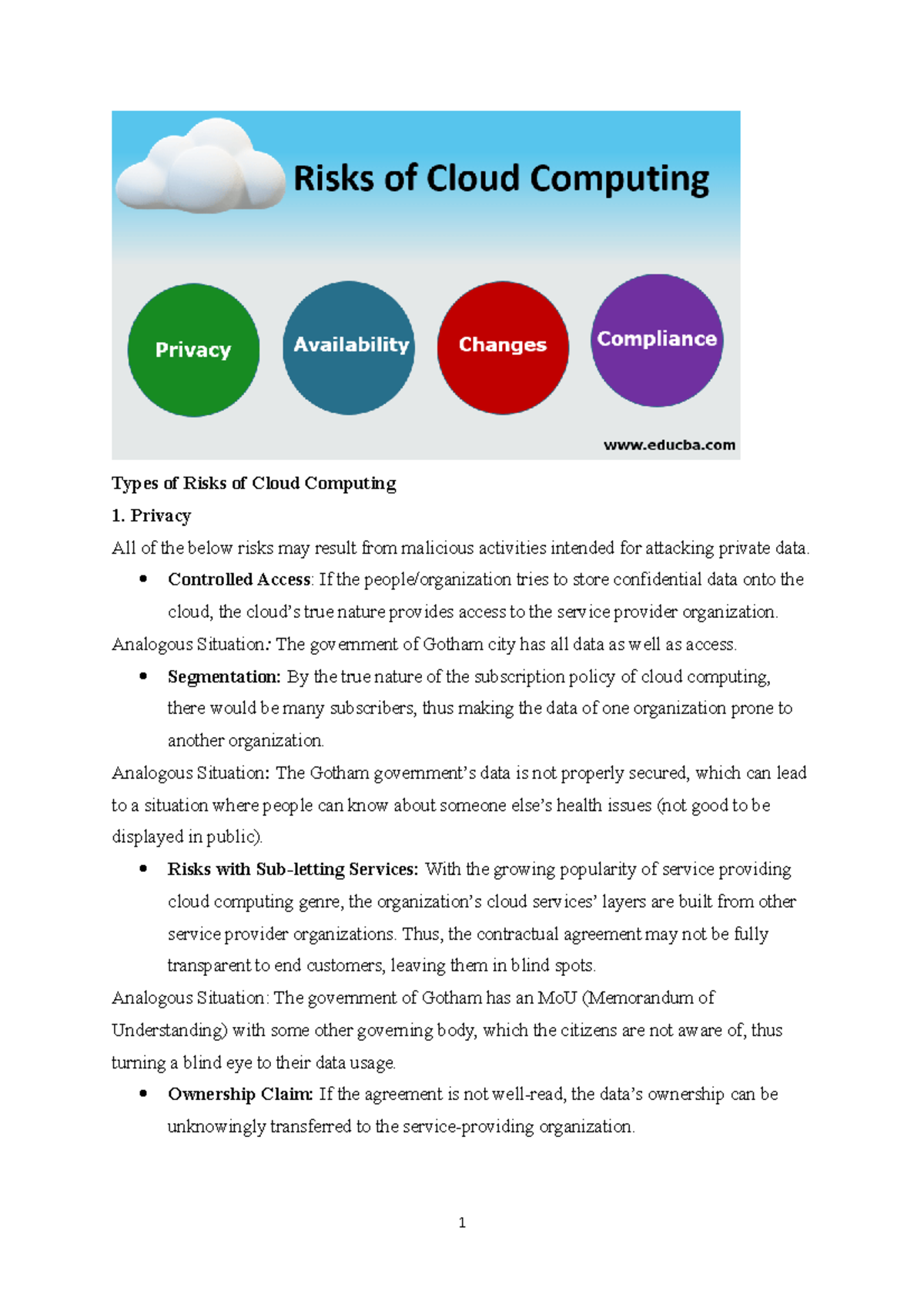
Understanding cloud privacy and security misconceptions helps organizations correctly assign responsibilities, secure data, and implement appropriate controls. A primary misconception is that cloud service providers handle all security and compliance obligations, whereas the shared responsibility model dictates that users must protect their own data, manage user access, and configure security settings properly.
The rapid migration of enterprise workloads, consumer data, and critical infrastructure to cloud environments has fundamentally changed how organizations think about digital assets. However, this architectural shift has also given rise to persistent myths, outdated assumptions, and dangerous misunderstandings. When decision-makers, IT professionals, and everyday users rely on flawed perceptions of how cloud computing works, critical vulnerabilities emerge. Addressing these misconceptions requires a rigorous look at technical realities, regulatory frameworks, and operational models.
The Core Architecture of Cloud Security
To understand where misconceptions originate, one must first examine the foundational mechanics of cloud infrastructure. Cloud computing is built on shared physical hardware, virtualized abstraction layers, and massive multi-tenant networks.
In traditional on-premises environments, an organization owns the physical server, manages the HVAC systems in the server room, patches the hypervisor, and configures the firewall. Transitioning to the cloud outsources various layers of this stack to a cloud service provider (CSP) such as Amazon Web Services (AWS), Microsoft Azure, or Google Cloud Platform (GCP).
Yet, outsourcing infrastructure does not equate to outsourcing ultimate accountability. The division of labor is formally defined by frameworks known as shared responsibility models. While CSPs maintain absolute control over the physical data centers, host hardware, global network infrastructure, and underlying virtualization software, customers retain ownership of everything they build and put onto that infrastructure. This distinction forms the bedrock of modern cloud security discussions.
Major Misconception 1: "The Cloud Provider Secures Everything"
The most pervasive and dangerous myth in modern IT is that migrating data to a major cloud provider automatically makes it secure and compliant. This belief often stems from marketing language that highlights enterprise-grade data centers guarded by biometric security, redundant power supplies, and advanced automated threat detection.
While it is true that CSPs build exceptionally secure foundational infrastructure, they do not automatically configure your databases, applications, or storage buckets securely.
The Shared Responsibility Model in Practice
Every major cloud vendor structures its security obligations through a shared responsibility framework, typically divided into security of the cloud versus security in the cloud:
- Security of the Cloud: Managed entirely by the provider. This includes the physical facilities, host hardware, network infrastructure, data center security guards, and the core virtualization hypervisors.
- Security in the Cloud: Managed entirely by the customer. This includes guest operating systems, application patches, firewall configurations, identity and access management (IAM), encryption key management, and data classification.
When a misconfigured cloud storage bucket leaks millions of customer records, the root cause is rarely a flaw in the cloud provider's underlying software. Instead, it typically stems from a customer leaving default administrative permissions open to the public internet.
Major Misconception 2: "Cloud Data is Inherently Private from the Provider"
Another common assumption is that storing data in the cloud creates an absolute cryptographic wall between the data owner and the cloud provider. Users often assume that because they control the login credentials, the provider has no visibility into or control over their files.
The reality of data privacy in multi-tenant cloud environments is far more nuanced. While enterprise agreements typically stipulate strict data privacy and non-disclosure terms, technical reality dictates that cloud operators require certain levels of access to manage, back up, and optimize their infrastructure.
Encryption and Key Management Realities
If data is stored using standard server-side encryption managed by the cloud provider, the provider holds the cryptographic keys used to encrypt and decrypt that data. Consequently, if legally compelled by a court order or if administrative access is leveraged during a critical system recovery, the provider technically has the capability to read that data.
Achieving true privacy—where even the cloud provider cannot read your data—requires Customer-Managed Keys (CMK) or Client-Side Encryption. With client-side encryption, data is encrypted on the user's local device before it is uploaded to the cloud, ensuring that the cloud provider receives only ciphertext.
Major Misconception 3: "Public Cloud is Inherently Less Secure than On-Premises"
Many organizations—particularly in highly regulated sectors like finance, healthcare, and government—long resisted cloud adoption out of a belief that keeping servers locked in an on-premises closet is safer than putting them in a public cloud.
This perception reverses the actual security posture of most organizations. Very few small-to-medium enterprises possess the budget, specialized staff, or tooling required to match the security operations centers (SOCs), automated vulnerability scanning, and dedicated cryptographic engineering teams employed by hyperscale cloud providers.
Comparing On-Premises and Cloud Security Postures
| Security Vector | Traditional On-Premises | Public Cloud Infrastructure |
|---|---|---|
| Physical Security | Dependent on individual building security, local locks, and internal staff vigilance. | Enterprise-grade, multi-factor biometric access, 24/7 armed guards, and strict environmental controls. |
| Patch Management | Often manual, prone to backlogs, and dependent on internal IT bandwidth. | Largely automated for foundational layers; streamlined orchestration tools for customer workloads. |
| Threat Detection | Requires purchasing, installing, and maintaining disparate SIEM and IDS hardware. | Built-in native telemetry, machine learning threat detection, and global intelligence feeds. |
| Human Error Risk | High exposure due to localized misconfigurations, physical theft, and single points of failure. | High exposure due to identity misconfigurations, though mitigated by granular IAM and audit logging. |
While public clouds offer superior baseline defenses, they also present a vastly larger attack surface if identity perimeters are poorly managed. An on-premises server behind a physical wall requires physical proximity or a deep network breach to compromise; a misconfigured cloud resource is accessible from anywhere in the world.
Major Misconception 4: "Compliance and Regulatory Requirements are Handled Automatically"
Organizations frequently assume that if a cloud provider is certified compliant with standards like ISO 27001, SOC 2, HIPAA, or PCI-DSS, the tenant organization's applications running on that cloud are automatically compliant as well.
Compliance is an end-to-end operational state, not an inherited feature. While a cloud provider's attestation reports prove that their data centers and foundational services meet rigorous regulatory thresholds, those reports do not cover the customer's application code, database architecture, or internal user access policies.
The Compliance Audit Gap
- Inherited Compliance: Physical data center security, environmental controls, and underlying hardware disposal.
- Shared Compliance: Operating system hardening, network architecture segregation, and identity management policies.
- Customer-Only Compliance: Data privacy policies, customer consent tracking, application-level logging, and secure data retention lifecycles.
Failing to understand this distinction can result in severe regulatory penalties during an audit, even if the underlying infrastructure is hosted on a fully certified cloud platform.
Major Misconception 5: "Backups in the Cloud Protect Against All Data Loss"
With the proliferation of automated snapshot tools, geo-redundant storage tiers, and continuous replication, users often believe that data stored in the cloud is permanently safe from deletion, corruption, or ransomware.
This misconception ignores the primary causes of modern data loss: malicious insider deletion, application-level data corruption, and ransomware encryption that propagates across synchronized cloud drives.
The Need for Immutable, Off-Site Backups
If a ransomware strain infects an endpoint and synchronizes with a cloud storage repository, the encrypted files will instantly overwrite the clean files in the cloud storage tier. Similarly, if an administrative account is compromised and an attacker executes a script to delete production databases, standard replication will immediately propagate that deletion across secondary regions.
Robust cloud data protection requires:
- Versioning: Keeping historical iterations of files so they can be rolled back to a pre-corruption state.
- Immutable Storage: Implementing Write-Once-Read-Many (WORM) policies that prevent files from being deleted or modified by any user—including administrators—for a designated retention period.
- Air-Gapped Backups: Maintaining secondary backup copies in a completely separate cloud account or provider to isolate blast radiuses.
Actionable Steps to Overcome Cloud Security Risks
Clearing up misconceptions must be followed by concrete operational changes. Organizations migrating to or operating within cloud environments should implement a structured security hardening workflow:
- Audit Identity and Access Management (IAM): Enforce the principle of least privilege. Eliminate overly permissive wildcard policies (
*), mandate multi-factor authentication (MFA) for all user accounts, and transition from long-lived access keys to short-term federated tokens. - Implement Automated Posture Management: Deploy Cloud Security Posture Management (CSPM) tools to continuously scan environments for public storage buckets, open security groups, and unencrypted volumes.
- Establish Data Classification Protocols: Identify and catalog sensitive data (PII, financial records, proprietary IP) and apply tailored encryption strategies, including customer-managed keys where appropriate.
- Review the Shared Responsibility Matrix: Explicitly map out who within your engineering, security, and legal teams owns each layer of the cloud stack for every deployed application.
- Test Disaster Recovery Plans: Do not assume backups work. Regularly execute end-to-end restoration drills to verify recovery time objectives (RTO) and recovery point objectives (RPO).
Frequently Asked Questions
Is cloud storage inherently less secure than a physical hard drive?
Cloud storage is often significantly more secure against physical theft, hardware failure, and localized disasters than a local hard drive. However, it introduces risks related to network exposure and identity misconfiguration. Security depends entirely on how access controls and encryption are configured by the user.
Do cloud providers access customer data for advertising or analysis?
Enterprise cloud providers operate under strict contractual agreements that prohibit using customer data for advertising or unauthorized analytics. However, automated systems do analyze telemetry, metadata, and error logs for performance optimization, billing, and infrastructure security purposes.
What is the single biggest security risk in cloud computing?
Human error—specifically related to Identity and Access Management (IAM) misconfigurations, overly permissive access policies, and a failure to secure administrative credentials—remains the leading vector for cloud security breaches.
How does the shared responsibility model affect small businesses?
Small businesses often lack dedicated security staff, making them particularly vulnerable to the misconception that the cloud provider manages their security. Small organizations must rely heavily on managed security service providers (MSSPs) or native automated security baselines to cover the "security in the cloud" obligations.
Are multi-cloud strategies more secure than single-cloud architectures?
Multi-cloud strategies reduce vendor lock-in and can limit the impact of a catastrophic outage affecting a single provider. However, they also increase operational complexity, expand the attack surface, and require security teams to master multiple distinct identity and management frameworks, which can introduce new misconfiguration risks.
Conclusion
Navigating cloud environments safely requires discarding outdated assumptions about where security responsibility lies. By recognizing that cloud security is a collaborative effort between the provider's robust infrastructure and the customer's rigorous configuration management, organizations can build resilient, private, and compliant digital architectures. Prioritizing least-privilege access, robust encryption, and immutable backups ensures that the cloud fulfills its promise of scalable, secure innovation.
Image Gallery
Select an image to open it in a new tab.
Lars Thomsen
Global Labor Markets and Economic Strategy Editor
