What is an IP Connection Monitor? Definition, Core Features, and Implementation
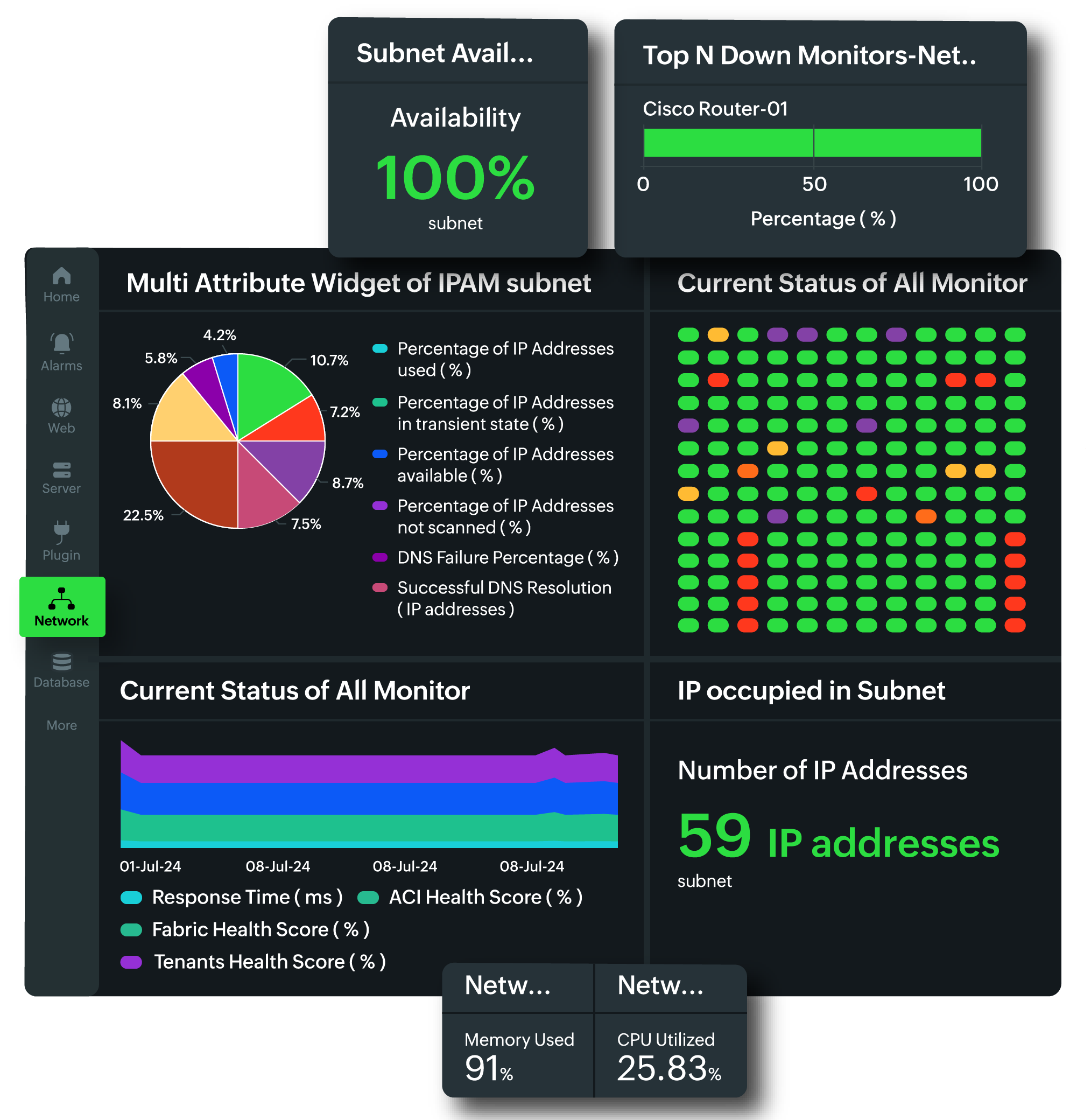
An IP connection monitor is a specialized network utility or software system designed to track, analyze, and manage active data transmissions between Internet Protocol (IP) addresses. It provides real-time visibility into incoming and outgoing traffic, allowing administrators to identify unauthorized access, optimize bandwidth, and troubleshoot connectivity issues across complex digital infrastructures.
Defining IP Connection Monitoring in 2026
At its fundamental level, an IP connection monitor functions as a specialized observer of the network layer (Layer 3) and transport layer (Layer 4) of the Open Systems Interconnection (OSI) model. While basic tools might simply list active sockets, modern solutions in 2026 integrate deep packet inspection (DPI), heuristic analysis, and real-time visualization to provide a comprehensive map of network behavior.
Unlike a standard firewall, which primarily focuses on permitting or denying traffic based on predefined rules, a connection monitor is investigative. It records the "who, when, where, and how" of every packet transition. This includes identifying the source IP, the destination IP, the port numbers involved, the protocol used (such as TCP, UDP, or ICMP), and the volume of data transferred.
In the current landscape, where Zero Trust Architecture (ZTA) has become the standard for enterprise security, IP connection monitors serve as the telemetry backbone. They provide the raw data necessary for security information and event management (SIEM) systems to detect anomalies that might indicate a breach, a misconfigured server, or a hardware failure.
Why IP Connection Monitoring is Critical
The complexity of modern networks—spanning multi-cloud environments, edge computing nodes, and vast IoT (Internet of Things) arrays—makes manual oversight impossible. IP connection monitoring bridges the gap between raw data and actionable intelligence through several critical functions.
Security and Threat Detection
The primary driver for implementing robust monitoring is security. By observing every active connection, administrators can spot "beaconing" behavior, where malware on an internal machine attempts to contact a command-and-control (C2) server. In 2026, many monitors utilize machine learning to establish a "baseline" of normal traffic; any deviation, such as an unusual outbound connection to a high-risk geographic region, triggers an immediate alert.
Performance Optimization and Capacity Planning
Network congestion often stems from a small number of "top talkers"—devices or applications consuming a disproportionate amount of bandwidth. An IP connection monitor identifies these entities in real-time. By analyzing historical connection data, organizations can make informed decisions about infrastructure upgrades, such as increasing backbone capacity or implementing Quality of Service (QoS) rules to prioritize critical business applications over background updates.
Compliance and Auditing
Regulatory frameworks such as GDPR, HIPAA, and PCI-DSS require organizations to maintain strict control over data movement. IP connection monitors provide the audit trails necessary to prove that sensitive data is only moving between authorized endpoints. In the event of a forensic investigation, the historical logs from a connection monitor are invaluable for reconstructing the timeline of a data leak or unauthorized access event.
Core Features of Modern IP Connection Monitors
To be effective in a 2026 enterprise environment, an IP connection monitor must offer more than just a list of active IPs. The following features represent the industry standard for comprehensive network visibility.
1. Real-Time Traffic Visualization
Static logs are difficult to interpret during an active incident. Modern monitors provide dynamic dashboards that visualize connections as flow maps or topological graphs. This allows administrators to see at a glance where traffic is concentrated and identify bottlenecks or unauthorized "sideways" (lateral) movement within the network.
2. Protocol and Port Identification
Monitoring must extend beyond the IP address to the specific service being accessed. A core feature is the ability to identify the protocol (e.g., HTTPS, SSH, FTP, or custom proprietary protocols) and the associated port. This level of detail is essential for verifying that services are only running on their intended ports and that legacy, insecure protocols (like Telnet or early versions of SMB) are not being used.
3. Geolocation and ASN Mapping
Understanding the physical and organizational origin of an IP address adds critical context. Core monitoring features include automated geolocation (identifying the country and city of the remote IP) and Autonomous System Number (ASN) mapping (identifying the Internet Service Provider or organization that owns the IP block). This helps in identifying suspicious traffic from regions where the company does not conduct business.
4. Historical Data Logging and Retention
A monitor is only as good as its memory. While real-time data is vital for immediate response, historical logging allows for trend analysis and post-incident forensics. Professional-grade monitors include compressed database storage to retain connection metadata for months or years without exhausting storage resources.
5. Automated Alerting and Thresholds
Administrators cannot watch a screen 24/7. Core features include the ability to set custom thresholds—for example, an alert if a single internal IP initiates more than 500 connections per minute, which could indicate a port scan or a DDoS attack. These alerts can be delivered via email, SMS, or direct integration with incident response platforms like PagerDuty or Slack.
6. IPv4 and IPv6 Dual-Stack Support
With the continued expansion of the internet, IPv6 is no longer optional. A modern monitor must handle both IPv4 and the significantly larger IPv6 address space seamlessly. This includes the ability to track "tunneling" protocols where IPv6 traffic is wrapped inside IPv4 packets.
Technical Implementation Methodologies
The way an IP connection monitor gathers data significantly impacts its accuracy and its effect on network performance. There are three primary methodologies used in 2026.
| Methodology | Data Source | Pros | Cons |
|---|---|---|---|
| Packet Capture (PCAP) | Direct mirror of network traffic. | Provides the highest level of detail, including payload content. | Extremely resource-intensive; requires significant storage and CPU. |
| Flow-Based (NetFlow/IPFIX) | Metadata exports from routers/switches. | Highly scalable; minimal impact on network performance. | Does not see the actual data within the packets; relies on hardware support. |
| Agent-Based | Software installed on individual endpoints. | Captures which specific process/app started the connection. | Requires installation and maintenance on every device; difficult for IoT. |
The Role of NetFlow and IPFIX
In large-scale environments, flow-based monitoring is the most common approach. Instead of looking at every individual packet, the monitor receives "flow records" from network hardware. A flow is defined as a unidirectional sequence of packets sharing the same source/destination IPs, ports, and protocol. This provides 90% of the necessary visibility with less than 1% of the overhead of full packet capture.
Agentless Monitoring and Port Mirroring
For environments where agents cannot be installed (such as printers or medical devices), monitors use "Port Mirroring" (SPAN) or "Network TAPs." This involves configuring a switch to send a copy of all traffic passing through specific ports to the monitoring server. This is the preferred method for ensuring that the monitoring process itself does not introduce latency into the production environment.
Challenges and Limitations in 2026
Despite their sophistication, IP connection monitors face several technical hurdles that administrators must account for when designing their visibility strategy.
The Impact of Encryption
With the near-universal adoption of TLS 1.3 and Encrypted Client Hello (ECH), the amount of information a monitor can "see" inside a packet is diminishing. While the monitor can still see the source and destination IP addresses, it can no longer see the specific URL being visited or the data being exchanged without employing invasive "SSL Decryption" proxies, which can raise privacy and performance concerns.
High-Volume Environments
In 100Gbps or 400Gbps data center environments, the sheer volume of connection metadata can overwhelm a monitor. Implementation requires high-performance hardware, often utilizing FPGA-based capture cards or distributed processing architectures to ensure no packets are dropped during the analysis phase.
Dynamic Addressing and NAT
Network Address Translation (NAT) and the use of dynamic IP addresses (DHCP) can complicate historical tracking. A monitor must be able to integrate with DHCP logs or Active Directory to correlate a specific IP address back to a specific user or device at a specific point in time.
Selecting and Implementing a Monitor
Choosing the right IP connection monitor depends on the scale of the network and the specific goals of the organization. For a small office, a lightweight software solution running on a gateway might suffice. For a global enterprise, a distributed system with multiple "collectors" and a centralized management console is necessary.
Implementation Checklist
- Define Scope: Decide if you need to monitor the entire network, just the data center, or specific high-risk endpoints.
- Choose Methodology: Determine if NetFlow/IPFIX is sufficient or if the security posture requires full packet capture.
- Hardware Considerations: Ensure the monitoring server has sufficient NIC (Network Interface Card) throughput and disk I/O to handle incoming data.
- Set Baselines: Run the monitor in "learning mode" for 2-4 weeks to understand normal traffic patterns before enabling aggressive alerting.
- Integration: Connect the monitor to your existing security stack, such as your firewall (for automated blocking) and your SIEM (for long-term analysis).
Frequently Asked Questions
What is the difference between an IP monitor and a firewall?
A firewall is a gatekeeper designed to block or allow traffic based on a set of security rules. An IP connection monitor is an analytical tool designed to observe, record, and report on all traffic, regardless of whether it was allowed or blocked. While some firewalls have built-in monitoring features, a dedicated monitor usually provides much deeper historical analysis and better visualization.
Can an IP connection monitor see what I am doing inside an encrypted website?
Generally, no. A monitor can see that your IP is connected to the IP of a website (like a bank or social media site) and how much data is being transferred. However, because the connection is encrypted (HTTPS), the monitor cannot see your password, the specific pages you view, or the content of your messages unless it is specifically configured with decryption certificates, which is uncommon for general network monitoring.
Does monitoring every connection slow down the network?
If implemented correctly, the impact is negligible. Using flow-based monitoring (like NetFlow) or port mirroring (SPAN) ensures that the monitoring happens "out-of-band." This means the monitor is looking at a copy of the traffic, so even if the monitoring server becomes overloaded, the actual flow of production traffic remains unaffected.
Is IP connection monitoring legal for businesses?
In most jurisdictions, businesses have a legal right and often a regulatory obligation to monitor traffic on the networks they own. However, privacy laws like GDPR require that employees are notified that monitoring is taking place and that the collected data is handled securely. It is always recommended to consult with legal counsel to ensure your monitoring policy aligns with local privacy regulations.
How does IPv6 change connection monitoring?
IPv6 introduces a significantly larger address space, which can make traditional "IP scanning" and logging more complex. Because devices often use multiple IPv6 addresses (temporary addresses for privacy), a monitor must be more sophisticated in how it groups and identifies a single device over time. Most modern monitors are built with "IPv6-first" logic to handle these nuances.
Practical Recommendation
For organizations starting their journey into network visibility, the best first step is to enable flow-based monitoring (NetFlow or IPFIX) on your core switch or edge router. This provides immediate, high-level visibility into traffic patterns without requiring the deployment of expensive hardware or invasive agents. Once you have a clear picture of your "top talkers" and common connection paths, you can then layer on more advanced features like deep packet inspection or agent-based monitoring for your most critical assets.
Image Gallery
Select an image to open it in a new tab.
Simon Caldwell
Enterprise Technology and Systems Editor
