What Is an Impression in YouTube and Why It Matters for Creators
An impression on YouTube is recorded every time a video thumbnail is shown to a user on the platform, serving as the foundational metric for measuring a video's initial visibility, reach, and placement across YouTube's recommendation and search systems.
For content creators, video editors, and digital marketers, understanding metrics is vital for building a sustainable channel. Among the extensive analytics dashboard provided by YouTube Studio, the impression stands out as the very first threshold of audience engagement. Without impressions, a video cannot generate views, accumulate watch time, or build subscriber loyalty. It represents the digital equivalent of a billboard on a busy highway—the moment a potential viewer has the opportunity to notice your content.
However, an impression alone does not guarantee success. It is merely an indicator of how widely YouTube's algorithm is distributing your content across the platform. To fully grasp the health of a channel, creators must evaluate impressions alongside other critical performance indicators, such as the Click-Through Rate (CTR) and average view duration.
Defining an Impression on YouTube
In technical terms, an impression is counted whenever a YouTube thumbnail is displayed on a user's screen for at least one second, with at least 50 percent of the thumbnail being visible. This precise definition prevents accidental micro-scrolls or hidden background loads from artificially inflating a creator's analytics data.
Impressions are tracked across virtually all surfaces of the YouTube ecosystem where a user might encounter a video recommendation. These surfaces include:
- The Home Page: The primary feed presented to users when they open the YouTube app or website.
- Subscription Feeds: The dedicated tab where users view uploads from channels they have explicitly chosen to follow.
- Search Results: The list of videos generated when a user inputs specific keywords or phrases into the search bar.
- Watch Next / Suggested Videos: The panel of recommendations displayed alongside or beneath a video currently playing.
- Playlists and Channels: Thumbnails displayed when browsing curated lists or a creator's homepage.
Crucially, YouTube Shorts handle impressions differently than traditional long-form videos. While a Short appearing in the dedicated Shorts Feed generates impressions, the viewer behavior and scrolling mechanics mean that Shorts accumulate astronomical impression numbers compared to traditional horizontal videos. Differentiating between long-form and short-form impressions is essential when analyzing channel performance.
Where Impressions Come From: The YouTube Algorithm at Work
YouTube does not distribute impressions randomly. The platform's recommendation system determines how many impressions a video receives based on signals from viewer behavior, metadata relevance, and historical channel performance.
When a video is published, YouTube typically engages in a testing phase. The algorithm serves initial impressions to a small, targeted cohort of viewers—often subscribers who have bell notifications enabled or users who frequently watch content within that specific niche.
Initial Testing Phase
During this phase, the algorithm measures two primary metrics: Click-Through Rate (CTR), which calculates the percentage of impressions that turn into actual views, and Audience Retention, which measures how long those viewers stay on the video.
- High CTR and High Retention: If the initial cohort clicks the thumbnail and watches a significant portion of the video, YouTube interprets this as a strong signal of quality. The algorithm responds by expanding the impression pool, serving the thumbnail to a broader audience on the homepage and suggested video feeds.
- Low CTR or Low Retention: If users ignore the thumbnail or click away within the first few seconds, the algorithm concludes that the video lacks broad appeal. Impression growth stalls, and the video's distribution slows down significantly.

Key Metrics Linked to Impressions
An impression is only the starting point of the analytics journey. To make actionable decisions, creators must evaluate impressions in conjunction with other metrics found in YouTube Studio.
| Metric Name | Definition | What It Tells You |
|---|---|---|
| Impressions | Total times a thumbnail was shown on screen. | Measures the reach and distribution power of your video. |
| Click-Through Rate (CTR) | Percentage of impressions that resulted in a view. | Measures the effectiveness of your title, thumbnail, and topic appeal. |
| Views | Total number of legitimate video playback sessions. | Measures overall audience consumption resulting from clicks. |
| Average View Duration | The average amount of time viewers spend watching. | Measures content quality, pacing, and audience satisfaction. |
The Relationship Between Impressions and CTR
A common point of confusion among creators is the relationship between high impression counts and low click-through rates. For instance, a viral video might receive millions of impressions because YouTube pushes it to a wide, general audience. As the audience broadens past the core niche, the CTR naturally drops because casual viewers are less targeted than loyal subscribers. Conversely, a niche tutorial video might have low total impressions but an exceptionally high CTR because every person seeing it is actively searching for that specific solution.
Factors That Influence Impression Growth
Several controllable and uncontrollable variables dictate how many impressions a YouTube video will receive over its lifetime.
1. Title and Thumbnail Optimization
While the algorithm distributes impressions, human psychology dictates whether those impressions remain passive or convert into views. Compelling, clear thumbnails and intriguing, honest titles do not directly increase impressions on their own; rather, they drive the high CTR that signals to the algorithm to keep pushing the video to more viewers.
2. Consistency and Upload Frequency
Channels that upload content on a predictable schedule train both their audience and the algorithm. Consistent publishing helps build baseline trust with the recommendation system, often resulting in quicker initial impression distribution for new releases.
3. Audience Retention and Engagement
The algorithm prioritizes viewer satisfaction. Videos that keep users on the platform longer—thereby increasing total session time—are rewarded with sustained impression streams over weeks, months, or even years.
4. Search Engine Optimization (SEO)
For evergreen content, search traffic remains a steady source of impressions. Using accurate keywords in titles, descriptions, and tags ensures that your video appears when users actively search for relevant terms, providing long-term impression accumulation independent of the homepage feed.
Common Misconceptions About YouTube Impressions
Misunderstanding how impressions work can lead creators to make poor strategic decisions. Clarifying these misconceptions helps ensure efficient channel management.
- Misconception: Impressions equal views. An impression simply means a thumbnail was seen on a screen. A user scrolling past a video without clicking still registers an impression. Views are only counted when a user explicitly chooses to click and watch.
- Misconception: Buying views increases organic impressions. Attempting to artificially inflate metrics through unauthorized third-party services often damages channel performance. The YouTube algorithm detects unnatural traffic patterns, which can lead to suppressed impressions and penalties.
- Misconception: Low impressions mean your channel is shadowbanned. In most cases, low impressions are simply the result of weak topic demand, poor thumbnail design, or insufficient historical data on a newly launched channel, rather than an intentional penalty from the platform.
Frequently Asked Questions About YouTube Impressions
How many impressions are considered "good" on YouTube?
There is no universal benchmark for a "good" number of impressions because it depends entirely on your subscriber count, niche, and video format. A small channel with 500 subscribers might consider 5,000 impressions a massive success, whereas a channel with one million subscribers might expect hundreds of thousands of impressions within hours of publishing. Focus on your Click-Through Rate (CTR) rather than raw impression counts to gauge performance.
Can I reset or fix a video with zero impressions?
If a video receives virtually no impressions after publishing, it usually means the algorithm has not found a viable audience match or the metadata is unclear. You can improve this by updating the video title to be more searchable, redesigning the thumbnail to be clearer and more visually appealing, or adding the video to a relevant playlist to give the algorithm additional context clues.
Do YouTube Shorts impressions count the same as regular video impressions?
Technically, yes—both represent a thumbnail being shown on screen. However, consumer behavior on the Shorts Feed differs drastically from the traditional homepage. Users scroll through Shorts rapidly, meaning a Short can accumulate massive impression counts very quickly, often resulting in a lower overall Click-Through Rate compared to long-form content.
Why do impressions drop off suddenly after a few days?
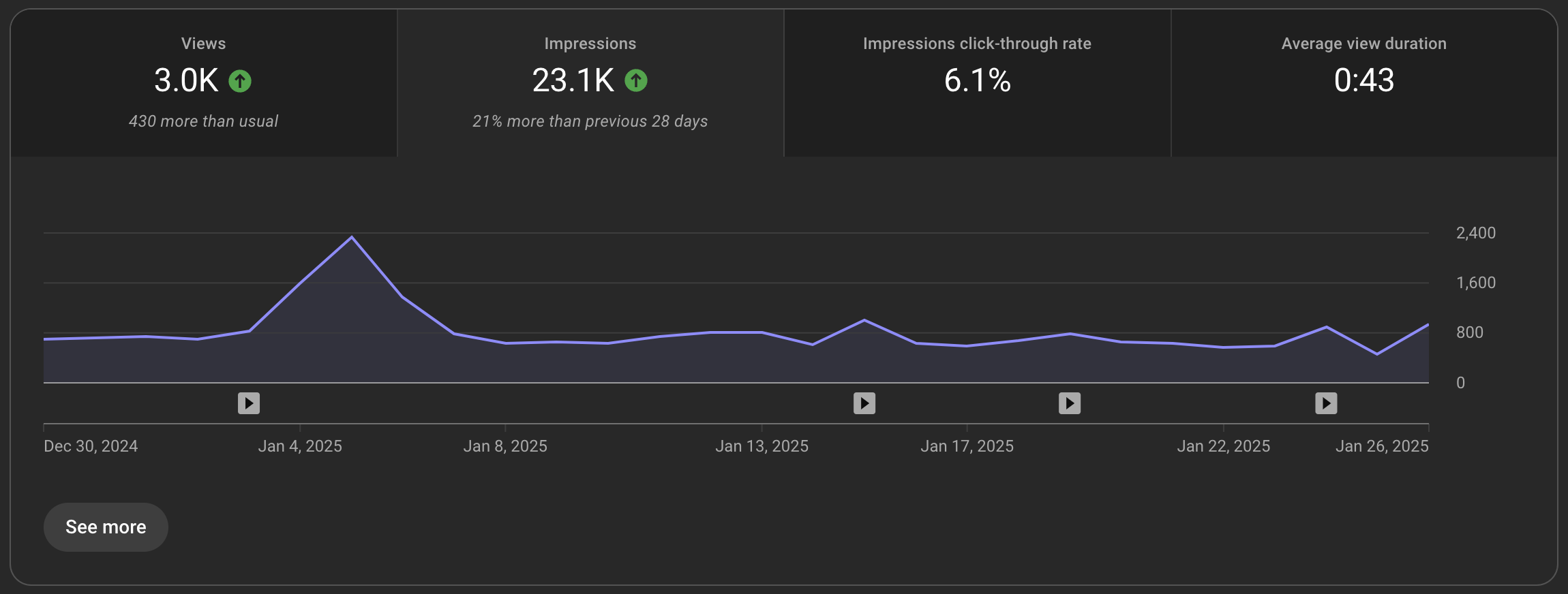
Most videos experience an initial impression spike immediately after publication as the algorithm tests the content with core audiences and subscribers. Once that initial pool is exhausted, impressions typically plateau unless the video achieves a high enough CTR and retention rate to warrant distribution to a wider, colder audience. This decay phase is normal for the vast majority of uploads.
Practical Next Actions for Creators
To leverage your understanding of YouTube impressions to grow your channel, follow these practical steps:
- Audit Your Analytics: Open YouTube Studio, navigate to your channel analytics, and select the Reach tab. Review your total impressions, traffic source types, and overall Click-Through Rate over the last 28 days.
- Identify Underperforming CTRs: Look for videos that have high impressions (meaning YouTube is trying to push them) but low CTRs (meaning users are ignoring your thumbnails). These represent your highest-leverage optimization opportunities.
- Redesign and Test: Update the thumbnails and titles of those underperforming videos to make the value proposition clearer, then monitor changes in CTR over the subsequent week.
- Analyze Traffic Sources: Determine whether your impressions are coming primarily from browse features (suggesting strong homepage appeal) or search (suggesting strong SEO foundations), and tailor your future content strategy accordingly.
Image Gallery
Select an image to open it in a new tab.


Simon Caldwell
Enterprise Technology and Systems Editor
