In the context of Voice over Internet Protocol (VoIP), HT most commonly refers to HandyTone, a popular line of Analog Telephone Adapters (ATAs) manufactured by Grandstream Networks. Additionally, in wireless VoIP networking, HT stands for High Throughput, referring to 802.11n Wi-Fi standards that affect call quality and bandwidth management.
Understanding these two distinct definitions is essential for both hardware deployment and network optimization. While one refers to the physical device that bridges analog hardware with digital networks, the other refers to the protocol settings that ensure those digital packets travel efficiently across a wireless environment. This guide explores both meanings in depth to help you manage your telecommunications infrastructure effectively in 2026.
The Primary Definition: Grandstream HandyTone (HT) Series
For most IT professionals and business owners, seeing "HT" in a VoIP equipment list refers to the HandyTone series. These devices are Analog Telephone Adapters (ATAs). Their primary purpose is to allow traditional analog devices—such as cordless phones, fax machines, and legacy PBX systems—to communicate over a modern IP network.
As of 2026, the HandyTone series remains a cornerstone of "hybrid" communication strategies. Even as native IP phones become the standard, many organizations still rely on HT devices to sweat their legacy assets or provide connectivity in environments where running new Ethernet cabling is cost-prohibitive.
How HT Devices Function
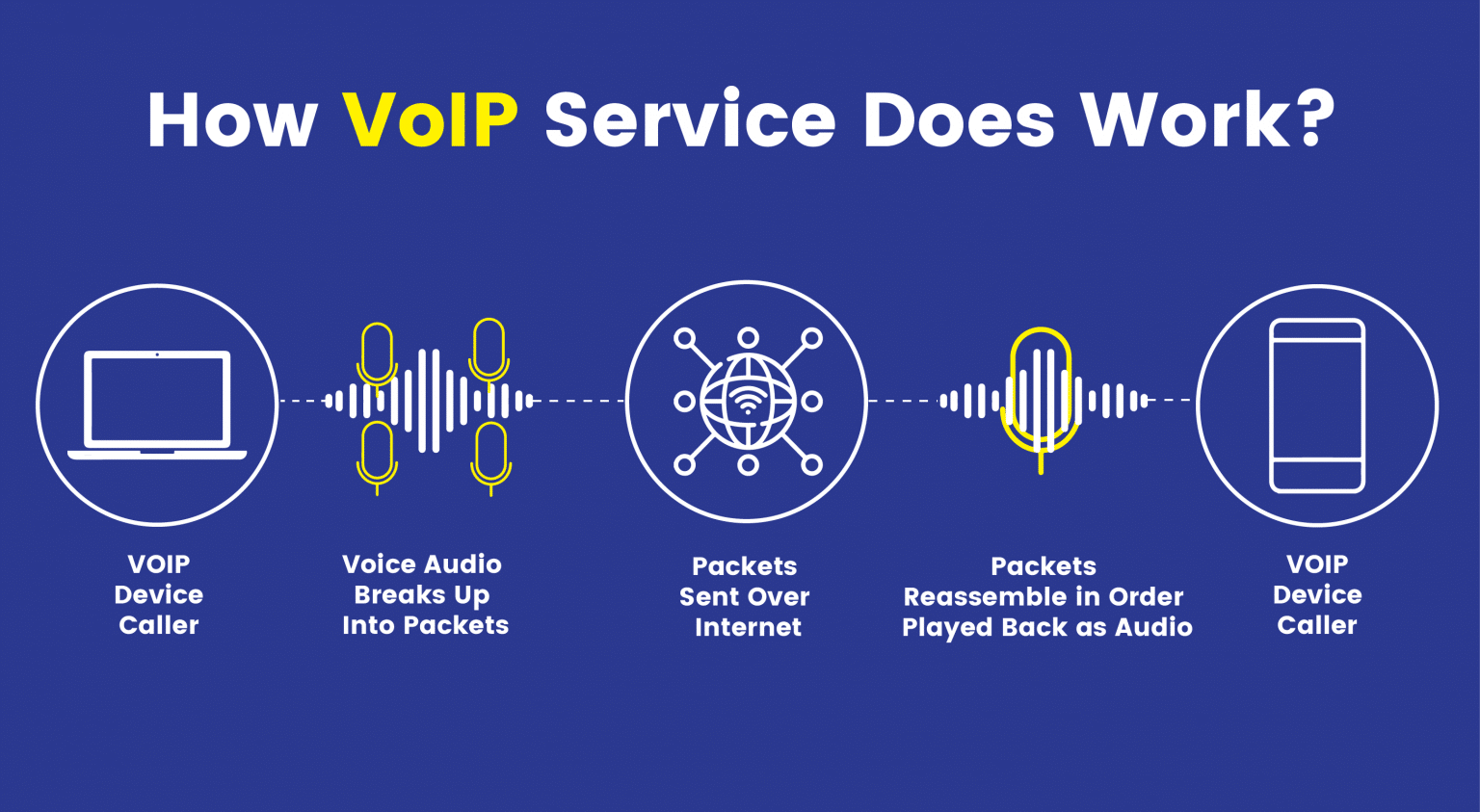
An HT device acts as a translator. When you speak into an analog handset connected to an HT802 or HT814, the adapter performs several critical tasks:
- Sampling and Quantization: The device takes the continuous analog wave of your voice and converts it into discrete digital values.
- Compression: Using specific codecs (like G.711 or G.729), the HT device compresses the digital data to save bandwidth.
- Packetization: The data is wrapped into IP packets, addressed to the destination SIP (Session Initiation Protocol) server.
- Signaling: The device handles "off-hook" signals, dial tones, and ringing voltages, mimicking a traditional Central Office (CO).
Common HT Hardware Models and Use Cases
The HT product line is segmented by the number of ports and the complexity of the routing required.
- HT801/HT802: These are the "workhorse" models for home offices and small retail spots. The HT801 features one FXS (Foreign Exchange Station) port, while the HT802 features two. These are ideal for connecting a single phone and a fax machine to a cloud VoIP provider.
- HT812/HT814: These devices are more advanced, offering integrated Gigabit NAT routers. They allow the device to sit directly between a modem and a local network, prioritizing voice traffic (Quality of Service) over data traffic.
- HT818: A high-density ATA with eight FXS ports, typically used in small hotels, apartment complexes, or businesses with localized clusters of analog phones.
The Secondary Definition: High Throughput (HT) in Networking
If you are troubleshooting a wireless VoIP handset (VoWLAN) and see "HT" in your router settings, it refers to High Throughput. This is a technical designation introduced with the IEEE 802.11n Wi-Fi standard.
In a VoIP context, HT settings determine how much data your wireless network can carry and how it handles interference. While VoIP calls themselves do not require massive amounts of bandwidth, they are extremely sensitive to latency (delay) and jitter (variation in delay). Incorrect HT configurations can cause audio to drop or become robotic.
HT20 vs. HT40: The VoIP Trade-off
When configuring a network for VoIP, you will often see choices for HT20 or HT40 (referring to 20MHz or 40MHz channel widths).
- HT20 (20MHz): This is generally the preferred setting for VoIP. Using a narrower channel provides more "clean" channels in the spectrum, reducing the likelihood of interference from other Wi-Fi networks. Since a VoIP call only needs about 100kbps, the massive bandwidth of HT40 is unnecessary, while the stability of HT20 is vital.
- HT40 (40MHz): This bonds two 20MHz channels together. While it doubles the potential speed for downloading large files, it increases the risk of packet collisions and interference, which can be devastating for real-time voice traffic.
Very High Throughput (VHT) and Beyond
In 2026, we also encounter VHT (Very High Throughput) associated with 802.11ac and HE (High Efficiency) associated with 802.11ax (Wi-Fi 6/6E). When setting up a VoIP system on these newer standards, the "HT" legacy settings often act as a compatibility baseline. If your VoIP handsets are older models, the router must maintain HT support to ensure they can still connect and maintain a stable call.

Technical Specifications: HT Device Comparison
When selecting an HT (HandyTone) device, the technical specifications dictate the device's capacity to handle simultaneous calls and secure the data.
| Feature | HT801 | HT802 | HT812 | HT814 |
|---|---|---|---|---|
| FXS Ports | 1 | 2 | 2 | 4 |
| Ethernet Ports | 1 x 10/100 | 1 x 10/100 | 2 x 10/100/1000 | 2 x 10/100/1000 |
| NAT Router | No | No | Yes | Yes |
| SIP Profiles | 1 | 2 | 2 | 4 |
| Fax Support | T.38 Passthrough | T.38 Passthrough | T.38 Passthrough | T.38 Passthrough |
| Security | TLS/SRTP | TLS/SRTP | TLS/SRTP | TLS/SRTP |
| Conferencing | 3-Way | 3-Way | 3-Way | 3-Way |
Key Features to Configure in HT Devices
Simply plugging in an HT adapter is rarely enough for a professional-grade setup. To ensure "carrier-grade" voice quality, several internal settings must be addressed.
Echo Cancellation
Analog lines are prone to echo caused by impedance mismatches. HT devices include built-in Line Echo Cancellation (LEC). For the best results, this should be configured to follow the G.168 standard. If callers report hearing their own voice back with a slight delay, the echo canceller on the HT device usually needs to be adjusted or the "Tail Length" increased.
Codec Selection
The codec determines how voice is digitized.
- PCMU (G.711u): The standard for North America. It offers the best quality but uses more bandwidth (approx. 64kbps-80kbps).
- PCMA (G.711a): The standard for Europe and the rest of the world.
- G.729A/B: A compressed codec that uses very little bandwidth (approx. 8kbps) but slightly reduces audio fidelity. In 2026, most HT devices also support Opus, a highly flexible codec that adapts to changing network conditions in real-time.
Jitter Buffer Management
A jitter buffer is a shared memory area where packets are collected, stored, and sent to the voice processor in an even flow. In the HT web interface, you can set the jitter buffer to "Adaptive" or "Fixed." For most internet connections, Adaptive is the better choice, as it allows the device to expand the buffer during periods of high network congestion and shrink it when the connection is stable, minimizing unnecessary delay.
Troubleshooting Common HT Issues
Even with high-quality hardware, VoIP over HT devices can encounter hurdles. Here are the most common issues and their resolutions.
The "No Dial Tone" Mystery
If your analog phone connected to an HT802 has no dial tone, the issue is usually one of three things:
- Registration Failure: The device cannot reach the SIP server. Check the "Status" page in the HT web interface. If the account status is "Not Registered," verify your SIP credentials and ensure your firewall isn't blocking port 5060.
- Physical Connection: Ensure the phone cable is plugged into the FXS port, not the WAN/LAN port.
- Power Supply: HT devices are sensitive to power fluctuations. Ensure you are using the original 5V or 12V adapter provided by the manufacturer.
One-Way Audio
One-way audio is almost always a NAT (Network Address Translation) issue. This happens when the voice packets from one side can't find their way through the router to the HT device.
- Solution: Enable STUN (Session Traversal Utilities for NAT) in the HT settings or use a Keep-Alive interval of 20 seconds to keep the firewall "hole" open for incoming traffic.
Faxing Reliability over HT
Fax machines were designed for analog copper lines, not packet-switched networks. To make faxes work over an HT device:
- Use the T.38 protocol if your VoIP provider supports it.
- If T.38 is not available, set the HT device to "Pass-through" mode and force the use of the G.711 codec.
- Disable "Echo Cancellation" and "VAD" (Voice Activity Detection) for the port connected to the fax machine, as these can distort the fax tones.
Why HT Devices Still Matter in 2026
You might wonder why a technology designed to bridge analog and digital still exists in 2026. The answer lies in specialized applications and cost management.
- Emergency Infrastructure: Many elevator phones and emergency call boxes are hardwired for analog. Replacing these with IP hardware involves massive labor costs. An HT device allows these systems to remain compliant while moving to a modern VoIP backend.
- Long-Distance Analog Extensions: In large warehouses, analog lines can often run longer distances (up to 1km) than Ethernet cables (100m). By placing an HT device at a central point and using existing twisted-pair copper, businesses can extend phone service without installing expensive fiber or repeaters.
- Cost Efficiency: A basic analog phone costs significantly less than a mid-range IP phone. For environments where phones are likely to be damaged or stolen—such as public lobbies, breakrooms, or workshop floors—the combination of an HT adapter and a cheap analog handset is the most economical solution.
FAQs
Can I use a Grandstream HT device with any VoIP provider?
Yes, Grandstream HT devices are "unlocked" and follow standard SIP protocols. This means they are compatible with almost all major VoIP service providers, including RingCentral, 8x8, Nextiva, and open-source platforms like Asterisk or FreePBX. You simply need the SIP server address, port number, and user credentials from your provider to configure the device.
What is the difference between FXS and FXO on an HT device?
Most HT devices feature FXS (Foreign Exchange Station) ports, which provide a dial tone and power to an analog phone. Some specialized models (like the GXW series, often confused with the HT line) feature FXO (Foreign Exchange Office) ports. FXO ports are used to connect an existing traditional analog telephone line (PSTN) to a VoIP system, allowing you to make calls over your local copper line through your digital network.
Does "HT" mean the same thing for all VoIP brands?
While "HT" specifically stands for HandyTone in the Grandstream ecosystem, it is not a universal industry acronym for all ATAs. For example, Cisco uses "SPA" or "ATA" prefixes, and AudioCodes uses "MP." However, because Grandstream is a dominant player in the market, "HT" has become a shorthand term among technicians for analog-to-VoIP adapters in general.
How do I update the firmware on my HT device?
Firmware updates for HT devices are typically handled through the web interface under the "Maintenance" or "Upgrade" tab. You can point the device to Grandstream’s official firmware server (firmware.grandstream.com) using HTTP, HTTPS, or TFTP. It is highly recommended to keep these devices updated to protect against security vulnerabilities like remote code execution or SIP-based attacks.
Is High Throughput (HT) necessary for voice quality?
Strictly speaking, VoIP does not require the "High" throughput that 802.11n provides. However, the management features that come with HT and VHT standards—such as Frame Aggregation and MIMO—help the network handle multiple devices at once. Without these standards, a single person downloading a large file could easily cause enough "congestion" on an older 802.11b/g network to ruin a VoIP call.
Final Recommendation
When you encounter the term HT in a VoIP context, first identify whether you are looking at hardware or network settings.
If you are dealing with hardware, you are likely working with a Grandstream HandyTone ATA. Ensure you choose the model that fits your port requirements (HT802 for basic use, HT814 for routing capabilities) and always prioritize the G.711 codec for the best audio quality unless you are severely bandwidth-constrained.
If you are looking at router settings for a wireless VoIP phone, HT (High Throughput) is your friend, but keep it at 20MHz (HT20) to ensure the most stable, interference-free environment for your voice traffic. By mastering these two "HT" definitions, you can ensure your communication system remains robust and clear throughout 2026 and beyond.
Image Gallery
Select an image to open it in a new tab.
Ingrid Bjornson
Global Cyber Policy and Regulation Analyst
