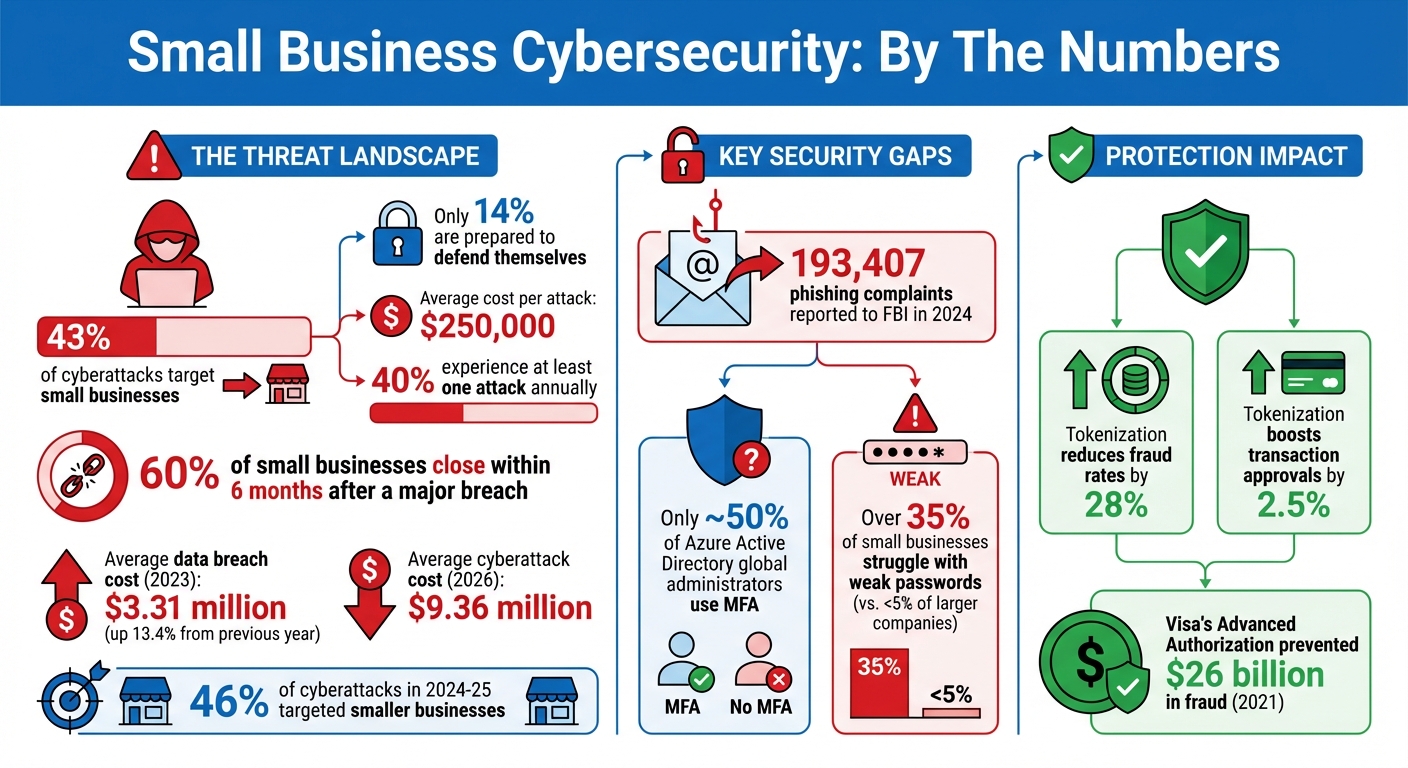
Protecting small business data in the cloud requires a multi-layered strategy centered on zero-trust principles, robust encryption, and rigorous access controls. By implementing multi-factor authentication (MFA), maintaining immutable backups, and regularly auditing cloud configurations, small businesses can effectively neutralize threats such as ransomware, unauthorized access, and accidental data exposure in 2026.
The shift toward cloud computing has reached a point of near-total adoption for small and medium-sized businesses (SMBs). However, as of 2026, the sophistication of cyber threats has evolved alongside these technologies. Small businesses are no longer "too small to be noticed"; instead, they are often viewed as "soft targets" with valuable data but fewer defensive resources than large enterprises. Securing your business data is not merely a technical requirement but a fundamental pillar of operational continuity and customer trust.
Understanding the 2026 Threat Landscape for Small Businesses
In 2026, the primary risks to cloud data have moved beyond simple password theft. Automated AI-driven phishing attacks can now create highly convincing, personalized messages at scale, making traditional "look for the typo" training obsolete. Furthermore, "Shadow IT"—the use of unauthorized cloud applications by employees—remains a significant leak point for sensitive corporate information.
Small businesses must also contend with the "Shared Responsibility Model." Many business owners mistakenly believe that because their data is on a major platform like Microsoft Azure, Amazon Web Services (AWS), or Google Cloud, the provider is solely responsible for security. In reality, while the provider secures the underlying infrastructure, the customer is responsible for securing the data they put into the cloud, managing who can access it, and configuring the security settings correctly. Misconfiguration of cloud buckets and databases remains the leading cause of data breaches for SMBs.
Implementing Zero Trust Architecture in an SMB Environment
The "Zero Trust" model operates on the principle of "never trust, always verify." In a traditional setup, once someone is "inside" the network, they are trusted. In a cloud-native 2026 environment, there is no traditional perimeter. Zero Trust ensures that every request for data, whether it comes from the CEO’s home office or an automated script, is authenticated, authorized, and encrypted.
Multi-Factor Authentication (MFA) and Identity Management
Identity is the new perimeter. Protecting your small business starts with controlling who can log into your cloud environment.
- Enforce Hardware-Based MFA: By 2026, SMS-based authentication is considered insecure due to the prevalence of SIM-swapping attacks. Small businesses should transition to hardware security keys (like YubiKeys) or app-based authenticators that use FIDO2 standards.
- Role-Based Access Control (RBAC): Not every employee needs access to the entire company drive. Implement the "Principle of Least Privilege" (PoLP). Assign permissions based on the specific tasks an employee must perform. If a marketing assistant only needs to upload images to a specific folder, they should not have delete permissions for the entire directory.
- Regular Access Reviews: Employee roles change. Conduct quarterly audits to ensure that former employees’ accounts are deactivated and that current employees do not have "permission creep," where they accumulate access rights they no longer need.
Securing Remote Work Access
With hybrid and remote work being the standard, ensuring that the devices accessing your cloud data are secure is critical. Small businesses should utilize Endpoint Detection and Response (EDR) tools that monitor the "health" of a laptop or mobile device before allowing it to connect to the cloud. If a device is missing a critical security patch or shows signs of malware, the cloud service should automatically block its access until the issue is resolved.

Data Encryption Strategies: Protecting Information at Rest and in Transit
Encryption is the process of scrambling data so that it can only be read by someone with the correct decryption key. In 2026, high-grade encryption is standard, but it must be applied correctly to be effective.
Encryption at Rest
Data "at rest" refers to information sitting on a server or disk. Most reputable cloud providers offer server-side encryption by default. However, for highly sensitive data—such as customer PII (Personally Identifiable Information) or proprietary trade secrets—small businesses should consider using their own encryption keys. This "Bring Your Own Key" (BYOK) approach ensures that even if the cloud provider’s infrastructure is compromised, your data remains an unreadable cipher.
Encryption in Transit
Data "in transit" is information moving between your computer and the cloud server. Ensure that all connections use the latest Transport Layer Security (TLS) protocols—specifically TLS 1.3, which is the standard in 2026. This prevents "man-in-the-middle" attacks where hackers intercept data as it travels over public Wi-Fi or unsecure networks. You can verify this by ensuring that all web-based cloud portals use HTTPS and have valid, current security certificates.
Backup, Redundancy, and the Immutable Cloud
A common misconception is that "syncing" is the same as "backing up." If a user accidentally deletes a file or a ransomware virus encrypts your local files, a sync service (like a standard Dropbox or OneDrive setup) will immediately "sync" those changes to the cloud, destroying your data in both places.
The 3-2-1-1-0 Backup Rule
To truly protect your small business data, follow the modern evolution of the classic backup strategy:
- 3 copies of data: Your primary data and two backups.
- 2 different media: For example, one in your primary cloud and one on a secondary cloud provider or local encrypted drive.
- 1 copy offsite: This is inherently handled by the cloud.
- 1 copy offline or immutable: This is the most critical step for 2026. An "immutable" backup is a version of your data that cannot be changed or deleted for a set period, even by someone with administrator credentials. This is the ultimate defense against ransomware.
- 0 errors: Regular testing of your backups to ensure they actually work when needed.
Disaster Recovery Planning
Small businesses should have a written Disaster Recovery (DR) plan. This document outlines exactly how to restore data if the primary cloud provider experiences an outage or if the business suffers a major cyberattack. Test this plan at least once a year. A backup is only as good as your ability to restore it quickly enough to keep the business running.
Cloud Security Posture Management (CSPM) for SMBs
As cloud environments grow, manual checking for security gaps becomes impossible. Cloud Security Posture Management (CSPM) tools are designed to automate the identification and remediation of risks.
For a small business, a CSPM tool will alert you if:
- An encrypted storage bucket has been accidentally made "public."
- An administrative account does not have MFA enabled.
- A new cloud resource has been created in a geographical region where you don't do business.
- Compliance standards (like SOC 2 or HIPAA) are not being met.
By 2026, many CSPM features are integrated directly into the "Security Center" or "Trust Center" of major cloud platforms. Small business owners should make it a weekly habit to check these dashboards and resolve any "High" or "Critical" alerts immediately.
Regulatory Compliance and Legal Data Protection
Depending on your industry and location, you may be legally required to protect data in specific ways. Failure to do so can result in massive fines that can bankrupt a small business.
| Regulation | Scope | Key Requirement for Cloud Data |
|---|---|---|
| GDPR | Anyone handling EU citizen data | "Privacy by Design" and strict data residency controls. |
| CCPA/CPRA | Businesses with California customers | Right to delete and strict "opt-out" mechanisms for data sharing. |
| HIPAA | Healthcare-related entities in the US | Business Associate Agreements (BAA) with cloud providers. |
| SOC 2 Type II | Service organizations | Rigorous auditing of security, availability, and processing integrity. |
| PCI DSS 4.0 | Anyone accepting credit cards | Strict isolation of cardholder data environments in the cloud. |
Small businesses should ensure that their Cloud Service Provider (CSP) offers a Data Processing Agreement (DPA) that aligns with these regulations. For example, the Official GDPR Site provides guidelines on how cloud storage must be handled to remain compliant.
Selecting and Auditing Your Cloud Service Provider
Not all cloud providers are created equal. When selecting a partner to host your business data, look for those who prioritize transparency and have third-party certifications.
Security Checklists for Providers
Before committing to a provider, verify the following:
- Physical Security: Do they use Tier 3 or Tier 4 data centers with biometric access and 24/7 monitoring?
- Certifications: Do they hold ISO 27001, SOC 2, or FedRAMP certifications?
- Data Residency: Can you choose exactly which country your data is stored in? This is vital for legal compliance.
- Availability SLAs: Do they guarantee at least 99.9% "uptime"?
- Support: Does the provider offer 24/7 security support for your business tier?
Small businesses should also consider the "exit strategy." How easy is it to download all your data and move it to a different provider? Avoid "vendor lock-in" by using standardized data formats and keeping an updated inventory of all cloud assets.
Cultivating a Culture of Cybersecurity
Technology alone cannot protect a business if the people using it are not informed. Human error remains the primary catalyst for security breaches.
- Phishing Simulations: Use tools to send "fake" phishing emails to your staff. Use the results as a learning opportunity rather than a disciplinary one.
- Clear Policies: Establish a "Cloud Usage Policy" that clearly states which apps are allowed and how passwords (or passkeys) should be managed.
- Incentivize Reporting: Encourage employees to report suspicious emails or potential data leaks immediately. The faster a breach is identified, the less damage it causes.
For more technical guidance on establishing a security framework, the Cybersecurity & Infrastructure Security Agency (CISA) offers specialized resources for small businesses to improve their digital resilience.
FAQ
What is the most common cloud security mistake small businesses make?
The most common mistake is misconfiguration, specifically leaving cloud storage buckets (like AWS S3) open to the public. Business owners often assume these settings are private by default, but errors during setup can make sensitive files indexable by search engines. Regularly using a Cloud Security Posture Management (CSPM) tool can help identify these "leaks" before they are exploited.
Is cloud storage safer than keeping data on a local server?
Generally, yes. Major cloud providers have security budgets in the billions, allowing them to employ world-class experts and maintain physical security that no small business could replicate. However, the cloud introduces different risks, such as account takeover and API vulnerabilities. The cloud is safer only if you take responsibility for the "customer" side of the shared responsibility model.
Do I need a VPN if my business uses the cloud?
In 2026, many businesses are moving toward Zero Trust Network Access (ZTNA) rather than traditional VPNs. While a VPN encrypts the tunnel between your device and a network, ZTNA provides more granular control by checking the user's identity and device health before granting access to specific cloud apps. If you are not using ZTNA, a high-quality, business-grade VPN is still recommended when employees work from public Wi-Fi.
How often should I back up my cloud data?
For most small businesses, an automated daily backup is the minimum requirement. However, for businesses with high transaction volumes (like e-commerce), near-real-time or hourly backups are preferred. The frequency should be determined by your Recovery Point Objective (RPO)—the maximum amount of data your business can afford to lose in a disaster.
Can small businesses afford "Enterprise-grade" cloud security?
Yes, because most cloud security tools in 2026 are offered as "Software as a Service" (SaaS) with scalable pricing. Small businesses can access the same AI-driven threat detection and encryption tools as Fortune 500 companies by paying a per-user monthly fee, rather than investing in expensive hardware.
Practical Recommendation
To protect your small business data in the cloud today, start by performing a comprehensive data audit. Identify where your most sensitive information lives and immediately enable Hardware-based MFA for every user with access to that data. Once identity is secured, implement an immutable backup solution that is separate from your primary cloud provider. This creates a "safety net" that ensures your business can recover from a total system compromise or ransomware attack without paying a ransom.
Image Gallery
Select an image to open it in a new tab.

Simon Caldwell
Enterprise Technology and Systems Editor
