QuickBooks Online versus Desktop for Small Business: Choosing the Best Platform in 2026

Choosing between QuickBooks Online and QuickBooks Desktop depends primarily on your business’s need for remote accessibility versus specialized, industry-specific functionality. QuickBooks Online provides superior automation and cloud-based mobility, whereas QuickBooks Desktop—specifically the Enterprise edition—remains the standard for complex inventory management, advanced job costing, and businesses requiring localized data control.
For over a decade, the debate between QuickBooks Online (QBO) and QuickBooks Desktop (QBD) has been a central point of consideration for small business owners. However, as we navigate 2026, the landscape has shifted significantly. Intuit has moved almost entirely to a subscription-based model for all products, and the availability of Desktop Pro and Premier has been restricted for several years. This evolution makes the choice less about "software versioning" and more about the operational philosophy of your organization.
The State of QuickBooks in 2026: An Overview
By 2026, the distinction between "online" and "desktop" has moved beyond simple interface differences. Intuit's "Cloud First" strategy, which accelerated in the early 2020s, has matured. For most new small businesses, QuickBooks Online is the default recommendation. For established businesses with complex workflows, QuickBooks Desktop Enterprise continues to serve as a robust, albeit more expensive, on-premise solution.
It is important to note that as of July 2024, Intuit ceased selling new subscriptions of QuickBooks Desktop Pro, Premier, and Mac to new U.S. customers. Consequently, in 2026, businesses looking for a "Desktop" experience are either renewing existing Pro/Premier subscriptions or moving into the Enterprise tier. This shift has made QuickBooks Online the primary entry point for almost every new entrepreneur.
The Hybrid Reality
Many businesses in 2026 utilize a hybrid approach. While the core accounting lives in the cloud via QBO, they may use specialized desktop-based tools for heavy manufacturing or proprietary data processing, connecting them through third-party APIs. However, for a single-source-of-truth accounting system, you must still choose a primary host.
QuickBooks Online: The Cloud-First Advantage
QuickBooks Online is a Software-as-a-Service (SaaS) platform. It is hosted on Intuit’s servers and accessed via a web browser or a dedicated mobile app. This model is designed for the modern business environment where flexibility and real-time data are paramount.
Accessibility and Collaboration
The primary benefit of QBO is the ability to work from anywhere. Whether you are at the office, a coffee shop, or traveling, your financial data is accessible. This extends to collaboration; you can invite your CPA or bookkeeper to access your books remotely without the need to create "Accountant’s Copies" or transfer large backup files.
In QBO, multi-user access is handled through the cloud. Depending on the plan (Simple Start, Essentials, Plus, or Advanced), you can have between one and 25 users. Each user has their own login, and their actions are tracked in a comprehensive audit log, which is essential for internal controls and fraud prevention.
Automation and Bank Feeds
By 2026, the automation capabilities of QBO have surpassed those of the Desktop versions. QBO uses machine learning to categorize transactions based on your historical data. Bank feeds in QBO stay connected more reliably than their Desktop counterparts, downloading transactions every night so that your "Bank Balance" versus "In QuickBooks" balance is always visible upon login.
Features like receipt capture—where you take a photo of a receipt via the mobile app and QBO automatically matches it to a bank transaction—save hours of manual data entry. QBO also handles automatic software updates, ensuring you are always using the latest version with the most recent tax tables and security patches without any downtime.
The App Ecosystem
QBO is built to be a hub. With over 750 third-party integrations available in the QuickBooks App Store, you can connect your accounting software to tools like Shopify, Bill.com, Expensify, and various CRM platforms. This allows data to flow seamlessly between departments, reducing the risk of human error during manual entry.

QuickBooks Desktop: The Powerhouse for Complex Operations
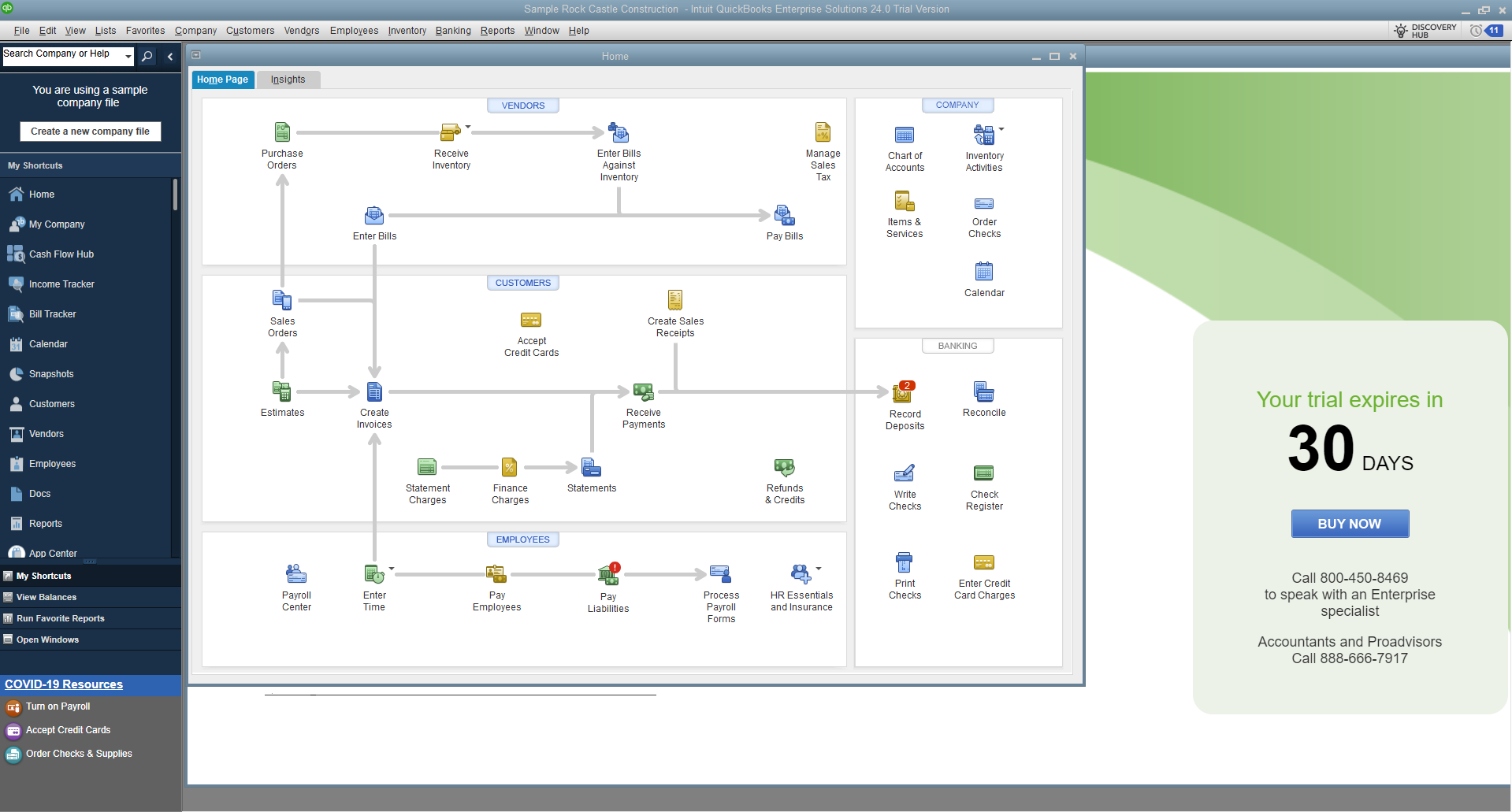
While QBO is the favorite for service-based businesses, QuickBooks Desktop (specifically Enterprise) remains the gold standard for businesses with heavy inventory, manufacturing requirements, or those who prefer to keep their data on a local server or a private hosted cloud.
Advanced Inventory Management
If your business manages thousands of SKUs across multiple warehouses, QuickBooks Desktop Enterprise is often the better choice. It offers features that QBO Plus and Advanced still struggle to replicate, such as:
- Bin Location Tracking: Know exactly which shelf an item is on.
- Barcoding: Integrated barcode scanning for receiving and shipping.
- Serial Number or Lot Tracking: Essential for electronics, medical supplies, or food industries where recall tracking is mandatory.
- FIFO Costing: While QBO supports FIFO, Desktop Enterprise offers more granular control over inventory valuation methods in complex environments.
Robust Reporting and Job Costing
Desktop has long been praised for its reporting depth. While QBO has improved its reporting suite (especially in the Advanced tier), Desktop still offers more "out-of-the-box" industry-specific reports. For contractors, the job costing features in Desktop allow for a more detailed comparison of "Estimated vs. Actual" costs, helping to identify where projects are losing money in real-time.
Data Ownership and Speed
For businesses in areas with unreliable internet, a desktop-based solution is a necessity. Furthermore, some business owners prefer the "feel" of a desktop application, which can be faster for high-volume data entry because it doesn't rely on browser refresh rates. Data is stored on your local hardware, giving you total control over your backup frequency and data security protocols, though this also places the burden of IT maintenance on the business owner.
Core Comparison: Feature Set and Suitability
To help visualize the differences, the following table compares the two platforms across the most critical business functions as of 2026.
| Feature | QuickBooks Online (Plus/Advanced) | QuickBooks Desktop (Enterprise) |
|---|---|---|
| Access | Cloud-based; any device with internet. | Local install; requires hosting for remote access. |
| Pricing Model | Monthly or annual subscription. | Annual subscription (Enterprise). |
| User Limits | Up to 25 users (Advanced tier). | Up to 40 users. |
| Inventory | Basic tracking; FIFO valuation. | Advanced; Bin locations, Barcoding, Serial/Lot #. |
| Automation | High; Auto-categorization, Receipt capture. | Moderate; Manual bank feed downloads often required. |
| Updates | Automatic and included. | Annual version updates included in subscription. |
| Reporting | Customizable; 65+ to 100+ reports. | Highly customizable; 200+ industry-specific reports. |
| Industry Versions | Generic (customizable by chart of accounts). | Specific versions for Contractor, Retail, Non-Profit, etc. |
| Mobile App | Full-featured app for on-the-go tasks. | Limited "companion" apps for specific tasks. |
Cost Considerations and Long-Term Value
In 2026, neither option is "cheap," but their cost structures differ significantly. QuickBooks Online is typically billed on a monthly basis. While the entry-level plans are affordable for freelancers, the "Plus" and "Advanced" tiers required by most growing small businesses can cost between $900 and $2,400 annually.
QuickBooks Desktop Enterprise is a significant investment, often starting at over $1,500 per year for a single user and scaling upwards based on the number of users and the inclusion of features like "Diamond" tier payroll or advanced cloud hosting.
When calculating the Total Cost of Ownership (TCO), you must also consider:
- Hardware: Desktop requires a robust PC or server. Online works on a basic laptop or tablet.
- IT Support: Desktop may require a consultant for networking, backups, and version upgrades.
- Third-Party Apps: QBO often requires paid apps to match Desktop’s native features (like advanced inventory), which can increase the monthly "stack" cost.
Security in the 2026 Digital Environment
A common concern for small business owners is the security of their financial data. In 2026, both platforms offer high levels of protection, but the responsibility lies in different places.
QuickBooks Online Security: Intuit uses bank-level encryption (AES-256) to protect data in transit and at rest. They perform regular SOC 2 audits and maintain redundant servers to ensure data is never lost due to a single hardware failure. For the average small business owner, QBO is likely more secure than a local computer because Intuit handles the cybersecurity defense.
QuickBooks Desktop Security: The security of Desktop data is the responsibility of the business owner. If your office is burglarized or your server is hit by ransomware, your financial data is at risk unless you have a rigorous, off-site backup strategy. However, for businesses with strict regulatory requirements regarding data residency (keeping data within a specific jurisdiction), Desktop provides the assurance that the data never leaves their physical control.
Common Migration Challenges
If you are moving from Desktop to Online—a trend that has dominated the mid-2020s—there are several technical hurdles to anticipate. Not all data "maps" perfectly from the Desktop database structure to the QBO cloud structure.
- Inventory History: Detailed inventory logs may not transfer perfectly; often, only current quantities on hand are moved.
- Custom Templates: Highly customized invoice templates in Desktop will need to be rebuilt in QBO.
- Audit Trail: The audit trail from Desktop does not migrate into the QBO audit log; you should keep a backup of your Desktop file for historical tax purposes.
- Job Costing Structure: If you rely on complex "Classes" and "Locations" in Desktop, you will need to carefully map these to QBO’s "Projects" feature to maintain reporting accuracy.
Frequently Asked Questions
Can I use QuickBooks Desktop offline?
Yes. Unlike QuickBooks Online, which requires a persistent internet connection, QuickBooks Desktop is installed on your hard drive. You can record transactions, generate reports, and manage your books without any internet. However, you will need to go online periodically to verify your subscription, download bank transactions, or process payroll.
How many users can access QuickBooks Online?
The user limit depends on your subscription level. Simple Start allows for 1 user, Essentials allows for 3, Plus allows for 5, and Advanced allows for up to 25. All plans allow you to invite up to two accounting firms to access your data for free, which does not count toward your user limit.
Is QuickBooks Desktop being discontinued?
As of 2026, QuickBooks Desktop is not discontinued, but it has been "sunsetted" for new users in the Pro and Premier categories. Intuit continues to support and sell QuickBooks Desktop Enterprise. Existing subscribers of Pro and Premier can generally continue to renew their annual subscriptions, but the company is heavily incentivizing the move to QuickBooks Online.
Which version is better for a non-profit organization?
QuickBooks Desktop has a dedicated "Premier Non-Profit" edition that includes specific reports like the Statement of Functional Expenses and Donor Contribution reports. While QuickBooks Online can be configured for non-profits (and is available at a discount through programs like TechSoup), many non-profits prefer the Desktop version for its specialized tracking of grants and restricted funds.
Can I switch from QuickBooks Online back to Desktop?
Yes, it is possible, but it is a complex process. You must export your QBO data to a format that Desktop can read, which often requires a specific migration tool or professional assistance from a ProAdvisor. It is much easier to move from Desktop to Online than vice versa.
Final Recommendation: Which Should You Choose?
The decision in 2026 boils down to your business type and growth trajectory.
Choose QuickBooks Online if:
- You are a service-based business, freelancer, or a retail shop with standard inventory needs.
- You need to access your books from multiple locations or via mobile devices.
- You want to automate bank entries and receipt management to save time.
- You want a lower upfront cost and no responsibility for IT maintenance or backups.
Choose QuickBooks Desktop (Enterprise) if:
- You are in manufacturing, wholesale distribution, or construction with complex job costing.
- You manage high-volume inventory across multiple physical locations.
- You work in an environment with poor or restricted internet access.
- You require specialized industry reports that are not available in the cloud version.
For most modern small businesses, QuickBooks Online Plus represents the best balance of features, cost, and accessibility. It provides enough power to scale while offering the convenience of a cloud-native application. However, before making the final transition, consult with a certified QuickBooks ProAdvisor to ensure your specific data needs will be met by the platform you choose.
Image Gallery
Select an image to open it in a new tab.




Celine Dubois
Contemporary Living and Global Arts Columnist
