Understanding Variable Definition in Computer Programming: A Comprehensive Guide

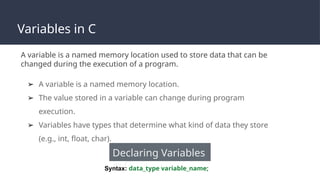
A variable definition in computer programming is the act of reserving a specific location in a computer’s memory to store data, assigning that location a symbolic name, and often specifying the type of data that the storage container is permitted to hold. By defining variables, programmers create an abstraction layer that allows the computer to manage complex data manipulation through readable, named identifiers rather than raw memory addresses.
The Fundamental Concept of Variables
At the machine level, a computer operates using raw memory addresses—numeric indices that pinpoint exactly where a byte of information resides within the Random Access Memory (RAM). For a human developer, referencing memory as hexadecimal addresses (such as 0x7ffcf8) would be prohibitively difficult and error-prone. Variable definition acts as the bridge between human logic and machine architecture.
When you define a variable, you are instructing the compiler or interpreter to set aside a specific number of bytes—determined by the data type—and link those bytes to a human-readable identifier, such as userAge or total_price. Throughout the execution of the program, the system translates these identifiers back into memory locations, ensuring that the data stored there can be accessed, modified, or retrieved at any point.
The Anatomy of a Definition
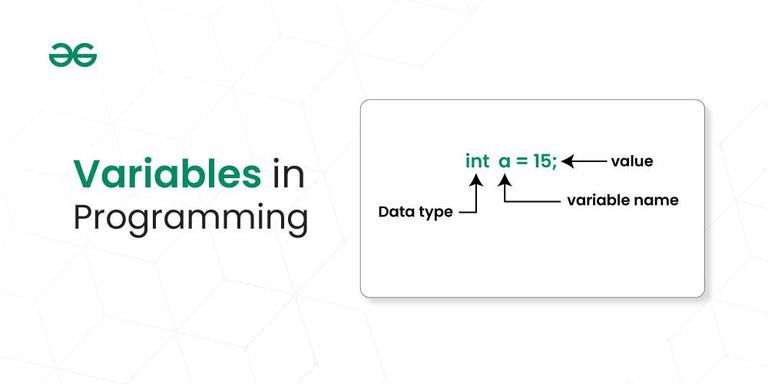
While syntax varies across programming languages, the logical requirements of a variable definition remain largely consistent. Most definitions involve three core components:
- The Identifier (Name): This is the symbolic name given to the variable. Identifiers must follow the naming conventions of the specific language (e.g., camelCase, snake_case) and cannot be reserved keywords (like
if,while, orclass). - The Data Type: This specifies what kind of data the variable holds. Common types include integers (whole numbers), floating-point numbers (decimals), characters (single letters), strings (text sequences), and booleans (true/false).
- The Initialization (Optional): Many definitions include assigning an initial value to the variable. If a variable is defined but not initialized, it may contain "garbage data"—random remnants of previous memory usage—depending on the language’s memory management policies.
Static vs. Dynamic Typing
One of the most important distinctions in how computers handle variable definitions is the difference between static and dynamic typing.
Statically Typed Languages
In languages like C++, Java, or Rust, you must explicitly declare the data type when defining the variable. The compiler verifies these types at "compile time" (before the program ever runs). This approach is highly efficient for the computer because it knows exactly how much memory to allocate for each variable, leading to faster execution speeds and fewer type-related errors during production.
Example: int count = 10;
Dynamically Typed Languages
In languages like Python, JavaScript, or Ruby, you do not need to specify the type. The interpreter assigns the type based on the value assigned to the variable at runtime. This allows for greater flexibility and faster code prototyping, but it shifts the responsibility of type safety onto the developer, as the computer does not check for type mismatches until the code is actually executing.
Example: count = 10
Memory Allocation and Scoping
Defining a variable also determines its "scope" and "lifetime." Scope refers to the portion of the program where a variable is visible and accessible.
- Global Variables: These are defined outside of any specific function or block. They are accessible from anywhere in the program, which can make them dangerous if not managed properly, as any part of the code can alter their state.
- Local Variables: These are defined within a function or block of code. They exist only while that specific block is running. Once the function completes, the computer typically deallocates that memory, making it available for other tasks.
Understanding scope is essential for effective memory management. If a programmer defines too many variables globally, the application may consume excessive memory, as those variables persist for the entire duration of the program’s lifecycle.
Comparison of Variable Definition Approaches
| Feature | Statically Typed (e.g., Java) | Dynamically Typed (e.g., Python) |
|---|---|---|
| Type Declaration | Required at definition | Inferred from value |
| Performance | Generally faster execution | Slower due to runtime checks |
| Error Checking | Compile-time (Early) | Runtime (Late) |
| Flexibility | Rigid | High |
| Memory Usage | Predictable and fixed | Often higher overhead |
Common Pitfalls and Best Practices
Even experienced developers encounter issues related to how variables are defined. Addressing these early can significantly improve code stability.
1. The "Magic Number" Problem
Defining variables is not just about memory; it is about maintainability. Hard-coding numbers (e.g., if (user_age > 18)) is considered poor practice. Instead, define a variable named LEGAL_AGE_THRESHOLD = 18 and use that variable throughout your code. This ensures that if the requirement changes, you only need to update the variable definition in one place.
2. Scope Creep
A common mistake is defining variables in a broader scope than necessary. If a variable is only needed inside a small loop, it should be defined inside that loop. This keeps the global namespace clean and prevents accidental modifications of data by unrelated functions.
3. Uninitialized Variables
In languages that do not automatically zero-out memory, accessing an uninitialized variable can lead to non-deterministic behavior. Always attempt to initialize your variables at the moment of definition to ensure the program starts from a known, safe state.
4. Meaningful Naming
While x or y are valid identifiers, they provide no context. Modern IDEs and compilers do not care about the length of your variable names. Prioritize descriptive names like sessionTimeoutLimit or isAuthenticationEnabled to make your code self-documenting.
Frequently Asked Questions
Why does the computer need to know the data type of a variable?
The data type tells the computer how many bytes to reserve in memory and, crucially, how to interpret those bytes. For instance, the binary pattern 01000001 could represent the integer 65 or the character A. The data type dictates whether the processor performs arithmetic or text formatting on that memory segment.
What happens if I change the value of a variable later? Changing the value of a variable is called re-assignment. In most languages, the variable identifier remains linked to the same memory address, but the underlying bits at that address are updated to reflect the new value. If you change a variable to a different type in a dynamic language, the computer may reallocate a completely new section of memory to accommodate the different size requirements.
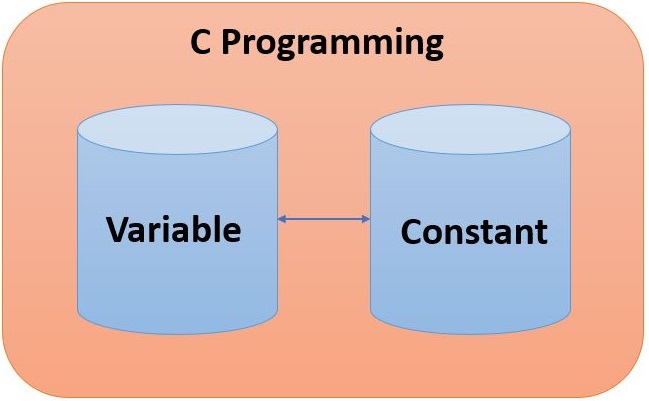
What is the difference between a variable and a constant? A variable is a storage location whose value is intended to change during the execution of a program. A constant is a fixed identifier whose value is defined once and cannot be changed thereafter. Using constants for values that should remain fixed (like mathematical constants or configuration paths) prevents accidental errors.
Can I define a variable without assigning a value?
Yes, this is known as "declaring" a variable. While you can declare a variable without initializing it, doing so is risky in low-level languages. In high-level languages, the environment may provide a "default" value (such as null, 0, or undefined).
How do variables relate to pointers? In languages like C or C++, a variable stores data. A "pointer" is a special type of variable that stores the memory address of another variable. While a standard variable helps you manage data, a pointer allows you to manipulate memory addresses directly, which is powerful but requires careful management to avoid security vulnerabilities.
Recommendation for Best Practices
To master variable definition, focus on the principle of Least Privilege. Define your variables in the smallest scope possible, use descriptive names that reflect their purpose, and choose static typing where performance and strict error catching are prioritized. By treating your variables as the foundation of your data structure rather than mere afterthoughts, you will write more robust, maintainable, and efficient software.

Image Gallery
Select an image to open it in a new tab.



Declan O'Connor
Higher Education and Campus Culture Reporter
