
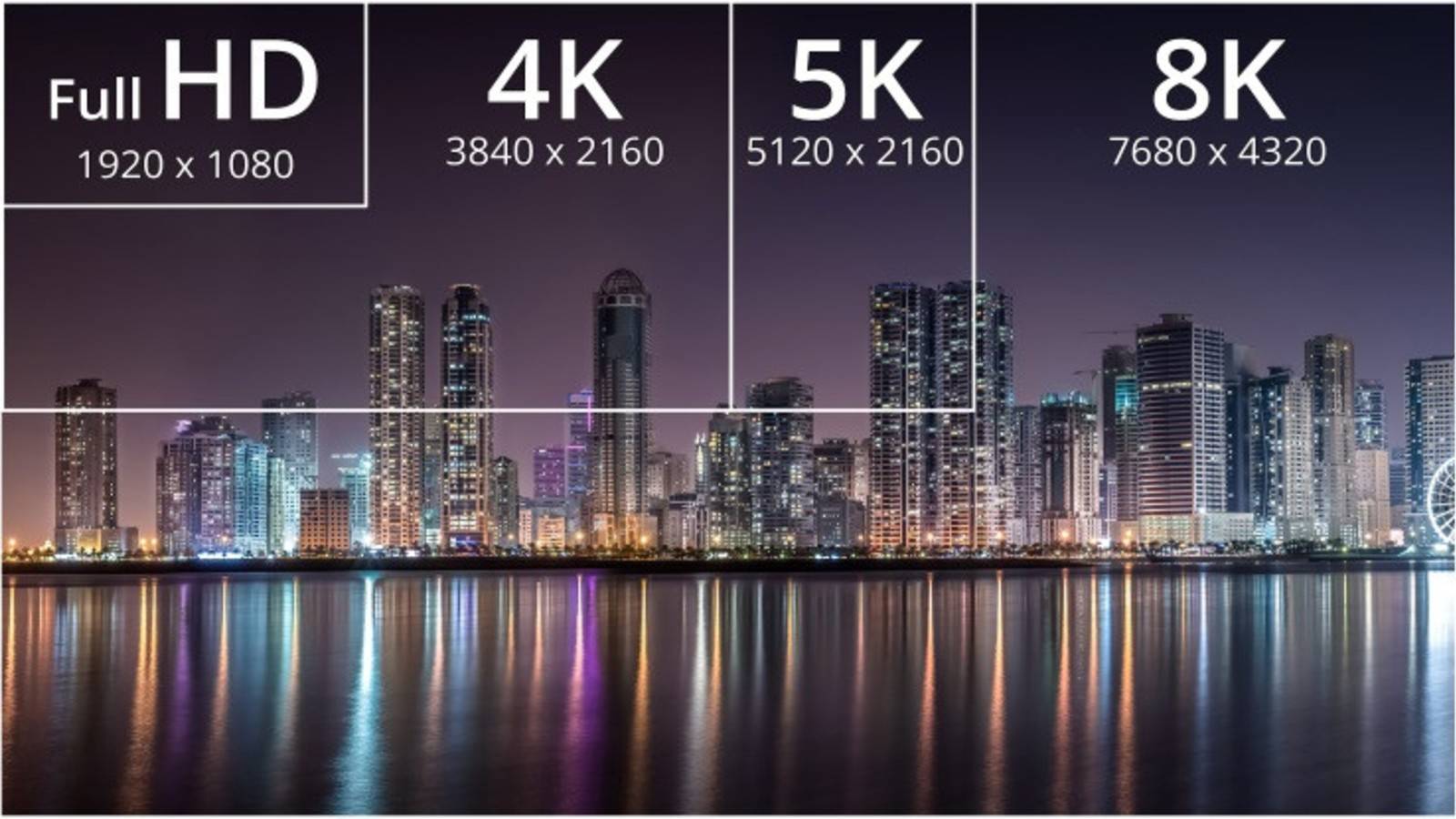
4K resolution represents a display standard characterized by approximately 4,000 horizontal pixels. In consumer electronics, this typically refers to Ultra High Definition (UHD), featuring a grid of 3840 x 2160 pixels. This configuration yields a total of approximately 8.3 million pixels, delivering four times the detail of standard 1080p High Definition.
The Mathematical Foundation of 4K Resolution
To understand 4K resolution, one must first look at the mathematical breakdown of the "pixel" itself. A pixel, short for "picture element," is the smallest physical point in a raster image or the smallest addressable element in an all-points-addressable display device. When we discuss 4K in the year 2026, we are looking at a technology that has moved from a premium luxury to the baseline standard for televisions, computer monitors, and high-end mobile devices.
The "4K" label is derived from the horizontal pixel count, which is roughly 4,000. This marks a significant shift in naming conventions. Historically, resolutions were named after their vertical pixel count. For example, 720p (1280 x 720) and 1080p (1920 x 1080) both used the vertical height as the descriptor. However, with the advent of Ultra High Definition, the industry shifted toward the horizontal count to emphasize the massive leap in width and total surface area.
Calculating the Total Pixel Density
The total pixel count is the product of the horizontal and vertical lines. For a standard 4K UHD screen:
- Horizontal: 3,840 pixels
- Vertical: 2,160 pixels
- Calculation: 3,840 × 2,160 = 8,294,400 pixels
In contrast, a 1080p (Full HD) screen consists of:
- Horizontal: 1,920 pixels
- Vertical: 1,080 pixels
- Calculation: 1,920 × 1,080 = 2,073,600 pixels
When you compare 8.29 million pixels to 2.07 million pixels, the "4K" name becomes more intuitive—not just because of the horizontal width, but because the total number of pixels is exactly four times greater than that of 1080p. This geometric expansion means that for every single pixel in a 1080p image, a 4K display uses four pixels to represent the same area, allowing for significantly finer detail, smoother curves, and higher color gradients.
DCI 4K vs. UHD: Resolving the Terminology Ambiguity
One common point of confusion is the existence of two distinct 4K standards: UHD (Ultra High Definition) and DCI 4K (Digital Cinema Initiatives). While both are frequently marketed under the "4K" umbrella, they serve different purposes and utilize different pixel counts.
Ultra High Definition (UHD)
UHD is the standard used for consumer displays, including televisions and streaming services. It maintains the 16:9 aspect ratio, which has been the standard for broadcast media for decades. By using 3840 x 2160 pixels, manufacturers ensure that 1080p and 720p content can be scaled up perfectly without stretching the image or losing the original proportions.
DCI 4K
DCI 4K is the professional standard used in the film industry and digital cinemas. It features a resolution of 4096 x 2160 pixels. This standard utilizes a slightly wider aspect ratio of 1.9:1. The "extra" 256 pixels in the horizontal count allow filmmakers more flexibility in cropping and framing for wide-screen theater formats. When a DCI 4K film is converted for home viewing on a UHD television, it is usually slightly cropped or letterboxed to fit the 16:9 display.

Why Pixel Count Matters: PPI and Viewing Distance
The sheer number of pixels is only one part of the equation. The impact of those pixels on the human eye is determined by Pixel Density, measured in Pixels Per Inch (PPI). This is the relationship between the resolution and the physical size of the display.
On a 32-inch 4K monitor, the pixels are packed incredibly tightly, resulting in a very high PPI (approximately 137 PPI). At this density, the human eye cannot distinguish individual pixels from a normal sitting distance, making text look as sharp as a printed page. However, on an 85-inch 4K television, those same 8.3 million pixels are spread across a much larger surface area, resulting in a lower PPI (approximately 52 PPI).
The "Retina" Effect and Human Acuity
In 2026, display engineering heavily focuses on the limits of human visual acuity. The benefit of 4K numbers is most apparent when the screen occupies a large portion of the viewer's field of vision. If a viewer sits too far away from a 4K screen, the eye’s inability to resolve such fine detail means the image may look indistinguishable from 1080p.
To fully appreciate the 8.29 million pixels of a 4K display:
- For a 55-inch screen: The ideal viewing distance is between 2.3 and 4.6 feet.
- For a 65-inch screen: The ideal viewing distance is between 2.7 and 5.4 feet.
- For a 75-inch screen: The ideal viewing distance is between 3.1 and 6.3 feet.
Sitting within these ranges allows the retina to perceive the additional data provided by the higher pixel count, particularly in textures like skin, fabric, and distant landscapes.
Technical Specifications and Hardware Requirements
Driving over 8 million pixels at high refresh rates requires substantial bandwidth and processing power. Understanding the 4K numbers also involves understanding the data that moves behind those pixels.
Bandwidth and HDMI Standards
A 4K image at a standard 60Hz refresh rate with 8-bit color depth requires a data rate of approximately 12.54 Gbps. If you increase the refresh rate to 120Hz—now common for gaming in 2026—and move to 10-bit or 12-bit color for High Dynamic Range (HDR), the bandwidth requirements jump significantly, often exceeding 32 Gbps. This necessitated the transition from HDMI 2.0 to HDMI 2.1, which supports up to 48 Gbps. Without the correct cable and port version, the hardware may be forced to "downsample" the signal, reducing color accuracy or frame rates to accommodate the lower bandwidth.
Processing and Compression
Streaming a 4K signal over the internet is another hurdle. Raw 4K video is too massive for home internet connections. To solve this, providers use advanced codecs like HEVC (H.265) or AV1. These algorithms use mathematical shortcuts to describe groups of pixels rather than identifying every single pixel individually. In 2026, AV1 has become the standard for high-efficiency 4K streaming, allowing for high-quality 8.3-million-pixel images at bitrates as low as 15–25 Mbps.
Comparative Resolution Table
The following table compares 4K to other common display standards to illustrate the scale of pixel counts.
| Standard Name | Common Resolution | Total Pixel Count | Aspect Ratio | Primary Use Case |
|---|---|---|---|---|
| 720p (HD) | 1280 x 720 | 921,600 | 16:9 | Budget tablets, older broadcasts |
| 1080p (Full HD) | 1920 x 1080 | 2,073,600 | 16:9 | Standard monitors, mobile phones |
| 1440p (QHD) | 2560 x 1440 | 3,686,400 | 16:9 | Mid-range gaming monitors |
| 4K UHD | 3840 x 2160 | 8,294,400 | 16:9 | Modern TVs, High-end Monitors |
| DCI 4K | 4096 x 2160 | 8,847,360 | 1.9:1 | Digital Cinema/Film Production |
| 8K UHD | 7680 x 4320 | 33,177,600 | 16:9 | Ultra-premium TVs, Professional VFX |
Beyond the Numbers: HDR and Color Depth
While pixel count determines the sharpness of an image, it does not determine the quality of the light or color. In 2026, the discussion of 4K is inseparable from High Dynamic Range (HDR) and Wide Color Gamut (WCG).
The Role of HDR
HDR allows a 4K display to utilize its millions of pixels more effectively by increasing the contrast ratio. While standard definition might have a limited range of brightness, HDR-enabled 4K screens can show extremely bright highlights and deep, ink-like blacks simultaneously. Standards like Dolby Vision and HDR10+ use metadata to tell the screen exactly how bright or dark each group of pixels should be on a frame-by-frame basis.
Bit Depth and Color Accuracy
The "numbers" also extend to bit depth. Most 1080p content is 8-bit, which allows for 256 shades of red, green, and blue, totaling about 16.7 million possible colors. True 4K HDR content is usually 10-bit (or even 12-bit), allowing for 1,024 shades per channel and over 1 billion colors. This eliminates "banding"—those visible lines you see in a sunset or a clear blue sky—by providing enough pixel data to create a perfect gradient.
Practical Considerations for 4K Adoption
When upgrading to a 4K system, the pixel count is just the starting point. Users must consider several operational factors:
- Storage Demands: 4K video files are significantly larger than 1080p files. A one-hour 4K video at a high bitrate can easily exceed 40 GB. For content creators, this necessitates high-speed NVMe storage and massive archival drives.
- GPU Requirements: For gamers, rendering 8.3 million pixels 60 or 120 times per second is an immense computational task. Even in 2026, high-end GPUs like the NVIDIA RTX series rely on AI-assisted technologies like DLSS (Deep Learning Super Sampling) to upscale images in real-time, providing 4K-level detail without the massive performance hit of native rendering.
- Interface Compatibility: Ensure that all devices in the chain—from the media player to the AV receiver to the TV—support the HDCP 2.2 (or newer) copy protection standard. If one device is incompatible, the system may downscale the resolution to 1080p to prevent unauthorized copying.
Frequently Asked Questions
Does 4K look better on a small screen?
The benefit of 4K on a small screen, such as a 13-inch laptop, is primarily found in text clarity and workspace "real estate." Because the pixels are so small, you can display more windows side-by-side without text becoming pixelated. However, for video content, the difference between 1080p and 4K is much harder to notice on a small screen compared to a 65-inch television.
Is "Ultra HD" exactly the same as 4K?
In the consumer market, the terms are used interchangeably. Technically, Ultra HD (UHD) is 3840 x 2160, while true 4K (DCI) is 4096 x 2160. For all practical home purposes, including streaming and gaming, UHD is the "4K" you are purchasing.
Can I run a 4K monitor with an older HDMI cable?
It depends on the version. An old High Speed HDMI (Category 2) cable may support 4K at 30Hz, but it will likely fail to provide 4K at 60Hz or HDR. To ensure full compatibility with modern 4K standards in 2026, you should use an Ultra High Speed HDMI (Category 3) cable, often labeled as HDMI 2.1 compatible.
Why do some 4K movies look "grainy"?
Film grain is often a creative choice made by directors or a byproduct of the original film stock used. 4K resolution is so sharp that it actually reveals the texture of the original film grain more clearly than 1080p did. This is not a "flaw" in the resolution but rather a more accurate representation of the source material.
Will 8K make 4K obsolete?
While 8K exists, 4K remains the "sweet spot" for most consumers in 2026. The human eye struggles to see the difference between 4K and 8K at standard viewing distances unless the screen is exceptionally large (over 85 inches). Furthermore, the lack of native 8K content and the massive bandwidth requirements mean that 4K will remain the primary standard for the foreseeable future.
Final Recommendation
When evaluating 4K resolution, focus on the total ecosystem rather than just the pixel count numbers. A high-quality 4K display with excellent HDR, localized dimming, and high color accuracy will always look better than a budget 4K or even a low-end 8K screen. For the best experience, ensure your content source (streaming, disc, or PC) matches the native 3840 x 2160 resolution of your display, and verify that your cables and hardware ports support the necessary bandwidth for HDR and high refresh rates.
Image Gallery
Select an image to open it in a new tab.

Zara El-Hashem
Sociocultural Dynamics and Academics Writer
