
To determine the correct charging wattage for a MacBook Pro, you must match the specific model and processor to its recommended power adapter, ranging from 67W to 140W. While using a higher-wattage charger is safe and enables fast charging on supported models, using a lower-wattage adapter will result in slower charging or battery drain during intensive tasks.
Understanding MacBook Pro charging wattage is no longer as simple as grabbing any USB-C cable and plugging it into a wall brick. Since the transition to Apple Silicon and the reintroduction of MagSafe 3, the power requirements for Apple’s professional laptops have become highly specialized. As of 2026, the ecosystem includes a variety of chargers utilizing Gallium Nitride (GaN) technology and the USB Power Delivery (USB-PD) 3.1 standard, making it essential to understand how these technologies interact with your hardware to ensure battery health and peak performance.
The Fundamentals of MacBook Pro Power Delivery
At its core, charging a MacBook Pro involves a negotiation between the Power Adapter and the laptop's internal Power Management Unit (PMU). This process is governed by the USB Power Delivery specification. When you connect a charger, the MacBook "asks" the adapter what voltages and amperages it can provide. The adapter responds with its "Power Profiles," and the MacBook selects the most appropriate one.
Wattage is the product of Voltage (V) and Amperage (A). For example, the 140W USB-C Power Adapter typically operates at 28V and 5A. Older adapters might operate at 20V and 4.8A to achieve 96W. This distinction is critical because if a cable or adapter cannot support the specific voltage required for a high-wattage mode, the system will default to a lower, slower charging speed.
Why Wattage Varies by Model
The primary reason for different wattage requirements is the Thermal Design Power (TDP) of the chips inside. A 14-inch MacBook Pro with a base M-series chip does not require the same energy as a 16-inch model equipped with a "Max" or "Ultra" tier processor. The larger models feature more CPU and GPU cores, which consume significantly more power when rendering 8K video, compiling complex code, or running AI models locally. Apple bundles chargers that provide enough overhead to both power the machine at full load and charge the battery simultaneously.
Comprehensive MacBook Pro Wattage Comparison Table
The following table outlines the standard and fast-charging requirements for recent MacBook Pro models as of 2026.
| MacBook Pro Model | Standard Included Charger | Fast Charging Requirement | Maximum Supported Intake |
|---|---|---|---|
| 13-inch (M1/M2) | 67W USB-C | N/A | ~67W |
| 14-inch (Base Chip) | 70W USB-C | 96W or higher | 96W |
| 14-inch (Pro/Max Chip) | 96W USB-C | 96W or higher | 96W |
| 16-inch (All Chips) | 140W USB-C | 140W (MagSafe 3) | 140W+ |
| 15-inch (Intel Legacy) | 87W USB-C | N/A | 87W |
| 16-inch (Intel Legacy) | 96W USB-C | N/A | 96W |
Decoding Fast Charging on the MacBook Pro
Fast charging is a feature that allows you to charge your MacBook Pro battery from 0% to 50% in approximately 30 minutes. However, the requirements to achieve this vary significantly depending on the size of your laptop.
Fast Charging the 14-inch Model
For the 14-inch MacBook Pro, fast charging is relatively accessible. You need a power source capable of delivering at least 96W. Interestingly, you can achieve these speeds using either the MagSafe 3 cable or a high-rated USB-C to USB-C cable, provided the charger supports the necessary Power Delivery profile. Many users opt for the 96W or 100W GaN chargers because they are more compact than the older 140W versions while still hitting the fast-charging ceiling for the 14-inch chassis.
Fast Charging the 16-inch Model
The 16-inch MacBook Pro is more demanding. To achieve fast charging, you must use the 140W USB-C Power Adapter paired with the MagSafe 3 cable. This is due to the USB-PD 3.1 Extended Power Range (EPR) standard. Until recently, standard USB-C cables were limited to 100W. While newer 240W-rated USB-C cables exist, early iterations of the 16-inch MacBook Pro hardware were designed to specifically recognize the 140W handshake via the MagSafe 3 port. If you use a 140W charger with a standard USB-C cable on older 16-inch Apple Silicon models, the charge may be capped at 100W.
The Role of the Charging Cable
The cable is often the "bottleneck" in the charging equation. Not all USB-C cables are created equal. A cable included with an iPad or a third-party smartphone may only be rated for 60W. If you use a 60W cable with a 140W charger, your MacBook Pro will only receive 60W of power.
E-Marker Chips
High-wattage cables (those supporting over 60W) contain a small integrated circuit called an E-Marker (Electronic Marker). This chip communicates with the MacBook and the charger to verify the cable's current-carrying capacity. Without this chip, the system defaults to a safe 60W limit to prevent the cable from overheating or melting. When shopping for a replacement cable in 2026, ensure it is explicitly rated for 240W or USB4 to future-proof your setup for high-wattage needs.
MagSafe 3 vs. USB-C
MagSafe 3 remains the preferred charging method for most Pro users for several reasons:
- Safety: The magnetic connection detaches if tripped over, preventing the laptop from falling.
- Visual Feedback: The LED indicator shows charging status (amber for charging, green for full).
- Port Availability: It frees up a Thunderbolt port for data peripherals.
- Full Speed: As mentioned, it is currently the most reliable way to ensure 140W delivery on 16-inch models.
Mixing and Matching: Safety and Compatibility
A common question among users is whether it is safe to use a charger that does not match the wattage that came in the box.
Using a Higher Wattage Charger
It is perfectly safe to use a higher-wattage charger (e.g., using a 140W adapter on a 13-inch MacBook Air). The MacBook Pro will only "pull" the maximum wattage it is designed to handle. Using a more powerful brick does not "force" electricity into the battery; rather, it provides a larger "reservoir" of power that the laptop can dip into as needed. In fact, using a higher-wattage charger can sometimes result in the charger running cooler because it isn't constantly pushed to its maximum capacity.
Using a Lower Wattage Charger
Using a lower-wattage charger (e.g., a 30W MacBook Air brick on a 16-inch Pro) is generally safe but inefficient.
- Slow Charging: The battery will take significantly longer to reach 100%.
- Battery Drain Under Load: If you are performing intensive tasks like video editing or 3D rendering, the laptop may consume power faster than the 30W charger can supply it. In this scenario, your battery percentage will actually drop while plugged in.
- System Throttling: In extreme cases, macOS may throttle the CPU performance to reduce power consumption to match the weak power source.
The Evolution to GaN Technology
In recent years, Apple and third-party manufacturers have transitioned to Gallium Nitride (GaN) technology for power adapters. Traditional chargers used silicon-based components, which generate significant heat and require a larger physical footprint to dissipate that heat.
GaN chargers are more efficient, allowing components to be packed closer together. This is why a modern 140W GaN charger is often the same size as an older 85W silicon charger. For the user, this means more power in a more portable form factor, making it easier to carry a "fast charger" in a travel bag without the bulk. When choosing a third-party charger, always look for GaN II or GaN III labels, as these represent the latest iterations of this efficiency technology.
Troubleshooting MacBook Pro Charging Issues
Even with the correct wattage, you may encounter issues where your MacBook Pro refuses to charge or charges slowly.
"Not Charging" Status
If your battery icon says "Not Charging" while plugged in, it is often due to Optimized Battery Charging. This macOS feature pauses charging at 80% to reduce battery aging. If you need a full charge immediately, you can click the battery icon and select "Charge to Full Now."
Heat and Thermal Throttling
Charging generates heat. If your MacBook Pro or the power adapter becomes too hot, the PMU will automatically reduce the charging wattage to protect the internal components. This is common when fast charging in warm environments or while the laptop is under heavy load. To remedy this, ensure the power brick is in a well-ventilated area and not tucked behind a sofa or under a blanket.
Port and Cable Debris
The USB-C and MagSafe 3 ports are susceptible to lint and dust. Even a tiny amount of debris can prevent the pins from making full contact, leading to a "handshake" failure where the charger defaults to a lower wattage or fails to charge entirely. Use a non-conductive toothpick or compressed air to gently clean the ports.
Recommendations for Different User Profiles
Selecting the right charging setup depends on your workflow and mobility needs:
- The Stationary Creative: If your MacBook Pro mostly stays at a desk, stick with the official Apple 140W adapter and MagSafe 3 cable. This ensures you always have the maximum overhead for intensive projects.
- The Digital Nomad: Look for a multi-port 100W or 120W GaN charger. These can often charge your MacBook Pro at near-fast speeds while simultaneously charging an iPhone and iPad from a single wall outlet.
- The Minimalist: If you use a 14-inch MacBook Pro and don't do heavy video work, a high-quality 65W or 70W ultra-compact GaN charger is often sufficient for overnight charging and light daily use.
When purchasing third-party hardware, prioritize brands that adhere to USB-IF certifications. Uncertified chargers may lack essential safety features like over-voltage protection (OVP) and over-temperature protection (OTP), which are vital for protecting your expensive MacBook Pro logic board.
Frequently Asked Questions
Can I charge my MacBook Pro with a high-wattage USB-C monitor?
Yes, many professional monitors provide "Power Delivery" (PD) through the same USB-C or Thunderbolt cable used for video. However, you must check the monitor's specs. Some provide only 60W, which may be insufficient for a 16-inch MacBook Pro under load, while newer high-end displays provide up to 96W or even 140W.
Is it bad for the battery to use a fast charger all the time?
While fast charging creates more heat—which is a primary enemy of lithium-ion batteries—modern macOS power management is highly sophisticated. The system will slow down the charging speed as the battery approaches 80% to minimize stress. For the best longevity, use fast charging when you're in a hurry and "Optimized Battery Charging" for overnight sessions.
Does the 140W charger work with older MacBook Pro models?
Yes, the 140W USB-C Power Adapter is backwards compatible with any USB-C MacBook Pro. It will simply provide the maximum wattage that the older laptop can handle (e.g., 61W or 87W). You will need the appropriate USB-C to USB-C cable for those older models, as they do not support MagSafe 3.
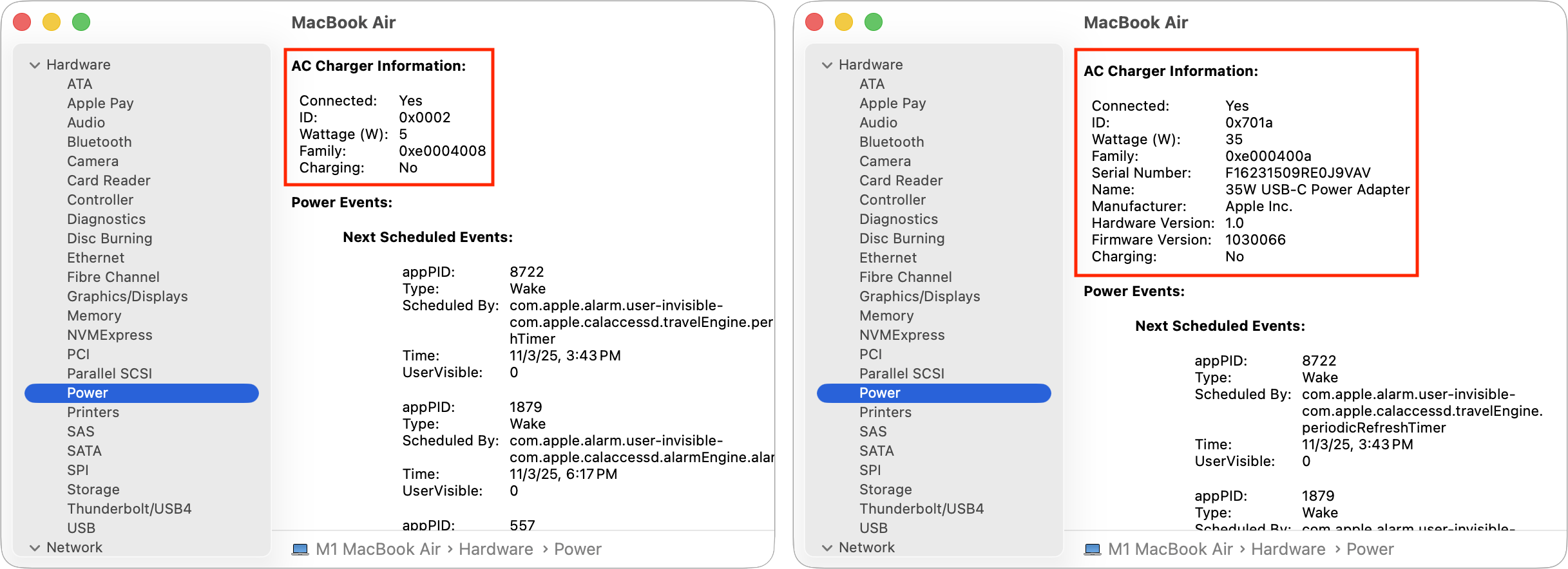
Why does my 140W charger only show 100W in System Report?
This usually happens if you are using a standard USB-C cable instead of the Apple MagSafe 3 cable or a specialized 240W-rated USB-C EPR cable. Standard USB-C cables are capped at 100W. To see the full 140W, the entire chain (charger, cable, and port) must support the USB-PD 3.1 EPR standard.
Can I use my iPhone's 20W charger to charge my MacBook Pro?
You can, but it is not recommended for active use. A 20W charger will charge a MacBook Pro very slowly while it is turned off or asleep. If the laptop is in use, the 20W input will likely be lower than the power consumption of the screen and processor, causing the battery to continue draining.
Image Gallery
Select an image to open it in a new tab.


Lars Thomsen
Global Labor Markets and Economic Strategy Editor
